
The Postgres development platform. Supabase gives you a dedicated Postgres database to build your web, mobile, and AI applications.
TypeScript aialternativeauthdatabasedenoembeddingsexamplefirebasenextjsoauth2pgvectorpostgispostgrespostgresqlpostgrestrealtimesupabasevectorswebsockets
docs: add sample
Hieu Vu6435c6f46b36
diff --git a/apps/docs/pages/guides/getting-started/tutorials/with-kotlin.mdx b/apps/docs/pages/guides/getting-started/tutorials/with-kotlin.mdxindex 4f1e711c513..653d9472fe7 100644--- a/apps/docs/pages/guides/getting-started/tutorials/with-kotlin.mdx+++ b/apps/docs/pages/guides/getting-started/tutorials/with-kotlin.mdx@@ -1,36 +1,784 @@import Layout from '~/layouts/DefaultGuideLayout'export const meta = {- title: 'Build a Groceries Store App with Kotlin',- description: 'Learn how to use Supabase in your Kotlin App.',+ title: 'Build a Product Management App with Jetpack Compose in Android',+ description: 'Learn how to use Supabase in your Android Kotlin App.',}<QuickstartIntro />-+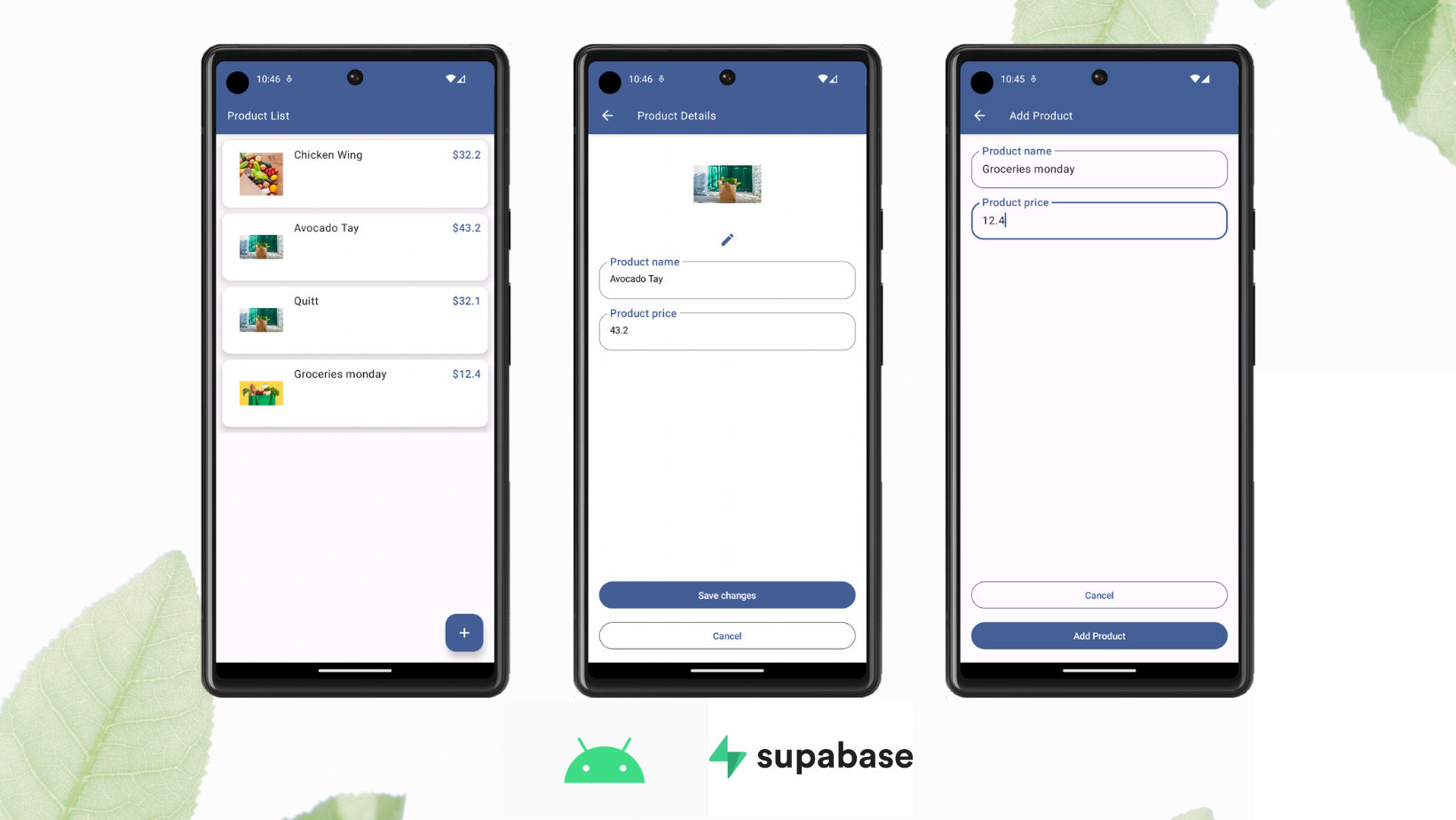<Admonition type="note">If you get stuck while working through this guide, refer to the [full example on- GitHub](https://github.com/supabase/supabase/tree/master/examples).+ GitHub](https://github.com/hieuwu/product-sample-supabase-kt).</Admonition><ProjectSetup />-## Building the App-Let's start building the Kotlin app from scratch.+### 1. Create new Android with Jetpack Compose in Android Studio+Open Android Studio > New Project > Base Activity (Jetpack Compose)-### Initialize a Kotlin app+<img width="720" alt="Screen Shot 2023-06-02 at 21 33 16" src="https://github.com/hieuwu/product-sample-supabase-kt/assets/43868345/288eef97-d8fe-422f-8bb3-1c8424bab08e"></img>-...+### 2. Set up API key and secret securely+API key and secret from any services are credential information, we should not want to expose these to others because some strangers will use it for bad purpose-```bash-...+#### 2.1. Create local environment secret+Create or edit `local.properties` file at top level (same level at build.gradle of the project).++> **Note**: This file should not be pushed directly to the repository, meaning that you should include this in `.gitignore` file++```kotlin+API_KEY=YOUR_SUPABASE_API_KEY+SECRET=YOUR_SUPABASE_SECRET+SUPABASE_URL=YOUR_SUPABASE_URL++```++#### 2.2. Read and set value to BuildConfig+In `build.gradle (app)`, create `Properties` object and read value from `local.properties` set value for `BuildConfig` by calling `buildConfigField` method++```kotlin+defaultConfig {+ applicationId "com.hieuwu.groceriesstore"+ minSdkVersion 22+ targetSdkVersion 33+ versionCode 5+ versionName "1.0"+ testInstrumentationRunner "androidx.test.runner.AndroidJUnitRunner"++ // Set value part+ Properties properties = new Properties()+ properties.load(project.rootProject.file("local.properties").newDataInputStream())+ buildConfigField("String", "API_KEY", "\"${properties.getProperty("API_KEY")}\"")+ buildConfigField("String", "SECRET", "\"${properties.getProperty("SECRET")}\"")+ buildConfigField("String", "SUPABASE_URL", "\"${properties.getProperty("SUPABASE_URL")}\"")+}```-### Setup deep links+#### 2.3. Use value from `BuildConfig`+Read value from `BuildConfig` (Remember to import the right class, it is one from your project). For example:+```kotlin+val url = BuildConfig.SUPABASE_URL+val apiKey = BuildConfig.API_KEY+```++### 3. Set up Supabase dependencies including Postgrest, GoTrue, Storage+<img width="720" alt="Screen Shot 2023-06-05 at 21 39 24" src="https://github.com/hieuwu/product-sample-supabase-kt/assets/43868345/3f154fda-aa9e-4baa-81f2-5b744c7ad2fe"></img>++In build.gradle (app) file, add these dependencies then press Sync now+```kotlin+// Supabase setup+implementation("io.ktor:ktor-client-cio:1.6.0")+implementation("io.github.jan-tennert.supabase:postgrest-kt-android:1.0.0")+implementation("io.github.jan-tennert.supabase:storage-kt:1.0.0")+implementation "io.ktor:ktor-client-android:2.2.1"+implementation "io.ktor:ktor-utils-jvm:1.6.0"+implementation "io.ktor:ktor-client-logging-jvm:1.6.0"+implementation("io.ktor:ktor-client-core:2.2.4")+```+### 4. Set up Hilt for dependency injection+In build.gradle (app) file, add these+```kotlin+implementation "com.google.dagger:hilt-android:$hilt_version"+annotationProcessor "com.google.dagger:hilt-compiler:$hilt_version"+implementation("androidx.hilt:hilt-navigation-compose:1.0.0")+```+Create new `ManageProductApplication.kt` class extending Application with `@HiltAndroidApp` annotation+```kotlin+// ManageProductApplication.kt+@HiltAndroidApp+class ManageProductApplication: Application()+```+Open AndroidManifest.xml file, update name property of Application tag+```xml+<application...+ android:name=".ManageProductApplication"+...+</application>++```+Add annotation for MainActivity+```kotlin+@AndroidEntryPoint+class MainActivity : ComponentActivity() {+}+```+### 5. Provide Supabase instances with Hilt+You can create it by just calling the constructor. However to make the app more testable, these should be provided+Create SupabaseMdule.kt+```kotlin+@InstallIn(SingletonComponent::class)+@Module+object SupabaseModule {++ @Provides+ @Singleton+ fun provideSupabaseClient(): SupabaseClient {+ return createSupabaseClient(+ supabaseUrl = BuildConfig.SUPABASE_URL,+ supabaseKey = BuildConfig.API_KEY+ ) {+ install(Postgrest)+ install(GoTrue)+ install(Storage)+ }+ }++ @Provides+ @Singleton+ fun provideSupabaseDatabase(client: SupabaseClient): Postgrest {+ return client.postgrest+ }++ @Provides+ @Singleton+ fun provideSupabaseGoTrue(client: SupabaseClient): GoTrue {+ return client.gotrue+ }+++ @Provides+ @Singleton+ fun provideSupabaseStorage(client: SupabaseClient): Storage {+ return client.storage+ }++}+```++### 6. Create data transfer object (DTO) to get data+Create `ProductDto.kt` class and use annotations to parse data from Supabase+```kotlin+@Serializable+data class ProductDto(++ @SerialName("name")+ val name: String,++ @SerialName("price")+ val price: Double,++ @SerialName("image")+ val image: String? = "",++ @SerialName("id")+ val id: String? = "",+)+```++### 7. Implement repository to interact with Supabase services+Create ProductRepository interface and its implementation named ProductRepositoryImpl.+This kind of class will hold every logic to interact with data source from Supabase.++```kotlin+interface ProductRepository {+ suspend fun createProduct(product: Product): Boolean+ suspend fun getProducts(): List<ProductDto>?+ suspend fun getProduct(id: String): ProductDto+ suspend fun deleteProduct(id: String)+ suspend fun updateProduct(+ id: String, name: String, price: Double, imageName: String, imageFile: ByteArray+ )+}+```++```kotlin+class ProductRepositoryImpl @Inject constructor(+ private val postgrest: Postgrest,+ private val storage: Storage,+) : ProductRepository {+ override suspend fun createProduct(product: Product): Boolean {+ return try {+ withContext(Dispatchers.IO) {+ val productDto = ProductDto(+ name = product.name,+ price = product.price,+ )+ postgrest["products"].insert(productDto)+ true+ }+ true+ } catch (e: java.lang.Exception) {+ throw e+ }+ }++ override suspend fun getProducts(): List<ProductDto>? {+ return withContext(Dispatchers.IO) {+ val result = postgrest["products"]+ .select().decodeList<ProductDto>()+ result+ }+ }+++ override suspend fun getProduct(id: String): ProductDto {+ return withContext(Dispatchers.IO) {+ postgrest["products"].select {+ eq("id", id)+ }.decodeSingle<ProductDto>()+ }+ }++ override suspend fun deleteProduct(id: String) {+ return withContext(Dispatchers.IO) {+ postgrest["products"].delete {+ eq("id", id)+ }+ }+ }++ override suspend fun updateProduct(+ id: String,+ name: String,+ price: Double,+ imageName: String,+ imageFile: ByteArray+ ) {+ withContext(Dispatchers.IO) {+ if (imageFile.isNotEmpty()) {+ val imageUrl =+ storage["Product%20Image"].upload(+ path = "$imageName.png",+ data = imageFile,+ upsert = true+ )+ postgrest["products"].update({+ set("name", name)+ set("price", price)+ set("image", buildImageUrl(imageFileName = imageUrl))+ }) {+ eq("id", id)+ }+ } else {+ postgrest["products"].update({+ set("name", name)+ set("price", price)+ }) {+ eq("id", id)+ }+ }+ }+ }++ // Because I named the bucket as "Product Image" so when it turns to an url, it is "%20"+ // For better approach, you should create your bucket name without space symbol+ private fun buildImageUrl(imageFileName: String) =+ "${BuildConfig.SUPABASE_URL}/storage/v1/object/public/${imageFileName}".replace(" ", "%20")+}+```++### 8. Implement screens+<Admonition type="note">+ By the time this page is written, there might be some changes in the code to make it more simple. If you face any problem when implement, feel free to refer the example repository above+</Admonition>+#### 8.1 Product list++Create ProductListViewModel+```kotlin+@HiltViewModel+class ProductListViewModel @Inject constructor(+ private val productRepository: ProductRepository,+) : ViewModel() {++ private val _productList = MutableStateFlow<List<Product>?>(listOf())+ override val productList: Flow<List<Product>?> = _productList+++ private val _isLoading = MutableStateFlow(false)+ val isLoading: Flow<Boolean> = _isLoading++ init {+ getProducts()+ }++ override fun getProducts() {+ viewModelScope.launch {+ val products = productRepository.getProducts()+ _productList.emit(products?.map { it -> it.asDomainModel() })+ }+ }++ override fun removeItem(product: Product) {+ viewModelScope.launch {+ val newList = mutableListOf<Product>().apply { _productList.value?.let { addAll(it) } }+ newList.remove(product)+ _productList.emit(newList.toList())+ // Call api to remove+ productRepository.deleteProduct(id = product.id)+ // Then fetch again+ getProducts()+ }+ }++ private fun ProductDto.asDomainModel(): Product {+ return Product(+ id = this.id ?: "",+ name = this.name,+ price = this.price,+ image = this.image ?: ""+ )+ }+}+```++Create ProductListScreen.kt+```kotlin+@OptIn(ExperimentalMaterial3Api::class, ExperimentalMaterialApi::class)+@Composable+fun ProductListScreen(+ modifier: Modifier = Modifier,+ navController: NavController,+ viewModel: ProductListViewModel = hiltViewModel(),+) {+ val isLoading by viewModel.isLoading.collectAsState(initial = false)+ val swipeRefreshState = rememberSwipeRefreshState(isRefreshing = isLoading)+ SwipeRefresh(state = swipeRefreshState, onRefresh = { viewModel.getProducts() }) {+ Scaffold(+ topBar = {+ TopAppBar(+ backgroundColor = MaterialTheme.colorScheme.primary,+ title = {+ Text(+ text = stringResource(R.string.product_list_text_screen_title),+ color = MaterialTheme.colorScheme.onPrimary,+ )+ },+ )+ },+ floatingActionButton = {+ AddProductButton(onClick = { navController.navigate(AddProductDestination.route) })+ }+ ) { padding ->+ val productList = viewModel.productList.collectAsState(initial = listOf()).value+ if (!productList.isNullOrEmpty()) {+ LazyColumn(+ modifier = modifier.padding(padding),+ contentPadding = PaddingValues(5.dp)+ ) {+ itemsIndexed(+ items = productList,+ key = { _, product -> product.name }) { _, item ->+ val state = rememberDismissState(+ confirmStateChange = {+ if (it == DismissValue.DismissedToStart) {+ // Handle item removed+ viewModel.removeItem(item)+ }+ true+ }+ )+ SwipeToDismiss(+ state = state,+ background = {+ val color by animateColorAsState(+ targetValue = when (state.dismissDirection) {+ DismissDirection.StartToEnd -> MaterialTheme.colorScheme.primary+ DismissDirection.EndToStart -> MaterialTheme.colorScheme.primary.copy(+ alpha = 0.2f+ )+ null -> Color.Transparent+ }+ )+ Box(+ modifier = modifier+ .fillMaxSize()+ .background(color = color)+ .padding(16.dp),+ ) {+ Icon(+ imageVector = Icons.Filled.Delete,+ contentDescription = null,+ tint = MaterialTheme.colorScheme.primary,+ modifier = modifier.align(Alignment.CenterEnd)+ )+ }++ },+ dismissContent = {+ ProductListItem(+ product = item,+ modifier = modifier,+ onClick = {+ navController.navigate(+ ProductDetailsDestination.createRouteWithParam(+ item.id+ )+ )+ },+ )+ },+ directions = setOf(DismissDirection.EndToStart),+ )+ }+ }+ } else {+ Text("Product list is empty!")+ }++ }+ }+}++@Composable+private fun AddProductButton(+ modifier: Modifier = Modifier,+ onClick: () -> Unit,+) {+ FloatingActionButton(+ modifier = modifier,+ onClick = onClick,+ containerColor = MaterialTheme.colorScheme.primary,+ contentColor = MaterialTheme.colorScheme.onPrimary+ ) {+ Icon(+ imageVector = Icons.Filled.Add,+ contentDescription = null,+ )+ }+}+```+++Product details+Create ProductDetailsViewModel.kt+```kotlin++@HiltViewModel+class ProductDetailsViewModel @Inject constructor(+ private val productRepository: ProductRepository,+ savedStateHandle: SavedStateHandle,++ ) : ViewModel() {+ private val _product = MutableStateFlow<Product?>(null)+ override val product: Flow<Product?> = _product++ private val _name = MutableStateFlow("")+ override val name: Flow<String> = _name++ private val _price = MutableStateFlow(0.0)+ override val price: Flow<Double> = _price++ private val _imageUrl = MutableStateFlow("")+ override val imageUrl: Flow<String> = _imageUrl++ init {+ val productId = savedStateHandle.get<String>(ProductDetailsDestination.productId)+ productId?.let {+ getProduct(productId = it)+ }+ }++ private fun getProduct(productId: String) {+ viewModelScope.launch {+ val result = productRepository.getProduct(productId).asDomainModel()+ _product.emit(result)+ _name.emit(result.name)+ _price.emit(result.price)+ }+ }++ fun onNameChange(name: String) {+ _name.value = name+ }++ fun onPriceChange(price: Double) {+ _price.value = price+ }++ override fun onSaveProduct(image: ByteArray) {+ viewModelScope.launch {+ productRepository.updateProduct(+ id = _product.value?.id ?: "",+ price = _price.value,+ name = _name.value,+ imageFile = image,+ imageName = "image_${_product.value?.id}",+ )+ }+ }++ override fun onImageChange(url: String) {+ _imageUrl.value = url+ }++ private fun ProductDto.asDomainModel(): Product {+ return Product(+ id = this.id ?: "",+ name = this.name,+ price = this.price,+ image = this.image ?: ""+ )+ }+}+```++Create ProductDetailsScreen.kt++```kotlin+@OptIn(ExperimentalCoilApi::class)+@SuppressLint("UnusedMaterialScaffoldPaddingParameter")+@Composable+fun ProductDetailsScreen(+ modifier: Modifier = Modifier,+ viewModel: ProductDetailsViewModel = hiltViewModel(),+ navController: NavController,+ productId: String?,+) {+ val snackBarHostState = remember { SnackbarHostState() }+ val coroutineScope = rememberCoroutineScope()++ Scaffold(+ snackbarHost = { SnackbarHost(snackBarHostState) },+ topBar = {+ TopAppBar(+ navigationIcon = {+ IconButton(onClick = {+ navController.navigateUp()+ }) {+ Icon(+ imageVector = Icons.Filled.ArrowBack,+ contentDescription = null,+ tint = MaterialTheme.colorScheme.onPrimary+ )+ }+ },+ backgroundColor = MaterialTheme.colorScheme.primary,+ title = {+ Text(+ text = stringResource(R.string.product_details_text_screen_title),+ color = MaterialTheme.colorScheme.onPrimary,+ )+ },+ )+ }+ ) {+ val name = viewModel.name.collectAsState(initial = "")+ val price = viewModel.price.collectAsState(initial = 0.0)+ var imageUrl = Uri.parse(viewModel.imageUrl.collectAsState(initial = "").value)+ val contentResolver = LocalContext.current.contentResolver++ Column(+ modifier = modifier+ .padding(16.dp)+ .fillMaxSize()+ ) {+ val galleryLauncher =+ rememberLauncherForActivityResult(ActivityResultContracts.GetContent())+ { uri ->+ uri?.let {+ if (it.toString() != imageUrl.toString()) {+ viewModel.onImageChange(it.toString())+ }+ }+ }++ Image(+ painter = rememberImagePainter(imageUrl),+ contentScale = ContentScale.Fit,+ contentDescription = null,+ modifier = Modifier+ .padding(16.dp, 8.dp)+ .size(100.dp)+ .align(Alignment.CenterHorizontally)+ )+ IconButton(modifier = modifier.align(alignment = Alignment.CenterHorizontally),+ onClick = {+ galleryLauncher.launch("image/*")+ }) {+ Icon(+ imageVector = Icons.Filled.Edit,+ contentDescription = null,+ tint = MaterialTheme.colorScheme.primary+ )+ }+ OutlinedTextField(+ label = {+ Text(+ text = "Product name",+ color = MaterialTheme.colorScheme.primary,+ style = MaterialTheme.typography.titleMedium+ )+ },+ maxLines = 2,+ shape = RoundedCornerShape(32),+ modifier = modifier.fillMaxWidth(),+ value = name.value,+ onValueChange = {+ viewModel.onNameChange(it)+ },+ )+ Spacer(modifier = modifier.height(12.dp))+ OutlinedTextField(+ label = {+ Text(+ text = "Product price",+ color = MaterialTheme.colorScheme.primary,+ style = MaterialTheme.typography.titleMedium+ )+ },+ maxLines = 2,+ shape = RoundedCornerShape(32),+ modifier = modifier.fillMaxWidth(),+ value = price.value.toString(),+ keyboardOptions = KeyboardOptions(keyboardType = KeyboardType.Number),+ onValueChange = {+ viewModel.onPriceChange(it.toDouble())+ },+ )+ Spacer(modifier = modifier.weight(1f))+ Button(+ modifier = modifier.fillMaxWidth(),+ onClick = {+ if (imageUrl.host?.contains("supabase") == true) {+ viewModel.onSaveProduct(image = byteArrayOf())+ } else {+ val image = uriToByteArray(contentResolver, imageUrl)+ viewModel.onSaveProduct(image = image)+ }+ coroutineScope.launch {+ snackBarHostState.showSnackbar(+ message = "Product updated successfully !",+ duration = SnackbarDuration.Short+ )+ }+ }) {+ Text(text = "Save changes")+ }+ Spacer(modifier = modifier.height(12.dp))+ OutlinedButton(+ modifier = modifier+ .fillMaxWidth(),+ onClick = {+ navController.navigateUp()+ }) {+ Text(text = "Cancel")+ }++ }++ }+}+++private fun getBytes(inputStream: InputStream): ByteArray {+ val byteBuffer = ByteArrayOutputStream()+ val bufferSize = 1024+ val buffer = ByteArray(bufferSize)+ var len = 0+ while (inputStream.read(buffer).also { len = it } != -1) {+ byteBuffer.write(buffer, 0, len)+ }+ return byteBuffer.toByteArray()+}+++private fun uriToByteArray(contentResolver: ContentResolver, uri: Uri): ByteArray {+ if (uri == Uri.EMPTY) {+ return byteArrayOf()+ }+ val inputStream = contentResolver.openInputStream(uri)+ if (inputStream != null) {+ return getBytes(inputStream)+ }+ return byteArrayOf()+}+```++Add product+Create AddProductScreen+```kotlin+@SuppressLint("UnusedMaterial3ScaffoldPaddingParameter")+@OptIn(ExperimentalMaterial3Api::class)+@Composable+fun AddProductScreen(+ modifier: Modifier = Modifier,+ navController: NavController,+ viewModel: AddProductViewModel = hiltViewModel(),+) {+ Scaffold(+ topBar = {+ TopAppBar(+ navigationIcon = {+ IconButton(onClick = {+ navController.navigateUp()+ }) {+ Icon(+ imageVector = Icons.Filled.ArrowBack,+ contentDescription = null,+ tint = MaterialTheme.colorScheme.onPrimary+ )+ }+ },+ backgroundColor = MaterialTheme.colorScheme.primary,+ title = {+ Text(+ text = stringResource(R.string.add_product_text_screen_title),+ color = MaterialTheme.colorScheme.onPrimary,+ )+ },+ )+ }+ ) { padding ->+ val navigateAddProductSuccess =+ viewModel.navigateAddProductSuccess.collectAsState(initial = null).value+ val isLoading =+ viewModel.isLoading.collectAsState(initial = null).value+ if (isLoading == true) {+ LoadingScreen(message = "Adding Product",+ onCancelSelected = {+ navController.navigateUp()+ })+ } else {+ SuccessScreen(+ message = "Product added",+ onMoreAction = {+ viewModel.onAddMoreProductSelected()+ },+ onNavigateBack = {+ navController.navigateUp()+ })+ }++ }+}+```++Create AddProductViewModel.kt+```kotlin+@HiltViewModel+class AddProductViewModel @Inject constructor(+ private val productRepository: ProductRepository,+) : ViewModel() {++ private val _isLoading = MutableStateFlow(false)+ override val isLoading: Flow<Boolean> = _isLoading++ private val _showSuccessMessage = MutableStateFlow(false)+ override val showSuccessMessage: Flow<Boolean> = _showSuccessMessage+ override fun onCreateProduct(name: String, price: Double) {+ if (name.isEmpty() || price <= 0) return+ viewModelScope.launch {+ _isLoading.value = true+ val product = Product(+ id = UUID.randomUUID().toString(),+ name = name,+ price = price,+ )+ productRepository.createProduct(product = product)+ _isLoading.value = false+ _showSuccessMessage.emit(true)++ }+ }+}+```+export const Page = ({ children }) => <Layout meta={meta} children={children} />