
The Postgres development platform. Supabase gives you a dedicated Postgres database to build your web, mobile, and AI applications.
TypeScript aialternativeauthdatabasedenoembeddingsexamplefirebasenextjsoauth2pgvectorpostgispostgrespostgresqlpostgrestrealtimesupabasevectorswebsockets
docs: update guideline for authentication features
Hieu Vu94d763ce4bdd
diff --git a/apps/docs/pages/guides/getting-started/tutorials/with-kotlin.mdx b/apps/docs/pages/guides/getting-started/tutorials/with-kotlin.mdxindex 62582c69f82..1627625fb50 100644--- a/apps/docs/pages/guides/getting-started/tutorials/with-kotlin.mdx+++ b/apps/docs/pages/guides/getting-started/tutorials/with-kotlin.mdx@@ -5,7 +5,12 @@ export const meta = {description: 'Learn how to use Supabase in your Android Kotlin App.',}-<QuickstartIntro />+This tutorial demonstrates how to build a basic product management app. The app demonstrates management operations, photo upload, account creation and authentication++- [Supabase Database](/docs/guides/database) - a Postgres database for storing your user data and [Row Level Security](/docs/guides/auth#row-level-security) so data is protected and users can only access their own information.+- [Supabase Auth](/docs/guides/auth) - users log in through magic links sent to their email (without having to set up passwords).+- [Supabase Storage](/docs/guides/storage) - users can upload a profile photo.+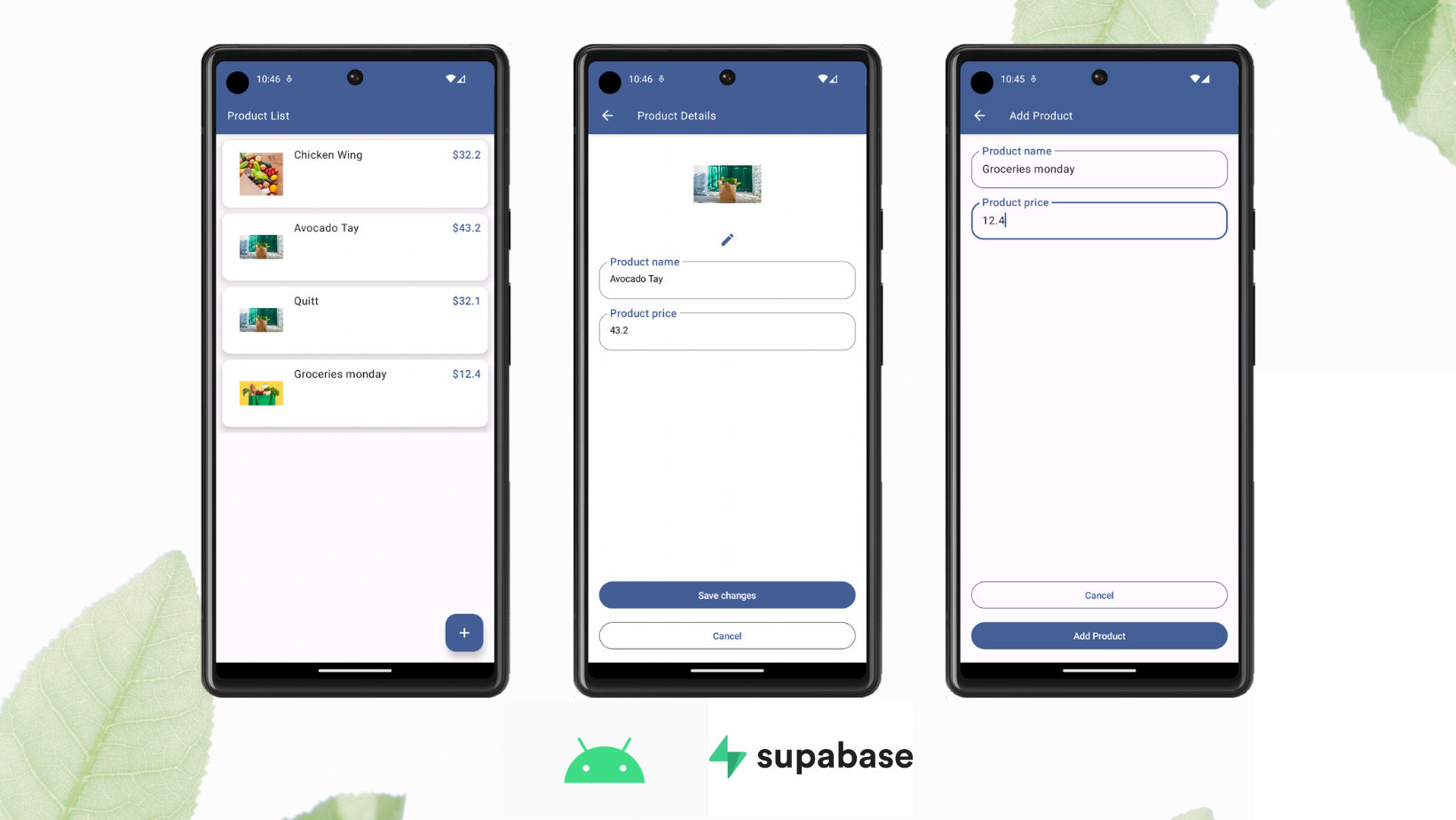@@ -201,10 +206,11 @@ data class Product()```-### 7. Implement repository to interact with Supabase services+### 7. Implement repositories to interact with Supabase servicesCreate ProductRepository interface and its implementation named ProductRepositoryImpl.-This kind of class will hold every logic to interact with data source from Supabase.+This kind of class will hold every logic to interact with data sources from Supabase. Do the same with AuthenticationRepository+Create Product Repository```kotlininterface ProductRepository {suspend fun createProduct(product: Product): Boolean@@ -303,14 +309,51 @@ class ProductRepositoryImpl @Inject constructor(}```+Create Authentication Repository+```kotlin+interface AuthenticationRepository {+ suspend fun signIn(email: String, password: String): Boolean+ suspend fun signUp(email: String, password: String): Boolean+}+```+```kotlin+class AuthenticationRepositoryImpl @Inject constructor(+ private val goTrue: GoTrue+) : AuthenticationRepository {+ override suspend fun signIn(email: String, password: String): Boolean {+ return try {+ goTrue.loginWith(Email) {+ this.email = email+ this.password = password+ }+ true+ } catch (e: Exception) {+ false+ }+ }++ override suspend fun signUp(email: String, password: String): Boolean {+ return try {+ goTrue.signUpWith(Email) {+ this.email = email+ this.password = password+ }+ true+ } catch (e: Exception) {+ false+ }+ }+}+```+### 8. Implement screens<Admonition type="note">By the time this page is written, there might be some changes in the code to make it more simple. If you face any problem when implement, feel free to refer the example repository above</Admonition>--#### 8.1 Product list+Product listCreate ProductListViewModel```kotlin+@HiltViewModelclass ProductListViewModel @Inject constructor(private val productRepository: ProductRepository,@@ -549,7 +592,6 @@ class ProductDetailsViewModel @Inject constructor(```Create ProductDetailsScreen.kt-```kotlin@OptIn(ExperimentalCoilApi::class)@SuppressLint("UnusedMaterialScaffoldPaddingParameter")@@ -810,6 +852,273 @@ class AddProductViewModel @Inject constructor(}```+Sign up+Create SignUpViewModel+```kotlin+@HiltViewModel+class SignUpViewModel @Inject constructor(+ private val authenticationRepository: AuthenticationRepository+) : ViewModel() {++ private val _email = MutableStateFlow("")+ val email: Flow<String> = _email++ private val _password = MutableStateFlow("")+ val password = _password++ fun onEmailChange(email: String) {+ _email.value = email+ }++ fun onPasswordChange(password: String) {+ _password.value = password+ }++ fun onSignUp() {+ viewModelScope.launch {+ authenticationRepository.signUp(+ email = _email.value,+ password = _password.value+ )+ }+ }+}+```++Create SignUpScreen.kt+```kotlin+@Composable+fun SignUpScreen(+ modifier: Modifier = Modifier,+ navController: NavController,+ viewModel: SignUpViewModel = hiltViewModel()+) {+ val snackBarHostState = remember { SnackbarHostState() }+ val coroutineScope = rememberCoroutineScope()+ Scaffold(+ snackbarHost = { androidx.compose.material.SnackbarHost(snackBarHostState) },+ topBar = {+ TopAppBar(+ navigationIcon = {+ IconButton(onClick = {+ navController.navigateUp()+ }) {+ Icon(+ imageVector = Icons.Filled.ArrowBack,+ contentDescription = null,+ tint = MaterialTheme.colorScheme.onPrimary+ )+ }+ },+ backgroundColor = MaterialTheme.colorScheme.primary,+ title = {+ Text(+ text = "Sign Up",+ color = MaterialTheme.colorScheme.onPrimary,+ )+ },+ )+ }+ ) { paddingValues ->+ Column(+ modifier = modifier+ .padding(paddingValues)+ .padding(20.dp)+ ) {+ val email = viewModel.email.collectAsState(initial = "")+ val password = viewModel.password.collectAsState()+ OutlinedTextField(+ label = {+ Text(+ text = "Email",+ color = MaterialTheme.colorScheme.primary,+ style = MaterialTheme.typography.titleMedium+ )+ },+ maxLines = 1,+ shape = RoundedCornerShape(32),+ modifier = modifier.fillMaxWidth(),+ value = email.value,+ onValueChange = {+ viewModel.onEmailChange(it)+ },+ )+ OutlinedTextField(+ label = {+ Text(+ text = "Password",+ color = MaterialTheme.colorScheme.primary,+ style = MaterialTheme.typography.titleMedium+ )+ },+ maxLines = 1,+ shape = RoundedCornerShape(32),+ modifier = modifier+ .fillMaxWidth()+ .padding(top = 12.dp),+ value = password.value,+ onValueChange = {+ viewModel.onPasswordChange(it)+ },+ )+ val localSoftwareKeyboardController = LocalSoftwareKeyboardController.current+ Button(modifier = modifier+ .fillMaxWidth()+ .padding(top = 12.dp),+ onClick = {+ localSoftwareKeyboardController?.hide()+ viewModel.onSignUp()+ coroutineScope.launch {+ snackBarHostState.showSnackbar(+ message = "Create account successfully. Sign in now!",+ duration = SnackbarDuration.Long+ )+ }+ }) {+ Text("Sign up")+ }+ }+ }+}+```+Sign In screen+Create SignInViewModel+```kotlin+@HiltViewModel+class SignInViewModel @Inject constructor(+ private val authenticationRepository: AuthenticationRepository+) : ViewModel() {++ private val _email = MutableStateFlow("")+ val email: Flow<String> = _email++ private val _password = MutableStateFlow("")+ val password = _password++ fun onEmailChange(email: String) {+ _email.value = email+ }++ fun onPasswordChange(password: String) {+ _password.value = password+ }++ fun onLogin() {+ viewModelScope.launch {+ authenticationRepository.signIn(+ email = _email.value,+ password = _password.value+ )+ }+ }+}+```++Create SignInScreen.kt+```kotlin+@OptIn(ExperimentalMaterial3Api::class, ExperimentalComposeUiApi::class)+@Composable+fun SignInScreen(+ modifier: Modifier = Modifier,+ navController: NavController,+ viewModel: SignInViewModel = hiltViewModel()+) {++ val snackBarHostState = remember { SnackbarHostState() }+ val coroutineScope = rememberCoroutineScope()+ Scaffold(+ snackbarHost = { androidx.compose.material.SnackbarHost(snackBarHostState) },+ topBar = {+ TopAppBar(+ navigationIcon = {+ IconButton(onClick = {+ navController.navigateUp()+ }) {+ Icon(+ imageVector = Icons.Filled.ArrowBack,+ contentDescription = null,+ tint = MaterialTheme.colorScheme.onPrimary+ )+ }+ },+ backgroundColor = MaterialTheme.colorScheme.primary,+ title = {+ Text(+ text = "Login",+ color = MaterialTheme.colorScheme.onPrimary,+ )+ },+ )+ }+ ) { paddingValues ->+ Column(+ modifier = modifier+ .padding(paddingValues)+ .padding(20.dp)+ ) {+ val email = viewModel.email.collectAsState(initial = "")+ val password = viewModel.password.collectAsState()+ androidx.compose.material.OutlinedTextField(+ label = {+ Text(+ text = "Email",+ color = MaterialTheme.colorScheme.primary,+ style = MaterialTheme.typography.titleMedium+ )+ },+ maxLines = 1,+ shape = RoundedCornerShape(32),+ modifier = modifier.fillMaxWidth(),+ value = email.value,+ onValueChange = {+ viewModel.onEmailChange(it)+ },+ )+ androidx.compose.material.OutlinedTextField(+ label = {+ Text(+ text = "Password",+ color = MaterialTheme.colorScheme.primary,+ style = MaterialTheme.typography.titleMedium+ )+ },+ maxLines = 1,+ shape = RoundedCornerShape(32),+ modifier = modifier+ .fillMaxWidth()+ .padding(top = 12.dp),+ value = password.value,+ onValueChange = {+ viewModel.onPasswordChange(it)+ },+ )+ val localSoftwareKeyboardController = LocalSoftwareKeyboardController.current+ Button(modifier = modifier+ .fillMaxWidth()+ .padding(top = 12.dp),+ onClick = {+ localSoftwareKeyboardController?.hide()+ viewModel.onSignIn()+ coroutineScope.launch {+ snackBarHostState.showSnackbar(+ message = "Sign in successfully !",+ duration = SnackbarDuration.Long+ )+ }+ }) {+ Text("Sign in")+ }+ OutlinedButton(modifier = modifier+ .fillMaxWidth()+ .padding(top = 12.dp), onClick = {+ navController.navigate(SignUpDestination.route)+ }) {+ Text("Sign up")+ }+ }+ }+}+```export const Page = ({ children }) => <Layout meta={meta} children={children} />