
TagSpaces is an offline, open source, document manager with tagging support
updating docu
uggrock6ac1aeaa6eba
diff --git a/README.md b/README.mdindex 59e52afe5..c958b5f39 100644--- a/README.md+++ b/README.md@@ -20,15 +20,15 @@ To get updates you can:./data/assets........contains all the css and images used in the application./data/js............contains the javascript module of the application./data/libs..........contains external javascript libraries together with the license they are distributed- ./data/chromium......contains files specific for the current Chrome browser extension- ./data/cordova ......contains files needed for the building of the Android application which is based on Cordova- ./data/electron......contains files needed for the Windows, Linux and Mac OS builds of the application- ./data/mozilla.......contains files needed for the Firefox extension based on addon sdk- ./data/web...........contains files needed for the WebDAV/ownCloud based release of TagSpaces- ./data/node-webkit...contains files needed for the Windows, Linux and Mac OS builds of the application+ ./data/chromium......contains the implementation and API for the Chrome/Chromium/Chrome OS browser extension+ ./data/cordova ......contains the implementation and API for the Cordova platform (Android and iOS releases)+ ./data/electron......contains the implementation and API for the Electron platform (Windows, Linux, OS X releases)+ ./data/mozilla.......contains the implementation and API of the Firefox Addon release of the application+ ./data/web...........contains the implementation and API of the WebDAV/ownCloud release of the application+ ./data/node-webkit...contains the implementation and API for the NW.js platform (deprecated)./data/templates.....contains HTML templates needed for the UI./data/locales.......contains files need for the localisation of the application UI- ./data/_locales......contains files need for the localisation of the chrome extension UI+ ./data/_locales......contains files need for the localisation of the Chrome extension UI## DownloadsYou can find the latest release of TagSpace in the github [release area](https://github.com/tagspaces/tagspaces/releases/) of TagSpaces@@ -44,7 +44,7 @@ A full list of the changes is available in our [changelog](CHANGELOG.md)## Screenshots-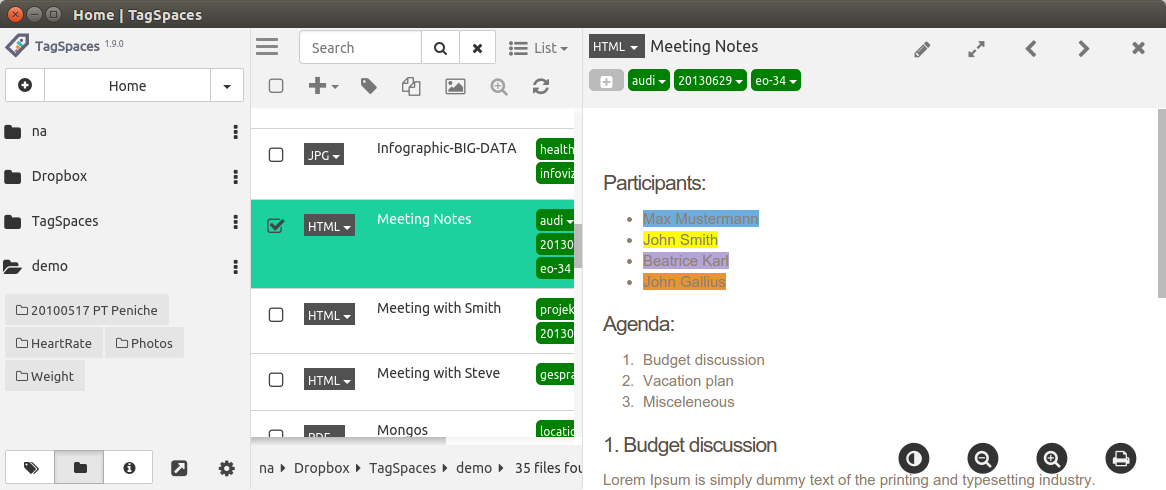+## Documentation@@ -92,7 +92,8 @@ Go to the data folder and install the TagSpaces extensions with bower:* Start the SDK by executing `source bin/activate` in the Addon SDK folder* Go to the your local tagspaces folder and run the following command, where the -p argument specifies some local firefox profile:- $cfx run -p /tmp/mozprofile++ cfx run -p /tmp/mozprofile* Start the addon by clicking the TagSpaces icon in the upper right area of Firefox@@ -100,6 +101,11 @@ Go to the data folder and install the TagSpaces extensions with bower:There is a script called `webdavserver.js` located in the data/web , which can be started with:node data/web/webdavserver.js++or++ npm webdav+This command will start a local node.js based WebDAV server on `http://127.0.0.1:8000`. Open your browser and enter the following URL: