
TagSpaces is an offline, open source, document manager with tagging support
chore: rewriting the readme file
Ilian Sapundshiev8b4bf431786e
diff --git a/README.md b/README.mdindex 4f261b703..cf85c4cf5 100644--- a/README.md+++ b/README.md@@ -1,185 +1,180 @@-+-[]() [](https://gurubase.io/g/tagspaces)+[](https://github.com/tagspaces/tagspaces/releases)+[](https://gurubase.io/g/tagspaces)-**TagSpaces** is a free, no vendor lock-in, open source application for organizing, annotating and managing local files with the help of tags. It features advanced note taking functionalities and some capabilities of to-do apps. The application is available for Windows, Linux and macOS. We provide a web clipper extension for Firefox, Edge and Chrome for easy collecting of online content in the form of local files.+# TagSpaces-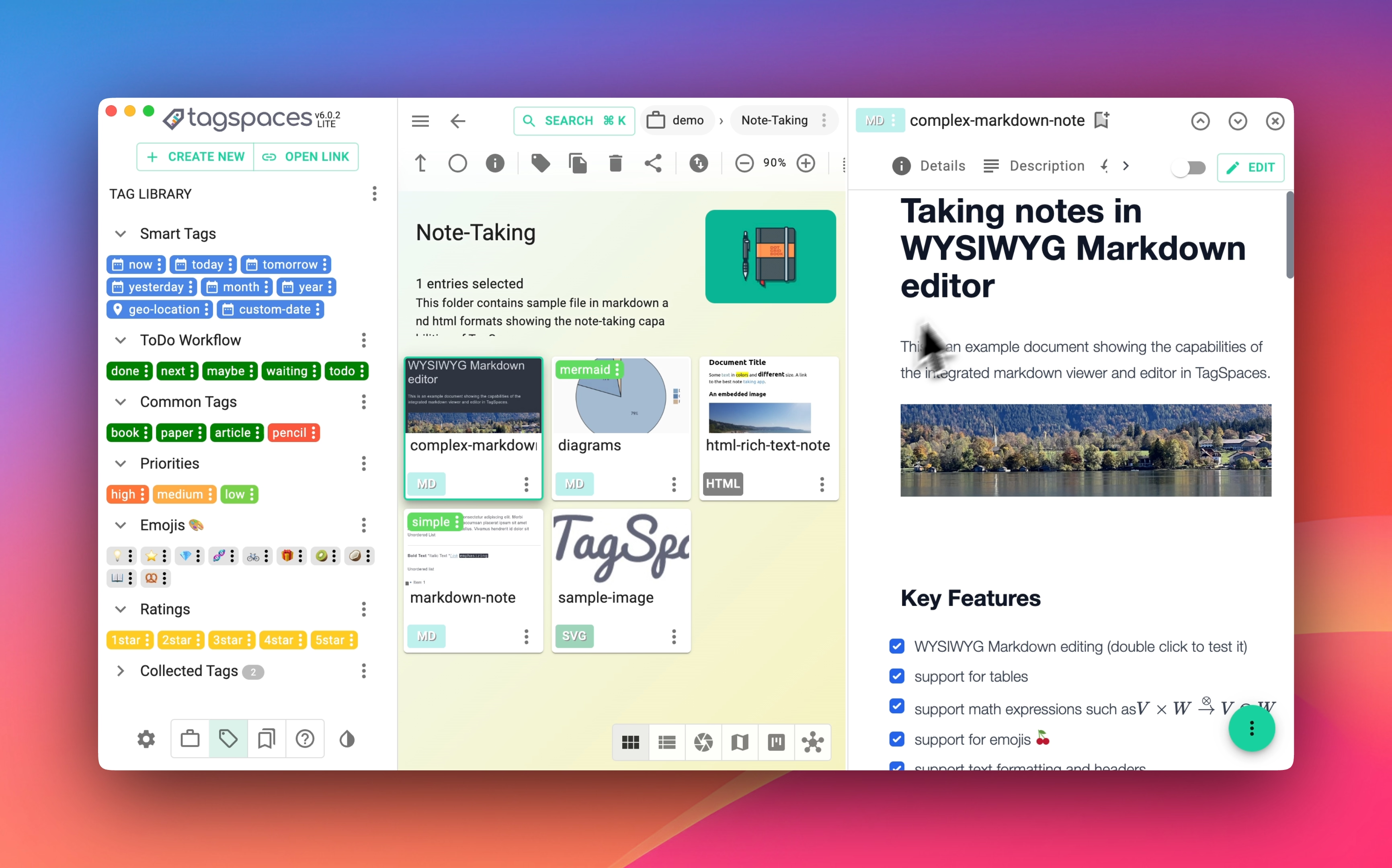+**TagSpaces** is a free and open-source platform for organizing, tagging, and managing your local files. It runs completely offline, with no need for cloud services, internet connection, or vendor lock-in. Available for **Windows**, **Linux**, and **macOS**, it also includes a [browser extension](https://github.com/tagspaces/browser-extensions) (Web Clipper) for Firefox, Edge, and Chrome to capture online content as local files.-More information about can be found from the following sources:+-- [Website](https://www.tagspaces.org/) - official web site of the project.-- [Blog](https://www.tagspaces.org/blog/) for news about TagSpaces-- [Docs](https://docs.tagspaces.org/) - the user documentation of the application-- [Forum](https://tagspaces.discourse.group/) - for feature request and support requests-- [Issues](https://github.com/tagspaces/tagspaces/issues) for filing bug reports-- [Intro Video](https://www.youtube.com/watch?v=Xjwxq4c0RBQ) - A video on Youtube showing the main concepts of the application.+## 🌐 Learn More-## Downloads+- 🌍 [Website](https://www.tagspaces.org/)+- 📰 [Blog](https://www.tagspaces.org/blog/)+- 📚 [Documentation](https://docs.tagspaces.org/)+- 💬 [Community Forum](https://tagspaces.discourse.group/)+- 🐛 [GitHub Issues](https://github.com/tagspaces/tagspaces/issues)-You can find the latest release of TagSpaces in the Github [release section](https://github.com/tagspaces/tagspaces/releases/)+----A full list of the changes is available in the [changelog](https://www.tagspaces.org/whatsnew/)+## 📦 Downloads-## Main Features+Grab the latest release from the [GitHub Releases Page](https://github.com/tagspaces/tagspaces/releases).+Check out the full [changelog](https://www.tagspaces.org/whatsnew/) for recent updates.-- **File and folder management** - TagSpaces provides a convenient user interface for browsing, viewing and managing files and folders.-- **File tagging** - The application supports two ways for tagging files. The default one embeds the tags directly in the name of the file, the other one uses a so called sidecar files for persisting the tags.-- **Searching** - The search functionality supports fuzzy functionality and can filter your locations for files and folders containing one or more tags-- **Browser for local content** - TagSpaces can be used just as browser for your local photos or navigation thought your local ebook library-- **Media player** - It supports playing for common audio and video files types and has integrated basic media player functionalities.-- **No-Cloud:** TagSpaces is running completely offline and serverless on your laptop, desktop or tablet and does not require an internet connection and any kind of online registration or service provider.-- **Note Taking** - you can create and edit notes in plain text, markdown and html file formats-- **To-Do Management** - with the help of the build in HTML editor you are able to create simple todo lists in every HTML file.-- **Cross-platform:** TagSpaces runs on Windows, Linux and macOS-- **Web Clipper** for saving web pages and screenshots from your browsers is also available as extension for [Firefox](https://addons.mozilla.org/en-US/firefox/addon/tagspaces/) and [Chrome](https://chrome.google.com/webstore/detail/tagspaces-web-clipper/ldalmgifdlgpiiadeccbcjojljeanhjk).+----## Infos for developers+## 🚀 Features at a Glance-The core of TagSpaces starting from version 3 is built with [react.js](https://reactjs.org/) and the great [material-ui](https://mui.com/) framework.+- **File & Folder Management** – Browse, organize, and manage local files in a powerful interface.+- **Tagging System** – Add tags directly into filenames or use sidecar files for metadata storage.+- **Flexible Search** – Filter and find files by name or tags using fuzzy search.+- **Offline First** – 100% offline, serverless, and privacy-focused.+- **Cross-platform** – Runs seamlessly on Windows, Linux, and macOS.+- **Note Taking** – Create notes in TXT, Markdown, or HTML.+- **To-Do Support** – Manage task lists using the built-in HTML editor.+- **Media Player** – Play common audio and video formats directly within the app.+- **Web Clipper** – Save web pages or screenshots locally using our browser extension.-The native Windows, Linux and Mac OS versions of TagSpaces are built with [Electron](https://electron.atom.io/). Electron is an app runtime based on Chromium and node.js. In order to combine it with react we have used the [electron-react-boilerplate](https://github.com/chentsulin/electron-react-boilerplate).+----## Repository Directory Structure+## 👩💻 Developer Guide- ./src/renderer................ contains the application core- ./src/main........ contains code needed for Electron platform- ./src/renderer/locales........ contains the language files needed for the application internationalization- ./src/node_modules... contains the TagSpaces extension modules- ./cordova............ contains the code needed for building the Cordova version- ./dll................ contains the files needed for live reload in development mode- ./docker............. files needed for the creation of a docker container- ./internals.......... contains files needed for supporting Flow and Eslint- ./node_modules....... after npm install, you will find here the external dependencies of the application- ./resources.......... contains images and other files needed for the application building- ./scripts............ contains js script needed for the npm tasks- ./test............... contains unit and e2e tests of the app- ./web................ contains assets needed for the web version of the app+### 🛠️ Technologies-## How to run TagSpaces from the source code?+- **Javascript Framework:** [React.js](https://reactjs.org/)+- **User Interface Styling:** [MUI](https://mui.com/)+- **Desktop App Framework:** [Electron](https://electron.atom.io/)+- **Boilerplate:** [Electron React Boilerplate](https://github.com/chentsulin/electron-react-boilerplate)-In order to run TagSpaces on your Windows, Mac OS or Linux from the source code published here, you will need the following prerequisites:+----- [node.js](https://nodejs.org/)-- [npm](https://www.npmjs.com/)-- [git](http://git-scm.org/)+### 📁 Project Structure-Get the TagSpaces source code by cloning its repository:+```text+src/+ renderer/ # Core application logic+ main/ # Electron main process+ locales/ # Language translation files+ node_modules/ # TagSpaces extension modules- $ git clone https://github.com/tagspaces/tagspaces.git+cordova/ # Deprecated Android build+dll/ # Live reload support for development+docker/ # Docker container setup+internals/ # Flow and ESLint configurations+resources/ # Images and build resources+scripts/ # NPM task-related scripts+test/ # Unit and E2E tests+web/ # Assets for web version+```-Go to the folder where the code was cloned to and select the branch you want to test. Use the **master** branch for the last officially released version or the branch **develop** for a kind of a nightly build, containing the changes we are preparing for the next release of the application.+### ▶️ Running from Source-Switch to the folder where you have cloned the repository:+#### Prerequisites- $ cd tagspaces+Install the following tools:-Change to the branch with the name **develop**:+- [Node.js](https://nodejs.org/)+- [npm](https://www.npmjs.com/)+- [Git](http://git-scm.org/)- $ git checkout develop+#### Setup Steps-and install the project dependencies:+ git clone https://github.com/tagspaces/tagspaces.git+ cd tagspaces+ git checkout develop # or 'master' for stable release+ npm install- $ npm install+#### Set Up Local Web Service-Starting from v4 of the application, a web service is running locally as a separate process. The web service is responsible for the search index creation and the generation of the thumbnails for most of the images formats. A key is required in order for the main application to communicate with the web server. It should be generated from webpack script in the `.env` file located in `release/app` folder. This is an example for an .env file.+Create a .env file in release/app/ with a custom key to avoid conflicts:- KEY=a_custom_key+The desktop version of the application uses a web service which is running locally as a separate process. The web service is responsible for the search index creation and the generation of the thumbnails for most of the images formats. A key is required in order for the main application to communicate with the web server. It should be generated from webpack script in the `.env` file located in `release/app` folder. This is an example for an .env file.-Having a custom key, ensures that another instance of TagSpaces will not communicate with the web service of the initial instance, since it is always running on the same port.+ KEY=a_custom_key-Now you are ready and can build and start the application with:+> Having a custom key, ensures that another instance of TagSpaces will not communicate with the web service of the initial instance, since it is always running on the same port.- $ npm run build+#### Build & Start- $ npm run start+ npm run build+ npm run start-If you want to try the development mode, you can start the app with:+#### Start in Development Mode- $ npm run dev+ npm run devThis will start a development server in background, which watches for changes in background and refreshes the application automatically once you have done some changes in the source code.-## Package for Windows, Linux and macOS+### 🧪 Testing-Building of the packages can be accomplished with the integrated npm scripts:+Run unit and integration tests:```bash-$ npm run package-win--$ npm run package-linux+ npm run test-unit+ npm run test-playwright+ npm run test-playwright-web-$ npm run package-mac--$ npm run package-mac-arm64```-The commands will create packages for Windows, Linux, Mac OS and Mac OS with the M1 processor respectively. Do not forget to run the `npm run build` script before packaging.--## Package the Android (deprecated)+### 💻 Packaging the Desktop App-Building of the packages for Android can be accomplished with the integrated npm scripts:+Build native apps for each platform:```bash-$ npm run version-meta--$ npm run prepare-cordova--$ npm run package-android+ npm run package-win+ npm run package-linux+ npm run package-mac+ npm run package-mac-arm64```-## Start the web version locally+The commands will create packages for Windows, Linux, Mac OS and Mac OS with the M1 processor respectively.-For developing purposes and local tests, the web version of the app can be started with the following npm command:+> ⚠️ Run npm run build before packaging.- $ npm run run-web+### 📱 Android Build (Deprecated)-## Running Tests+ npm run version-meta+ npm run prepare-cordova+ npm run package-android-To run tests, run the following command--```bash-npm run test-unit--npm run test-playwright--npm run test-playwright-web-```+### 🌐 Web Version-## Developing viewer and editor for TagSpaces+Start the web version locally:-TagSpaces can be easily extended with the help of extensions. Currently we use the extensions for supporting the opening and editing of different file types in the application. More information about this topic can be found on the [extension page](https://www.tagspaces.org/extensions/) of our website.+ npm run run-web-## Contribute+### 🔌 Extend with Custom Viewers & Editors-TagSpaces is an open source software, and as such, the code is publicly available on GitHub, and forking is particularly recommended! Still, contribution must be done following some guidelines.-Contributor License Agreement+TagSpaces supports extension modules for opening and editing different file types. Learn more on our [Extensions Page](https://www.tagspaces.org/extensions/).-The CLA is an agreement commonly used in major open source project, which aims at protecting all parties implied by a contribution: the contributor, the main code author, and above all, the community. The CLA model we have chosen basically tells the following: the contribution’s copyright is shared between the contributor and the main author. This means each party can do whatever she want in term of relicensing with this contributed piece of code. This is important, because, if in the future, the author wants to change the license in something more in favor of the community, a singular contributor cannot block the process.+### 🤝 Contributing-The Contributor License Agreement can be signed online on the following [CLA form](https://www.tagspaces.org/contribute/).+We welcome contributions! Please review and sign the [Contributor License Agreement (CLA)](https://www.tagspaces.org/contribute/) before submitting PRs.-## Localisation+## 🌍 Localization-TagSpaces is currently available in more than 20 languages. You can help the translation of this application in your language by joining the translation teams on [Transifex](https://www.transifex.com/tagspaces/tagspaces/).+TagSpaces is available in over 20 languages. Help us translate the app by joining our team on [Transifex](https://www.transifex.com/tagspaces/tagspaces/).-## Ideas and Suggestion+## 💡 Ideas & Suggestions-If you have ideas or suggestions on how we can improve our application, you can check the dedicated [section](https://tagspaces.discourse.group/c/feature-requests/6) in our forum. Here you will find numerous ideas already proposed by other users.+Have an idea or a feature request? Share it on our [community forum](https://tagspaces.discourse.group/c/feature-requests/6) and join the discussion.-## Support and Bugs+## 🐞 Support & Bug Reports-If you are having troubles using TagSpaces or have found a bug please [open a ticket](https://github.com/tagspaces/tagspaces/issues) on GitHub.+If you encounter a bug or need help, [open an issue](https://github.com/tagspaces/tagspaces/issues) on GitHub.-## Known issues+## ⚠️ Known Limitations-- TagSpaces is not suitable for searching in locations containing more than 100000 files.+TagSpaces is not optimized for locations with more than 100,000 files.-## Feeds+## 📡 Feeds-- Subscribe to RSS feed updates for the [tagspaces blog](http://www.tagspaces.org/blog/rss.xml)-- Subscribe to RSS feed updates for the [master branch](https://github.com/tagspaces/tagspaces/commits/master.atom)+- [Blog RSS Feed](http://www.tagspaces.org/blog/rss.xml)+- [GitHub Commits (master)](https://github.com/tagspaces/tagspaces/commits/master.atom)-## License+## 📄 License-This project is dual-licensed under the [AGPL](LICENSE.txt) (GNU Affero General Public License) Version 3 for FOSS projects and under a commercial license for independent software vendors and resellers. If you want to modify this application under different conditions, feel free to contact us.+TagSpaces is dual-licensed under the [AGPL](LICENSE.txt) (GNU Affero General Public License) v3 for open-source projects and a commercial license for vendors or resellers. Contact us if you're interested in using TagSpaces under different terms.