
UniFace: A Unified Face Analysis Library for Python | Detection, alignment, landmarks, face-mesh, recognition, parsing, gaze, attributes and anti-spoofing under one API.
Python computer-visiondeep-learningface-alignmentface-analysisface-anonymizationface-anti-spoofingface-attributesface-detectionface-meshface-parsingface-quality-assessmentface-recognitionface-segmentationface-trackingfacial-landmarksgaze-estimationhead-pose-estimationonnxruntimeportrait-mattingpython
docs: Rebuild demo images and README (#134)
Yakhyokhuja Valikhujaev6e49c78b04dd
diff --git a/.gitignore b/.gitignoreindex 681bbf0..7fc598e 100644--- a/.gitignore+++ b/.gitignore@@ -2,6 +2,9 @@ tmp_*.vscode/.claude+# CLI tools in tools/ write results here by default (--save-dir)+outputs/+# Byte-compiled / optimized / DLL files__pycache__/*.py[cod]diff --git a/README.md b/README.mdindex 5ce8bb5..a7fc8be 100644--- a/README.md+++ b/README.md@@ -7,7 +7,6 @@[](https://opensource.org/licenses/MIT)[](https://github.com/yakhyo/uniface/actions)[](https://pepy.tech/projects/uniface)-[](https://yakhyo.github.io/uniface/)[](https://www.kaggle.com/yakhyokhuja/code)</div>@@ -16,310 +15,171 @@<img src="https://raw.githubusercontent.com/yakhyo/uniface/main/.github/logos/uniface_rounded_q80.webp" width="90%" alt="UniFace - A Unified Face Analysis Library for Python"></div>-> [!NOTE]-> **UniFace** is a lightweight, production-ready Python library for face detection, recognition, tracking, landmark analysis, face parsing, gaze estimation, and face attributes.--## Features--| Feature | Details |-| --------------------------- | ------------------------------------------------------------------------------------------------ |-| **Face Detection** | RetinaFace, SCRFD, CenterFace, YOLOv5-Face, and YOLOv8-Face with 5-point landmarks; BlazeFace (MediaPipe, 6 keypoints) |-| **Face Recognition** | AdaFace, ArcFace, EdgeFace, MobileFace, and SphereFace embeddings |-| **Face Tracking** | Multi-object tracking with [BYTETracker](https://github.com/yakhyo/bytetrack-tracker) for persistent IDs across video frames |-| **Facial Landmarks** | 106-point (2d106det), 98 / 68-point (PIPNet), and 468 / 478-point dense 3D mesh (MediaPipe Face Mesh, the 478 variant adding irises) — separate from the 5-point detector landmarks |-| **Face Parsing** | BiSeNet semantic segmentation (19 classes), XSeg face masking |-| **Portrait Matting** | Trimap-free alpha matte with MODNet (background removal, green screen, compositing) |-| **Gaze Estimation** | Real-time gaze direction with MobileGaze |-| **Head Pose Estimation** | 3D head orientation (pitch, yaw, roll) with 6D rotation representation |-| **Attribute Analysis** | Age, gender, race (FairFace), emotion, and face states (eye openness, glasses, sunglasses, mask with FaceAttribNet) |-| **Vector Store** | FAISS-backed embedding store for fast multi-identity search |-| **Anti-Spoofing** | Face liveness detection with MiniFASNet |-| **Face Quality Assessment** | eDifFIQA single-score quality (T/S/M/L, NIST FATE-Quality #1 with the L variant) |-| **Face Anonymization** | 5 blur methods for privacy protection |-| **Hardware Acceleration** | ARM64 (Apple Silicon), CUDA (NVIDIA), CPU |--## Visual Examples--<table>- <tr>- <td align="center"><b>Face Detection</b><br><img src="https://raw.githubusercontent.com/yakhyo/uniface/main/assets/demos/detection.jpg" width="100%"></td>- <td align="center"><b>Gaze Estimation</b><br><img src="https://raw.githubusercontent.com/yakhyo/uniface/main/assets/demos/gaze.jpg" width="100%"></td>- </tr>- <tr>- <td align="center"><b>Head Pose Estimation</b><br><img src="https://raw.githubusercontent.com/yakhyo/uniface/main/assets/demos/headpose.jpg" width="100%"></td>- <td align="center"><b>Age & Gender</b><br><img src="https://raw.githubusercontent.com/yakhyo/uniface/main/assets/demos/age_gender.jpg" width="100%"></td>- </tr>- <tr>- <td align="center" colspan="2"><b>Face Verification</b><br><img src="https://raw.githubusercontent.com/yakhyo/uniface/main/assets/demos/verification.jpg" width="80%"></td>- </tr>- <tr>- <td align="center"><b>106-Point Landmarks</b><br><img src="https://raw.githubusercontent.com/yakhyo/uniface/main/assets/demos/landmarks.jpg" width="70%"></td>- <td align="center"><b>98-Point Landmarks (PIPNet)</b><br><img src="https://raw.githubusercontent.com/yakhyo/uniface/main/assets/demos/landmarks_pipnet.jpg" width="70%"></td>- </tr>- <tr>- <td align="center" colspan="2"><b>Face Parsing</b><br><img src="https://raw.githubusercontent.com/yakhyo/uniface/main/assets/demos/parsing.jpg" width="80%"></td>- </tr>- <tr>- <td align="center" colspan="2"><b>Face Segmentation</b><br><img src="https://raw.githubusercontent.com/yakhyo/uniface/main/assets/demos/segmentation.jpg" width="80%"></td>- </tr>- <tr>- <td align="center" colspan="2"><b>Portrait Matting</b><br><img src="https://raw.githubusercontent.com/yakhyo/uniface/main/assets/demos/matting.jpg" width="100%"></td>- </tr>- <tr>- <td align="center" colspan="2"><b>Face Anonymization</b><br><img src="https://raw.githubusercontent.com/yakhyo/uniface/main/assets/demos/anonymization.jpg" width="100%"></td>- </tr>-</table>--## Installation--**CPU / Apple Silicon**+<p align="center">+ UniFace is a lightweight, production-ready Python library for face detection, recognition,<br>+ tracking, landmark analysis, face parsing, gaze estimation, and face attributes.+</p>++<p align="center">+ <a href="https://yakhyo.github.io/uniface/quickstart/"><img src="https://img.shields.io/badge/Get%20Started-1f6feb?style=for-the-badge&logoColor=white" alt="Get Started"></a>+ + <a href="https://yakhyo.github.io/uniface/models/"><img src="https://img.shields.io/badge/Model%20Zoo-30363d?style=for-the-badge&logoColor=white" alt="Model Zoo"></a>+ + <a href="https://yakhyo.github.io/uniface/notebooks/"><img src="https://img.shields.io/badge/Notebooks-30363d?style=for-the-badge&logo=jupyter&logoColor=white" alt="Notebooks"></a>+ + <a href="https://yakhyo.github.io/uniface/"><img src="https://img.shields.io/badge/Full%20Docs-30363d?style=for-the-badge&logoColor=white" alt="Full Docs"></a>+</p>```bash-pip install uniface[cpu]+pip install "uniface[cpu]" # CPU and Apple Silicon+pip install "uniface[gpu]" # NVIDIA CUDA+pip install --pre "uniface[cpu]" # latest pre-release```-**GPU support (NVIDIA CUDA)**+<details>+<summary><b>A first script</b></summary>-```bash-pip install uniface[gpu]-```+<br>-> **Why separate extras?** `onnxruntime` and `onnxruntime-gpu` conflict when both are installed — they own the same Python namespace. Installing only the extra you need prevents that conflict entirely.+`FaceAnalyzer` runs detection, alignment and recognition in one call. Attribute models are opt-in.-**From source (latest version)**--```bash-git clone https://github.com/yakhyo/uniface.git-cd uniface && pip install -e ".[cpu]" # or .[gpu] for CUDA-```+```python+import cv2+from uniface import FaceAnalyzer, FairFace-**FAISS vector store**+analyzer = FaceAnalyzer(predictors=[FairFace()])-```bash-pip install faiss-cpu # or faiss-gpu for CUDA+for face in analyzer.analyze(cv2.imread("photo.jpg")):+ print(face.bbox, face.sex, face.age_group, face.embedding.shape)```-**Optional dependencies**+`bbox`, `confidence`, `landmarks` and `embedding` are always set. Age, sex, race, emotion, quality+and the face states stay `None` until you pass the predictor that fills them.-- Emotion model uses TorchScript and requires `torch`:- `pip install torch` (choose the correct build for your OS/CUDA)-- YOLOv5-Face and YOLOv8-Face support faster NMS with `torchvision`:- `pip install torch torchvision` then use `nms_mode='torchvision'`+</details>-## Model Downloads and Cache+<details>+<summary><b>All fifteen tasks, and which model does each</b></summary>-Models are downloaded automatically on first use and verified via SHA-256.+<br>-Default cache location: `~/.uniface/models`+| Task | Models |+| --- | --- |+| Face Detection | RetinaFace, SCRFD, CenterFace, YOLOv5-Face, YOLOv8-Face, BlazeFace |+| Face Recognition | AdaFace, ArcFace, EdgeFace, MobileFace, SphereFace |+| Face Tracking | BYTETracker, persistent IDs across video frames |+| Facial Landmarks | 2d106det (106), PIPNet (98 / 68), Face Mesh (468 / 478, 3D) |+| Face Parsing | BiSeNet (19 classes), XSeg masking |+| Portrait Matting | MODNet, trimap-free |+| Gaze Estimation | MobileGaze (ResNet-18 / 34 / 50, MobileNetV2) |+| Head Pose | 6D rotation representation, pitch / yaw / roll |+| Demographics | AgeGender, FairFace (age group, sex, race) |+| Emotion | AffectNet-7 and AffectNet-8 |+| Face States | FaceAttribNet: eyes, glasses, sunglasses, mask |+| Face Quality | eDifFIQA (T / S / M / L) |+| Anti-Spoofing | MiniFASNet liveness |+| Anonymization | 5 blur methods |+| Vector Store | FAISS-backed embedding search |-Override with the programmatic API or environment variable:--```python-from uniface.model_store import get_cache_dir, set_cache_dir--set_cache_dir('/data/models')-print(get_cache_dir()) # /data/models-```--```bash-export UNIFACE_CACHE_DIR=/data/models-```+Runs on CPU, Apple Silicon and CUDA. Weights download on first use, verified by SHA-256.-## Quick Example (Detection)+</details>-```python-import cv2-from uniface.detection import RetinaFace+<br>-detector = RetinaFace()+### Find and measure faces-image = cv2.imread("photo.jpg")-if image is None:- raise ValueError("Failed to load image. Check the path to 'photo.jpg'.")+**Face Detection** · [docs](https://yakhyo.github.io/uniface/modules/detection/)-faces = detector.detect(image)+<img src="https://raw.githubusercontent.com/yakhyo/uniface/main/assets/demo/detection.jpg" width="100%">-for face in faces:- print(f"Confidence: {face.confidence:.2f}")- print(f"BBox: {face.bbox}")- print(f"Landmarks: {face.landmarks.shape}")-```+**Facial Landmarks** · [docs](https://yakhyo.github.io/uniface/modules/landmarks/)-## Example (Face Analyzer)+<img src="https://raw.githubusercontent.com/yakhyo/uniface/main/assets/demo/landmarks.jpg" width="100%">-```python-import cv2-from uniface import FaceAnalyzer+**Face Mesh** · [docs](https://yakhyo.github.io/uniface/modules/landmarks/#face-mesh-468-or-478-points-3d)-# Zero-config: uses SCRFD (500M) + ArcFace (MobileNet) by default-analyzer = FaceAnalyzer()+<img src="https://raw.githubusercontent.com/yakhyo/uniface/main/assets/demo/face_mesh.jpg" width="100%">-image = cv2.imread("photo.jpg")-if image is None:- raise ValueError("Failed to load image. Check the path to 'photo.jpg'.")+**Face Quality** · [docs](https://yakhyo.github.io/uniface/modules/quality/)-faces = analyzer.analyze(image)+<img src="https://raw.githubusercontent.com/yakhyo/uniface/main/assets/demo/quality.jpg" width="100%">-for face in faces:- print(face.bbox, face.embedding.shape if face.embedding is not None else None)-```+### Cut faces out-With attributes:+**Face Parsing** · [docs](https://yakhyo.github.io/uniface/modules/parsing/)-```python-from uniface import FaceAnalyzer, AgeGender+<img src="https://raw.githubusercontent.com/yakhyo/uniface/main/assets/demo/parsing.jpg" width="100%">-analyzer = FaceAnalyzer(predictors=[AgeGender()])-faces = analyzer.analyze(image)+**Face Segmentation** · [docs](https://yakhyo.github.io/uniface/modules/parsing/#xseg)-for face in faces:- print(f"{face.sex}, {face.age}y, embedding={face.embedding.shape}")-```+<img src="https://raw.githubusercontent.com/yakhyo/uniface/main/assets/demo/segmentation.jpg" width="100%">-## Example (Portrait Matting)+<img src="https://raw.githubusercontent.com/yakhyo/uniface/main/assets/demo/segmentation_occluded.jpg" width="100%">-```python-import cv2-import numpy as np-from uniface.matting import MODNet+**Portrait Matting** · [docs](https://yakhyo.github.io/uniface/modules/matting/)-matting = MODNet()+<img src="https://raw.githubusercontent.com/yakhyo/uniface/main/assets/demo/matting.jpg" width="100%">-image = cv2.imread("portrait.jpg")-matte = matting.predict(image) # (H, W) float32 in [0, 1]+<img src="https://raw.githubusercontent.com/yakhyo/uniface/main/assets/demo/matting_alt.jpg" width="100%">-# Transparent PNG-rgba = cv2.cvtColor(image, cv2.COLOR_BGR2BGRA)-rgba[:, :, 3] = (matte * 255).astype(np.uint8)-cv2.imwrite("transparent.png", rgba)+### Read where a head is pointing-# Green screen-matte_3ch = matte[:, :, np.newaxis]-bg = np.full_like(image, (0, 177, 64), dtype=np.uint8)-result = (image * matte_3ch + bg * (1 - matte_3ch)).astype(np.uint8)-cv2.imwrite("green_screen.jpg", result)-```+**Head Pose** · [docs](https://yakhyo.github.io/uniface/modules/headpose/)-## Jupyter Notebooks--| Example | Colab | Description |-| ---------------------------------------------------------------------- | :-----------------------------------------------------------------------------------------------------------------------------------------------------------------------------------: | --------------------------------------- |-| [01_face_detection.ipynb](examples/01_face_detection.ipynb) | [](https://colab.research.google.com/github/yakhyo/uniface/blob/main/examples/01_face_detection.ipynb) | Face detection and landmarks |-| [02_face_alignment.ipynb](examples/02_face_alignment.ipynb) | [](https://colab.research.google.com/github/yakhyo/uniface/blob/main/examples/02_face_alignment.ipynb) | Face alignment for recognition |-| [03_face_verification.ipynb](examples/03_face_verification.ipynb) | [](https://colab.research.google.com/github/yakhyo/uniface/blob/main/examples/03_face_verification.ipynb) | Compare faces for identity |-| [04_face_search.ipynb](examples/04_face_search.ipynb) | [](https://colab.research.google.com/github/yakhyo/uniface/blob/main/examples/04_face_search.ipynb) | Find a person in group photos |-| [05_face_analyzer.ipynb](examples/05_face_analyzer.ipynb) | [](https://colab.research.google.com/github/yakhyo/uniface/blob/main/examples/05_face_analyzer.ipynb) | Unified face analysis |-| [06_face_parsing.ipynb](examples/06_face_parsing.ipynb) | [](https://colab.research.google.com/github/yakhyo/uniface/blob/main/examples/06_face_parsing.ipynb) | Semantic face segmentation |-| [07_face_anonymization.ipynb](examples/07_face_anonymization.ipynb) | [](https://colab.research.google.com/github/yakhyo/uniface/blob/main/examples/07_face_anonymization.ipynb) | Privacy-preserving blur |-| [08_gaze_estimation.ipynb](examples/08_gaze_estimation.ipynb) | [](https://colab.research.google.com/github/yakhyo/uniface/blob/main/examples/08_gaze_estimation.ipynb) | Gaze direction estimation |-| [09_face_segmentation.ipynb](examples/09_face_segmentation.ipynb) | [](https://colab.research.google.com/github/yakhyo/uniface/blob/main/examples/09_face_segmentation.ipynb) | Face segmentation with XSeg |-| [10_face_vector_store.ipynb](examples/10_face_vector_store.ipynb) | [](https://colab.research.google.com/github/yakhyo/uniface/blob/main/examples/10_face_vector_store.ipynb) | FAISS-backed face database |-| [11_head_pose_estimation.ipynb](examples/11_head_pose_estimation.ipynb) | [](https://colab.research.google.com/github/yakhyo/uniface/blob/main/examples/11_head_pose_estimation.ipynb) | Head pose estimation (pitch, yaw, roll) |-| [12_face_recognition.ipynb](examples/12_face_recognition.ipynb) | [](https://colab.research.google.com/github/yakhyo/uniface/blob/main/examples/12_face_recognition.ipynb) | Standalone face recognition pipeline |-| [13_portrait_matting.ipynb](examples/13_portrait_matting.ipynb) | [](https://colab.research.google.com/github/yakhyo/uniface/blob/main/examples/13_portrait_matting.ipynb) | Portrait matting with MODNet |-| [14_face_attributes.ipynb](examples/14_face_attributes.ipynb) | [](https://colab.research.google.com/github/yakhyo/uniface/blob/main/examples/14_face_attributes.ipynb) | Face states (eyes, glasses, sunglasses, mask) |-| [15_face_mesh.ipynb](examples/15_face_mesh.ipynb) | [](https://colab.research.google.com/github/yakhyo/uniface/blob/main/examples/15_face_mesh.ipynb) | 468 / 478-point dense 3D face mesh |--## Documentation--Full documentation: https://yakhyo.github.io/uniface/--| Resource | Description |-| -------------------------------------------------------------------- | ------------------------------------------- |-| [Quickstart](https://yakhyo.github.io/uniface/quickstart/) | Get up and running in 5 minutes |-| [Model Zoo](https://yakhyo.github.io/uniface/models/) | All models, benchmarks, and selection guide |-| [API Reference](https://yakhyo.github.io/uniface/modules/detection/) | Detailed module documentation |-| [Tutorials](https://yakhyo.github.io/uniface/recipes/image-pipeline/) | Step-by-step workflow examples |-| [Guides](https://yakhyo.github.io/uniface/concepts/overview/) | Architecture and design principles |-| [Datasets](https://yakhyo.github.io/uniface/datasets/) | Training data and evaluation benchmarks |--## Execution Providers (ONNX Runtime)+<img src="https://raw.githubusercontent.com/yakhyo/uniface/main/assets/demo/headpose.jpg" width="100%">-```python-from uniface.detection import RetinaFace+**Gaze Estimation** · [docs](https://yakhyo.github.io/uniface/modules/gaze/)-# Force CPU-only inference-detector = RetinaFace(providers=["CPUExecutionProvider"])-```+<img src="https://raw.githubusercontent.com/yakhyo/uniface/main/assets/demo/gaze.jpg" width="100%">-See more in the docs:-https://yakhyo.github.io/uniface/concepts/execution-providers/+### Read a face-## Datasets+**Age and Sex** · [docs](https://yakhyo.github.io/uniface/modules/attributes/)-| Task | Training Dataset | Models |-| ----------- | --------------------------- | ------------------------------------------- |-| Detection | WIDER FACE | RetinaFace, SCRFD, CenterFace, YOLOv5-Face, YOLOv8-Face |-| Recognition | MS1MV2 | MobileFace, SphereFace |-| Recognition | WebFace600K | ArcFace |-| Recognition | WebFace4M / 12M | AdaFace, EdgeFace |-| Landmarks | WFLW, 300W+CelebA | PIPNet (98 / 68 pts) |-| Detection | Proprietary (Google) | BlazeFace (short-range) |-| Landmarks | Proprietary (Google) | Face Mesh (468 / 478 pts) |-| Gaze | Gaze360 | MobileGaze |-| Head Pose | 300W-LP | HeadPose (ResNet, MobileNet) |-| Parsing | CelebAMask-HQ | BiSeNet |-| Attributes | CelebA, FairFace, AffectNet | AgeGender, FairFace, Emotion |-| Attributes | Proprietary (Qualcomm) | FaceAttribNet |+<img src="https://raw.githubusercontent.com/yakhyo/uniface/main/assets/demo/demography.jpg" width="100%">-> See [Datasets documentation](https://yakhyo.github.io/uniface/datasets/) for download links, benchmarks, and details.+**Emotion** · [docs](https://yakhyo.github.io/uniface/modules/attributes/#emotion)-## Licensing and Model Usage+<img src="https://raw.githubusercontent.com/yakhyo/uniface/main/assets/demo/emotion.jpg" width="100%">-UniFace is MIT-licensed, but several pretrained models carry their own licenses.-Review: https://yakhyo.github.io/uniface/license-attribution/+**Face States** · [docs](https://yakhyo.github.io/uniface/modules/attributes/#faceattribnet)-Notable examples:+<img src="https://raw.githubusercontent.com/yakhyo/uniface/main/assets/demo/face_states.jpg" width="100%">-- YOLOv5-Face and YOLOv8-Face weights are GPL-3.0-- FairFace weights are CC BY 4.0-- FaceAttribNet weights are BSD-3-Clause (© Qualcomm Technologies, Inc.)-- BlazeFace and Face Mesh weights are Apache-2.0 (© Google, from MediaPipe)+<img src="https://raw.githubusercontent.com/yakhyo/uniface/main/assets/demo/face_states_alt.jpg" width="100%">-If you plan commercial use, verify model license compatibility.+### Tell a real face from a replay-## References+**Anti-Spoofing** · [docs](https://yakhyo.github.io/uniface/modules/spoofing/)-| Feature | Repository | Training | Description |-| ------------- | --------------------------------------------------------------------------------------- | :------: | ------------------------------------ |-| Detection | [retinaface-pytorch](https://github.com/yakhyo/retinaface-pytorch) | ✓ | RetinaFace PyTorch Training & Export |-| Detection | [yolov5-face-onnx-inference](https://github.com/yakhyo/yolov5-face-onnx-inference) | - | YOLOv5-Face Inference |-| Detection | [yolov8-face-onnx-inference](https://github.com/yakhyo/yolov8-face-onnx-inference) | - | YOLOv8-Face Inference |-| Detection | [Star-Clouds/CenterFace](https://github.com/Star-Clouds/CenterFace) | - | CenterFace Original Weights |-| Tracking | [bytetrack-tracker](https://github.com/yakhyo/bytetrack-tracker) | - | BYTETracker Multi-Object Tracking |-| Recognition | [face-recognition](https://github.com/yakhyo/face-recognition) | ✓ | MobileFace, SphereFace Training |-| Recognition | [edgeface-onnx](https://github.com/yakhyo/edgeface-onnx) | - | EdgeFace Inference |-| Landmarks | [pipnet-onnx](https://github.com/yakhyo/pipnet-onnx) | - | PIPNet 98 / 68-point Inference |-| Landmarks | [mediapipe-face-mesh-onnx](https://github.com/yakhyo/mediapipe-face-mesh-onnx) | - | Face Mesh 468 / 478-point Inference |-| Parsing | [face-parsing](https://github.com/yakhyo/face-parsing) | ✓ | BiSeNet Face Parsing |-| Parsing | [face-segmentation](https://github.com/yakhyo/face-segmentation) | - | XSeg Face Segmentation |-| Gaze | [gaze-estimation](https://github.com/yakhyo/gaze-estimation) | ✓ | MobileGaze Training |-| Head Pose | [head-pose-estimation](https://github.com/yakhyo/head-pose-estimation) | ✓ | Head Pose Training (6DRepNet-style) |-| Matting | [modnet](https://github.com/yakhyo/modnet) | - | MODNet Portrait Matting |-| Anti-Spoofing | [face-anti-spoofing](https://github.com/yakhyo/face-anti-spoofing) | - | MiniFASNet Inference |-| Quality | [face-image-quality-assessment](https://github.com/yakhyo/face-image-quality-assessment) | - | eDifFIQA Inference |-| Attributes | [fairface-onnx](https://github.com/yakhyo/fairface-onnx) | - | FairFace Inference |-| Attributes | [face-attribute](https://github.com/yakhyo/face-attribute) | - | FaceAttribNet Inference |+<img src="https://raw.githubusercontent.com/yakhyo/uniface/main/assets/demo/spoofing.jpg" width="100%">-*SCRFD and ArcFace models are from [InsightFace](https://github.com/deepinsight/insightface).+### Match a face, or hide one-## Contributing+**Face Recognition** · [docs](https://yakhyo.github.io/uniface/modules/recognition/)-Contributions are welcome. Please see [CONTRIBUTING.md](CONTRIBUTING.md).+<img src="https://raw.githubusercontent.com/yakhyo/uniface/main/assets/demo/verification.jpg" width="100%">-## Support+**Face Anonymization** · [docs](https://yakhyo.github.io/uniface/modules/privacy/)-If you find this project useful, consider giving it a ⭐ on GitHub — it helps others discover it!+<img src="https://raw.githubusercontent.com/yakhyo/uniface/main/assets/demo/anonymization.jpg" width="100%">-Questions or feedback:+<br>-- Discord: https://discord.gg/wdzrjr7R5j-- GitHub Issues: https://github.com/yakhyo/uniface/issues-- DeepWiki Q&A: https://deepwiki.com/yakhyo/uniface+<div align="center">-## License+**[Get Started](https://yakhyo.github.io/uniface/quickstart/)** · +[Model Zoo](https://yakhyo.github.io/uniface/models/) · +[Notebooks](https://yakhyo.github.io/uniface/notebooks/) · +[Model licences](https://yakhyo.github.io/uniface/license-attribution/) · +[Contributing](CONTRIBUTING.md) · +[Discord](https://discord.gg/wdzrjr7R5j) · +[Issues](https://github.com/yakhyo/uniface/issues)-This project is licensed under the [MIT License](LICENSE).+Runs on CPU, Apple Silicon and CUDA. Weights download on first use, verified by SHA-256.<br>+UniFace is [MIT](LICENSE); some pretrained weights are not, so check+[licences](https://yakhyo.github.io/uniface/license-attribution/) before shipping commercially.<br>+Not affiliated with [Uniface](https://uniface.com/) by Rocket Software.-> **Disclaimer:** This project is not affiliated with or related to-> [Uniface](https://uniface.com/) by Rocket Software.+</div>diff --git a/assets/demo/README.md b/assets/demo/README.mdnew file mode 100644index 0000000..bda60e7--- /dev/null+++ b/assets/demo/README.md@@ -0,0 +1,109 @@+# Demo set++Photographs and rendered figures covering every component that a still image can show.+`assets/source/` holds only the photographs the figures read; this folder holds the figures. Rebuild with:++```bash+python3 tools/demo/build_demos.py assets+```++46 source photographs (16 MB), 20 figures (5.9 MB). Every number below is measured by that script,+not quoted from a paper. Rerun it after changing a source and update this file from its output.++## Naming++One pattern for every source: **`<task>_<variant>.jpg`**, task first. A trailing `2` marks a second+set of subjects for the same task (`state_mask` and `state_b_mask` are different people). Verification+uses `verify_<name>_<year>`, because a figure needs several photographs of one person and the+name is what tells you which.++## Source photographs, by task++| Source | Feeds | Notes |+| -------------------------------------------- | --------------------- | ------------------------------------------------------------------------------------------------------ |+| `detect_group.jpg` | detection, quality | 7 faces |+| `detect_crowd.jpg` | detection_alt | 29 faces, 37–46px each |+| `anon_group.jpg` | anonymization | 5 faces |+| `landmarks_face.jpg` | landmarks | |+| `mesh_face.jpg` | face_mesh | |+| `parse_face.jpg` | parsing | 13 of 19 classes present |+| `seg_face.jpg` | segmentation | |+| `seg_occluded.jpg` | segmentation_occluded | headscarf, so only the exposed region masks |+| `matte_face.jpg` | matting | |+| `matte_hair.jpg` | matting_alt | flyaway hair against a plain background |+| `pose_left/center/right.jpg` | headpose | yaw −78° / +9° / +40° |+| `gaze_away/averted/right.jpg` | gaze | yaw −30° / −19° / +23°, so not left/centre/right |+| `age_child/adult/middle/senior.jpg` | demography | 3-9, 20-29, 40-49, 60-69; sorted by prediction, not filename |+| `emotion_*.jpg` (8) | emotion | one per AffectNet-8 class |+| `state_closed/glasses/sunglasses/mask.jpg` | face_states | `emotion_happy` fills the eyes-open slot |+| `state_b_glasses/sunglasses/mask.jpg` | face_states_alt | second set;`age_adult` and `mesh_face` fill the two accessory-free slots |+| `spoof_live/print/screen.jpg` | spoofing | a live capture and two replays of it |+| `verify_now_2010/2014/2024.jpg` | verification | one living subject, three dates, left unnamed |+| `verify_einstein_1921/1947.jpg` | verification_alt | `_1947` is also the `tests/test_blazeface.py` fixture and notebook 04's query, so do not remove it |+| `verify_curie.jpg` | verification_alt | the unpaired negative; year not recorded |+| `verify_bohr_1910/1935.jpg` | verification_alt | second identity, 25 years apart |++Missing names are skipped with a warning rather than failing the run, so a partial set still builds.++## Figures++| File | Model | Measured |+| ------------------------- | -------------------- | ------------------------------------------------------------------------- |+| detection.jpg | SCRFD-10G | 7 faces |+| detection_alt.jpg | SCRFD-10G | 29 faces, 37–46px wide, weakest score 0.73 |+| landmarks.jpg | 2d106det, PIPNet | 106 / 98 / 68 points |+| face_mesh.jpg | MediaPipe | 468 and 478 points; landmarks above, 2556-edge tessellation below |+| parsing.jpg | BiSeNet ResNet-34 | 13 of 19 classes present |+| segmentation.jpg | XSeg | input / mask / cut out |+| segmentation_occluded.jpg | XSeg | 8.6% of frame masked |+| matting.jpg | MODNet | input / matte / composite |+| matting_alt.jpg | MODNet | fine hair, plain background |+| headpose.jpg | ResNet-34 | yaw −78° / +9° / +40° |+| gaze.jpg | MobileGaze ResNet-18 | yaw −30° / −19° / +23° |+| demography.jpg | FairFace | 3-9, 20-29, 40-49, 60-69 |+| emotion.jpg | AffectNet-8 | all 8 classes, p 0.75–0.99 |+| face_states.jpg | FaceAttribNet | glasses 0.74, shades 1.00, mask 1.00 |+| face_states_alt.jpg | FaceAttribNet | glasses 1.00, shades 1.00, mask 1.00 |+| quality.jpg | eDifFIQA(L) | 0.398 … 0.749 across 7 faces |+| spoofing.jpg | MiniFASNet | live Real 1.00; print Fake 0.66, screen Fake 0.99 |+| anonymization.jpg | BlurFace | 4 of 5 methods, 5 faces |+| verification.jpg | AdaFace IR-101 | +0.746 at 4 yr, +0.721 at 10 yr; −0.049 and −0.040 reject |+| verification_alt.jpg | AdaFace IR-101 | Einstein +0.583 at 26 yr, Bohr +0.689 at 25 yr; +0.001 and −0.031 reject |++Not covered: **tracking** needs video, and the **FAISS store** needs a database rather than an+image. Anti-spoofing is covered now, but only because the three frames come from one capture setup:+MiniFASNet judges presentation, so a found photograph is a replay by definition.++## Choices worth keeping++- **Gaze uses ResNet-18.** Against ResNet-34/50 and MobileNetV2 on the same three subjects it was+ the only backbone returning a positive yaw on the third face, so the row reads leftward to+ rightward instead of all-leftward.+- **Gaze subjects are not left/centre/right.** Measured at −30°, −19° and +23°, the middle face is+ still looking left, which is why the filenames say `away` and `averted`.+- **Demography uses FairFace, not AgeGender.** AgeGender put a child at 30 and called an elderly+ woman Male; FairFace's buckets order correctly. The figure sorts by predicted bucket, so filename+ order does not matter.+- **Head pose follows `tools/headpose.py`**: angles estimated on the unpadded bbox crop, drawn with+ `draw_head_pose(draw_type='cube')`.+- **Head pose prints pitch and roll only below 60° of yaw.** Past that this model returns 35–82° of+ tilt on a level head, so `pose_left` at −78° shows yaw alone.+- **Parsing crops to the face first.** BiSeNet trains on CelebAMask-HQ, which is face-centred crops,+ so a full-body portrait leaves the face too small for eyes, brows and lips to resolve.+- **Quality runs on one photograph and shows it.** Pooling faces from several sources made the count+ unverifiable, since the reader never saw where they came from.+- **Verification avoids twins.** An identical-twin pair scored above a genuine same-person match,+ which reads as a bug rather than a demonstration. Negatives are man-vs-man so the reject is not+ trivially separable by sex.+- **One type scale** across the set: footer 20, label 22, value 38, sub 19, legend 26, with a 34px+ clear band above every footer.++## Credits++Source photographs come from Pexels, Unsplash, Pixabay and Wikimedia Commons. The three+`spoof_*.jpg` frames come from [yakhyo/face-anti-spoofing](https://github.com/yakhyo/face-anti-spoofing).++| File | Source | Author | Licence |+| ------------------------ | ------------------------------------------------------------------------------------------------- | ------------------------------------------ | ------------------------------ |+| `verify_bohr_1910.jpg` | [Wikimedia Commons](https://commons.wikimedia.org/wiki/File:Niels_Bohr_-_LOC_-_ggbain_-_35303.jpg) | Bain News Service, via Library of Congress | PD-Bain, no known restrictions |+| `verify_bohr_1935.jpg` | [Wikimedia Commons](https://commons.wikimedia.org/wiki/File:Niels_Bohr_1935.jpg) | Unknown | PD-anon-70-EU |diff --git a/assets/demo/anonymization.jpg b/assets/demo/anonymization.jpgnew file mode 100644index 0000000..85de3eaBinary files /dev/null and b/assets/demo/anonymization.jpg differdiff --git a/assets/demo/demography.jpg b/assets/demo/demography.jpgnew file mode 100644index 0000000..71a68d4Binary files /dev/null and b/assets/demo/demography.jpg differdiff --git a/assets/demo/detection.jpg b/assets/demo/detection.jpgnew file mode 100644index 0000000..f61c607Binary files /dev/null and b/assets/demo/detection.jpg differdiff --git a/assets/demo/detection_alt.jpg b/assets/demo/detection_alt.jpgnew file mode 100644index 0000000..5336993Binary files /dev/null and b/assets/demo/detection_alt.jpg differdiff --git a/assets/demo/emotion.jpg b/assets/demo/emotion.jpgnew file mode 100644index 0000000..a47b2feBinary files /dev/null and b/assets/demo/emotion.jpg differdiff --git a/assets/demo/face_mesh.jpg b/assets/demo/face_mesh.jpgnew file mode 100644index 0000000..6839a38Binary files /dev/null and b/assets/demo/face_mesh.jpg differdiff --git a/assets/demo/face_states.jpg b/assets/demo/face_states.jpgnew file mode 100644index 0000000..681b591Binary files /dev/null and b/assets/demo/face_states.jpg differdiff --git a/assets/demo/face_states_alt.jpg b/assets/demo/face_states_alt.jpgnew file mode 100644index 0000000..0ced430Binary files /dev/null and b/assets/demo/face_states_alt.jpg differdiff --git a/assets/demo/gaze.jpg b/assets/demo/gaze.jpgnew file mode 100644index 0000000..f5e7ba2Binary files /dev/null and b/assets/demo/gaze.jpg differdiff --git a/assets/demo/headpose.jpg b/assets/demo/headpose.jpgnew file mode 100644index 0000000..b2d5531Binary files /dev/null and b/assets/demo/headpose.jpg differdiff --git a/assets/demo/landmarks.jpg b/assets/demo/landmarks.jpgnew file mode 100644index 0000000..a51de20Binary files /dev/null and b/assets/demo/landmarks.jpg differdiff --git a/assets/demo/matting.jpg b/assets/demo/matting.jpgnew file mode 100644index 0000000..f6f7de7Binary files /dev/null and b/assets/demo/matting.jpg differdiff --git a/assets/demo/matting_alt.jpg b/assets/demo/matting_alt.jpgnew file mode 100644index 0000000..817db84Binary files /dev/null and b/assets/demo/matting_alt.jpg differdiff --git a/assets/demo/parsing.jpg b/assets/demo/parsing.jpgnew file mode 100644index 0000000..cb9f89cBinary files /dev/null and b/assets/demo/parsing.jpg differdiff --git a/assets/demo/quality.jpg b/assets/demo/quality.jpgnew file mode 100644index 0000000..2d11befBinary files /dev/null and b/assets/demo/quality.jpg differdiff --git a/assets/demo/segmentation.jpg b/assets/demo/segmentation.jpgnew file mode 100644index 0000000..f08a208Binary files /dev/null and b/assets/demo/segmentation.jpg differdiff --git a/assets/demo/segmentation_occluded.jpg b/assets/demo/segmentation_occluded.jpgnew file mode 100644index 0000000..2cb4515Binary files /dev/null and b/assets/demo/segmentation_occluded.jpg differdiff --git a/assets/demo/spoofing.jpg b/assets/demo/spoofing.jpgnew file mode 100644index 0000000..fc3ebf6Binary files /dev/null and b/assets/demo/spoofing.jpg differdiff --git a/assets/demo/verification.jpg b/assets/demo/verification.jpgnew file mode 100644index 0000000..98fbca8Binary files /dev/null and b/assets/demo/verification.jpg differdiff --git a/assets/demo/verification_alt.jpg b/assets/demo/verification_alt.jpgnew file mode 100644index 0000000..3018a0eBinary files /dev/null and b/assets/demo/verification_alt.jpg differdiff --git a/assets/demos/age_gender.jpg b/assets/demos/age_gender.jpgdeleted file mode 100644index f88f67e..0000000Binary files a/assets/demos/age_gender.jpg and /dev/null differdiff --git a/assets/demos/anonymization.jpg b/assets/demos/anonymization.jpgdeleted file mode 100644index 7f50245..0000000Binary files a/assets/demos/anonymization.jpg and /dev/null differdiff --git a/assets/demos/detection.jpg b/assets/demos/detection.jpgdeleted file mode 100644index 649b46c..0000000Binary files a/assets/demos/detection.jpg and /dev/null differdiff --git a/assets/demos/face_attributes.png b/assets/demos/face_attributes.pngdeleted file mode 100644index c006d1f..0000000Binary files a/assets/demos/face_attributes.png and /dev/null differdiff --git a/assets/demos/gaze.jpg b/assets/demos/gaze.jpgdeleted file mode 100644index d5603a4..0000000Binary files a/assets/demos/gaze.jpg and /dev/null differdiff --git a/assets/demos/headpose.jpg b/assets/demos/headpose.jpgdeleted file mode 100644index f11dba6..0000000Binary files a/assets/demos/headpose.jpg and /dev/null differdiff --git a/assets/demos/landmarks.jpg b/assets/demos/landmarks.jpgdeleted file mode 100644index 353156f..0000000Binary files a/assets/demos/landmarks.jpg and /dev/null differdiff --git a/assets/demos/landmarks_pipnet.jpg b/assets/demos/landmarks_pipnet.jpgdeleted file mode 100644index cf66564..0000000Binary files a/assets/demos/landmarks_pipnet.jpg and /dev/null differdiff --git a/assets/demos/matting.jpg b/assets/demos/matting.jpgdeleted file mode 100644index 678b06a..0000000Binary files a/assets/demos/matting.jpg and /dev/null differdiff --git a/assets/demos/parsing.jpg b/assets/demos/parsing.jpgdeleted file mode 100644index ab84701..0000000Binary files a/assets/demos/parsing.jpg and /dev/null differdiff --git a/assets/demos/segmentation.jpg b/assets/demos/segmentation.jpgdeleted file mode 100644index 8a5171b..0000000Binary files a/assets/demos/segmentation.jpg and /dev/null differdiff --git a/assets/demos/src_friends.jpg b/assets/demos/src_friends.jpgdeleted file mode 100644index bde4829..0000000Binary files a/assets/demos/src_friends.jpg and /dev/null differdiff --git a/assets/demos/src_man1.jpg b/assets/demos/src_man1.jpgdeleted file mode 100644index 792baa4..0000000Binary files a/assets/demos/src_man1.jpg and /dev/null differdiff --git a/assets/demos/src_man2.jpg b/assets/demos/src_man2.jpgdeleted file mode 100644index 3e2d088..0000000Binary files a/assets/demos/src_man2.jpg and /dev/null differdiff --git a/assets/demos/src_man3.jpg b/assets/demos/src_man3.jpgdeleted file mode 100644index eb137bf..0000000Binary files a/assets/demos/src_man3.jpg and /dev/null differdiff --git a/assets/demos/src_meeting.jpg b/assets/demos/src_meeting.jpgdeleted file mode 100644index 1f8b3d0..0000000Binary files a/assets/demos/src_meeting.jpg and /dev/null differdiff --git a/assets/demos/verification.jpg b/assets/demos/verification.jpgdeleted file mode 100644index 6d2997f..0000000Binary files a/assets/demos/verification.jpg and /dev/null differdiff --git a/assets/einstein.png b/assets/einstein.pngdeleted file mode 100644index d72e45e..0000000Binary files a/assets/einstein.png and /dev/null differdiff --git a/assets/scientists.png b/assets/scientists.pngdeleted file mode 100644index dff4c9c..0000000Binary files a/assets/scientists.png and /dev/null differdiff --git a/assets/source/age_adult.jpg b/assets/source/age_adult.jpgnew file mode 100644index 0000000..7318d94Binary files /dev/null and b/assets/source/age_adult.jpg differdiff --git a/assets/source/age_child.jpg b/assets/source/age_child.jpgnew file mode 100644index 0000000..95d9d4eBinary files /dev/null and b/assets/source/age_child.jpg differdiff --git a/assets/source/age_middle.jpg b/assets/source/age_middle.jpgnew file mode 100644index 0000000..5a6a8e9Binary files /dev/null and b/assets/source/age_middle.jpg differdiff --git a/assets/source/age_senior.jpg b/assets/source/age_senior.jpgnew file mode 100644index 0000000..b9e0addBinary files /dev/null and b/assets/source/age_senior.jpg differdiff --git a/assets/source/anon_group.jpg b/assets/source/anon_group.jpgnew file mode 100644index 0000000..9324cf2Binary files /dev/null and b/assets/source/anon_group.jpg differdiff --git a/assets/source/detect_crowd.jpg b/assets/source/detect_crowd.jpgnew file mode 100644index 0000000..4834dbbBinary files /dev/null and b/assets/source/detect_crowd.jpg differdiff --git a/assets/source/detect_group.jpg b/assets/source/detect_group.jpgnew file mode 100644index 0000000..60a9325Binary files /dev/null and b/assets/source/detect_group.jpg differdiff --git a/assets/source/emotion_angry.jpg b/assets/source/emotion_angry.jpgnew file mode 100644index 0000000..da26b16Binary files /dev/null and b/assets/source/emotion_angry.jpg differdiff --git a/assets/source/emotion_contempt.jpg b/assets/source/emotion_contempt.jpgnew file mode 100644index 0000000..8bd750aBinary files /dev/null and b/assets/source/emotion_contempt.jpg differdiff --git a/assets/source/emotion_disgust.jpg b/assets/source/emotion_disgust.jpgnew file mode 100644index 0000000..04bb168Binary files /dev/null and b/assets/source/emotion_disgust.jpg differdiff --git a/assets/source/emotion_fear.jpg b/assets/source/emotion_fear.jpgnew file mode 100644index 0000000..71c8981Binary files /dev/null and b/assets/source/emotion_fear.jpg differdiff --git a/assets/source/emotion_happy.jpg b/assets/source/emotion_happy.jpgnew file mode 100644index 0000000..9b71b84Binary files /dev/null and b/assets/source/emotion_happy.jpg differdiff --git a/assets/source/emotion_neutral.jpg b/assets/source/emotion_neutral.jpgnew file mode 100644index 0000000..9f01427Binary files /dev/null and b/assets/source/emotion_neutral.jpg differdiff --git a/assets/source/emotion_sad.jpg b/assets/source/emotion_sad.jpgnew file mode 100644index 0000000..615224fBinary files /dev/null and b/assets/source/emotion_sad.jpg differdiff --git a/assets/source/emotion_surprise.jpg b/assets/source/emotion_surprise.jpgnew file mode 100644index 0000000..e154c7bBinary files /dev/null and b/assets/source/emotion_surprise.jpg differdiff --git a/assets/source/gaze_averted.jpg b/assets/source/gaze_averted.jpgnew file mode 100644index 0000000..5d40fb5Binary files /dev/null and b/assets/source/gaze_averted.jpg differdiff --git a/assets/source/gaze_away.jpg b/assets/source/gaze_away.jpgnew file mode 100644index 0000000..869c42fBinary files /dev/null and b/assets/source/gaze_away.jpg differdiff --git a/assets/source/gaze_right.jpg b/assets/source/gaze_right.jpgnew file mode 100644index 0000000..63372eaBinary files /dev/null and b/assets/source/gaze_right.jpg differdiff --git a/assets/source/landmarks_face.jpg b/assets/source/landmarks_face.jpgnew file mode 100644index 0000000..1be5446Binary files /dev/null and b/assets/source/landmarks_face.jpg differdiff --git a/assets/source/matte_face.jpg b/assets/source/matte_face.jpgnew file mode 100644index 0000000..34a0360Binary files /dev/null and b/assets/source/matte_face.jpg differdiff --git a/assets/demos/src_portrait1.jpg b/assets/source/matte_hair.jpgsimilarity index 100%rename from assets/demos/src_portrait1.jpgrename to assets/source/matte_hair.jpgdiff --git a/assets/source/mesh_face.jpg b/assets/source/mesh_face.jpgnew file mode 100644index 0000000..30f371aBinary files /dev/null and b/assets/source/mesh_face.jpg differdiff --git a/assets/source/parse_face.jpg b/assets/source/parse_face.jpgnew file mode 100644index 0000000..3734f1aBinary files /dev/null and b/assets/source/parse_face.jpg differdiff --git a/assets/source/pose_center.jpg b/assets/source/pose_center.jpgnew file mode 100644index 0000000..ef3745fBinary files /dev/null and b/assets/source/pose_center.jpg differdiff --git a/assets/source/pose_left.jpg b/assets/source/pose_left.jpgnew file mode 100644index 0000000..9cc9981Binary files /dev/null and b/assets/source/pose_left.jpg differdiff --git a/assets/source/pose_right.jpg b/assets/source/pose_right.jpgnew file mode 100644index 0000000..6e665b3Binary files /dev/null and b/assets/source/pose_right.jpg differdiff --git a/assets/source/seg_face.jpg b/assets/source/seg_face.jpgnew file mode 100644index 0000000..48f4ee7Binary files /dev/null and b/assets/source/seg_face.jpg differdiff --git a/assets/source/seg_occluded.jpg b/assets/source/seg_occluded.jpgnew file mode 100644index 0000000..bf5206bBinary files /dev/null and b/assets/source/seg_occluded.jpg differdiff --git a/assets/source/spoof_live.jpg b/assets/source/spoof_live.jpgnew file mode 100644index 0000000..11e7f4cBinary files /dev/null and b/assets/source/spoof_live.jpg differdiff --git a/assets/source/spoof_print.jpg b/assets/source/spoof_print.jpgnew file mode 100644index 0000000..6b6e761Binary files /dev/null and b/assets/source/spoof_print.jpg differdiff --git a/assets/source/spoof_screen.jpg b/assets/source/spoof_screen.jpgnew file mode 100644index 0000000..bab2eebBinary files /dev/null and b/assets/source/spoof_screen.jpg differdiff --git a/assets/test_images/attributes/eyeglasses.jpg b/assets/source/state_b_glasses.jpgsimilarity index 100%rename from assets/test_images/attributes/eyeglasses.jpgrename to assets/source/state_b_glasses.jpgdiff --git a/assets/test_images/attributes/mask.jpg b/assets/source/state_b_mask.jpgsimilarity index 100%rename from assets/test_images/attributes/mask.jpgrename to assets/source/state_b_mask.jpgdiff --git a/assets/test_images/attributes/sunglasses.jpg b/assets/source/state_b_sunglasses.jpgsimilarity index 100%rename from assets/test_images/attributes/sunglasses.jpgrename to assets/source/state_b_sunglasses.jpgdiff --git a/assets/source/state_closed.jpg b/assets/source/state_closed.jpgnew file mode 100644index 0000000..7b762dbBinary files /dev/null and b/assets/source/state_closed.jpg differdiff --git a/assets/source/state_glasses.jpg b/assets/source/state_glasses.jpgnew file mode 100644index 0000000..f170be4Binary files /dev/null and b/assets/source/state_glasses.jpg differdiff --git a/assets/source/state_mask.jpg b/assets/source/state_mask.jpgnew file mode 100644index 0000000..a51fbcdBinary files /dev/null and b/assets/source/state_mask.jpg differdiff --git a/assets/source/state_sunglasses.jpg b/assets/source/state_sunglasses.jpgnew file mode 100644index 0000000..129d67cBinary files /dev/null and b/assets/source/state_sunglasses.jpg differdiff --git a/assets/source/verify_bohr_1910.jpg b/assets/source/verify_bohr_1910.jpgnew file mode 100644index 0000000..e46c75eBinary files /dev/null and b/assets/source/verify_bohr_1910.jpg differdiff --git a/assets/source/verify_bohr_1935.jpg b/assets/source/verify_bohr_1935.jpgnew file mode 100644index 0000000..14f9edfBinary files /dev/null and b/assets/source/verify_bohr_1935.jpg differdiff --git a/assets/source/verify_curie.jpg b/assets/source/verify_curie.jpgnew file mode 100644index 0000000..e034a30Binary files /dev/null and b/assets/source/verify_curie.jpg differdiff --git a/assets/source/verify_einstein_1921.jpg b/assets/source/verify_einstein_1921.jpgnew file mode 100644index 0000000..fd91c22Binary files /dev/null and b/assets/source/verify_einstein_1921.jpg differdiff --git a/assets/source/verify_einstein_1947.jpg b/assets/source/verify_einstein_1947.jpgnew file mode 100644index 0000000..74a4a35Binary files /dev/null and b/assets/source/verify_einstein_1947.jpg differdiff --git a/assets/source/verify_now_2010.jpg b/assets/source/verify_now_2010.jpgnew file mode 100644index 0000000..482b60cBinary files /dev/null and b/assets/source/verify_now_2010.jpg differdiff --git a/assets/source/verify_now_2014.jpg b/assets/source/verify_now_2014.jpgnew file mode 100644index 0000000..38b85ccBinary files /dev/null and b/assets/source/verify_now_2014.jpg differdiff --git a/assets/source/verify_now_2024.jpg b/assets/source/verify_now_2024.jpgnew file mode 100644index 0000000..296d586Binary files /dev/null and b/assets/source/verify_now_2024.jpg differdiff --git a/assets/test.jpg b/assets/test.jpgdeleted file mode 100644index 4559d9f..0000000Binary files a/assets/test.jpg and /dev/null differdiff --git a/assets/test_images/image0.jpg b/assets/test_images/image0.jpgdeleted file mode 100644index 8fc067f..0000000Binary files a/assets/test_images/image0.jpg and /dev/null differdiff --git a/assets/test_images/image1.jpg b/assets/test_images/image1.jpgdeleted file mode 100644index ea086e1..0000000Binary files a/assets/test_images/image1.jpg and /dev/null differdiff --git a/assets/test_images/image2.jpg b/assets/test_images/image2.jpgdeleted file mode 100644index 0820062..0000000Binary files a/assets/test_images/image2.jpg and /dev/null differdiff --git a/assets/test_images/image3.jpg b/assets/test_images/image3.jpgdeleted file mode 100644index 325869c..0000000Binary files a/assets/test_images/image3.jpg and /dev/null differdiff --git a/assets/test_images/image4.jpg b/assets/test_images/image4.jpgdeleted file mode 100644index 0f56870..0000000Binary files a/assets/test_images/image4.jpg and /dev/null differdiff --git a/assets/test_images/image5.jpg b/assets/test_images/image5.jpgdeleted file mode 100644index 805d7dc..0000000Binary files a/assets/test_images/image5.jpg and /dev/null differdiff --git a/docs/concepts/execution-providers.md b/docs/concepts/execution-providers.mdindex fa7d634..f581087 100644--- a/docs/concepts/execution-providers.md+++ b/docs/concepts/execution-providers.md@@ -93,7 +93,7 @@ print("Available providers:", providers)No additional setup required. ARM64 optimizations are built into `onnxruntime`:```bash-pip install uniface[cpu]+pip install "uniface[cpu]"```Verify ARM64:@@ -113,7 +113,7 @@ python -c "import platform; print(platform.machine())"Install with GPU support (this installs `onnxruntime-gpu`, which already includes CPU fallback):```bash-pip install uniface[gpu]+pip install "uniface[gpu]"```**Requirements:**@@ -140,7 +140,7 @@ else:CPU execution is always available:```bash-pip install uniface[cpu]+pip install "uniface[cpu]"```Works on all platforms without additional configuration.@@ -171,7 +171,7 @@ print(f"Available: {providers}")For batch processing or real-time applications, GPU acceleration provides significant speedups:```bash-pip install uniface[gpu]+pip install "uniface[gpu]"```### 2. Optimize Input Size@@ -216,7 +216,7 @@ for image_path in image_paths:3. Reinstall with GPU support:```bashpip uninstall onnxruntime onnxruntime-gpu -y- pip install uniface[gpu]+ pip install "uniface[gpu]"```### Slow Performance on Macdiff --git a/docs/index.md b/docs/index.mdindex 91ce5c1..5e97902 100644--- a/docs/index.md+++ b/docs/index.md@@ -112,12 +112,12 @@ UniFace runs out of the box on macOS, Linux, and Windows, with automatic hardwar**CPU / Apple Silicon**```bash-pip install uniface[cpu]+pip install "uniface[cpu]"```**GPU (NVIDIA CUDA)**```bash-pip install uniface[gpu]+pip install "uniface[gpu]"```**From Source**diff --git a/docs/installation.md b/docs/installation.mdindex 85e3db4..a954d21 100644--- a/docs/installation.md+++ b/docs/installation.md@@ -24,13 +24,13 @@ UniFace exposes them as separate, mutually exclusive extras so you install exact=== "CPU / Apple Silicon"```bash- pip install uniface[cpu]+ pip install "uniface[cpu]"```=== "NVIDIA GPU (CUDA)"```bash- pip install uniface[gpu]+ pip install "uniface[gpu]"```---@@ -43,7 +43,7 @@ The `[cpu]` extra pulls in the standard `onnxruntime` package, which has nativebuilt in since version 1.13. No additional setup is needed for CoreML acceleration.```bash-pip install uniface[cpu]+pip install "uniface[cpu]"```!!! tip "Native Performance"@@ -62,7 +62,7 @@ python -c "import platform; print(platform.machine())"### Linux/Windows with NVIDIA GPU```bash-pip install uniface[gpu]+pip install "uniface[gpu]"```This installs `onnxruntime-gpu`, which includes both `CUDAExecutionProvider` and@@ -91,7 +91,7 @@ print("Available providers:", ort.get_available_providers())### CPU-Only (All Platforms)```bash-pip install uniface[cpu]+pip install "uniface[cpu]"```Works on all platforms with automatic CPU fallback.@@ -186,14 +186,14 @@ print("Installation successful!")When upgrading UniFace, stay consistent with your runtime extra:```bash-pip install --upgrade uniface[cpu] # or uniface[gpu]+pip install --upgrade "uniface[cpu]" # or uniface[gpu]```If you are switching from CPU to GPU (or vice versa):```bashpip uninstall onnxruntime onnxruntime-gpu -y-pip install uniface[gpu] # install the one you want+pip install "uniface[gpu]" # install the one you want```---@@ -206,10 +206,10 @@ UniFace ships release candidates and betas to PyPI ahead of stable releases (ver```bash# Latest pre-release (if newer than latest stable)-pip install uniface[cpu] --pre+pip install "uniface[cpu]" --pre# A specific pre-release-pip install uniface[cpu]==4.0.0rc1+pip install "uniface[cpu]==4.0.0rc1"```Pre-releases are not recommended for production — APIs may still change before the stable release.@@ -224,8 +224,8 @@ If you see:```ImportError: onnxruntime is not installed. Install it with one of:- pip install uniface[cpu] # CPU / Apple Silicon- pip install uniface[gpu] # NVIDIA GPU (CUDA)+ pip install "uniface[cpu]" # CPU / Apple Silicon+ pip install "uniface[gpu]" # NVIDIA GPU (CUDA)```You installed uniface without an extra. Run the appropriate command above.@@ -234,13 +234,13 @@ You installed uniface without an extra. Run the appropriate command above.### Both onnxruntime and onnxruntime-gpu Installed-If you previously ran `pip install uniface[gpu]` on top of a `pip install uniface[cpu]`+If you previously ran `pip install "uniface[gpu]"` on top of a `pip install "uniface[cpu]"`(or vice versa), you may have both packages installed simultaneously, which causes conflicts.Fix it with:```bashpip uninstall onnxruntime onnxruntime-gpu -y-pip install uniface[gpu] # or uniface[cpu]+pip install "uniface[gpu]" # or uniface[cpu]```---@@ -283,7 +283,7 @@ print(f"Model downloaded to: {model_path}")3. Reinstall the GPU extra cleanly:```bashpip uninstall onnxruntime onnxruntime-gpu -y- pip install uniface[gpu]+ pip install "uniface[gpu]"```---diff --git a/docs/models.md b/docs/models.mdindex 64a1f4d..333845c 100644--- a/docs/models.md+++ b/docs/models.md@@ -73,8 +73,8 @@ CenterFace is an anchor-free detector (MobileNetV2 + FPN) that treats faces as c### BlazeFace-Google MediaPipe's short-range SSD detector — the one `mp.solutions.face_mesh` runs-internally. Pairing it with [Face Mesh](#face-mesh-468-or-478-points) reproduces MediaPipe's own output.+Google MediaPipe's short-range SSD detector, the one that runs ahead of Face Mesh in+MediaPipe's own pipeline. Pairing it with [Face Mesh](#face-mesh-468-or-478-points) reproduces that output.| Model Name | Input | Keypoints | Size || ---------- | ----- | --------- | ---- |diff --git a/docs/modules/attributes.md b/docs/modules/attributes.mdindex ca9a2b8..9586543 100644--- a/docs/modules/attributes.md+++ b/docs/modules/attributes.md@@ -3,8 +3,8 @@Facial attribute analysis for age, gender, race, emotion, and face state detection (eye openness, glasses, mask).<figure markdown="span">- 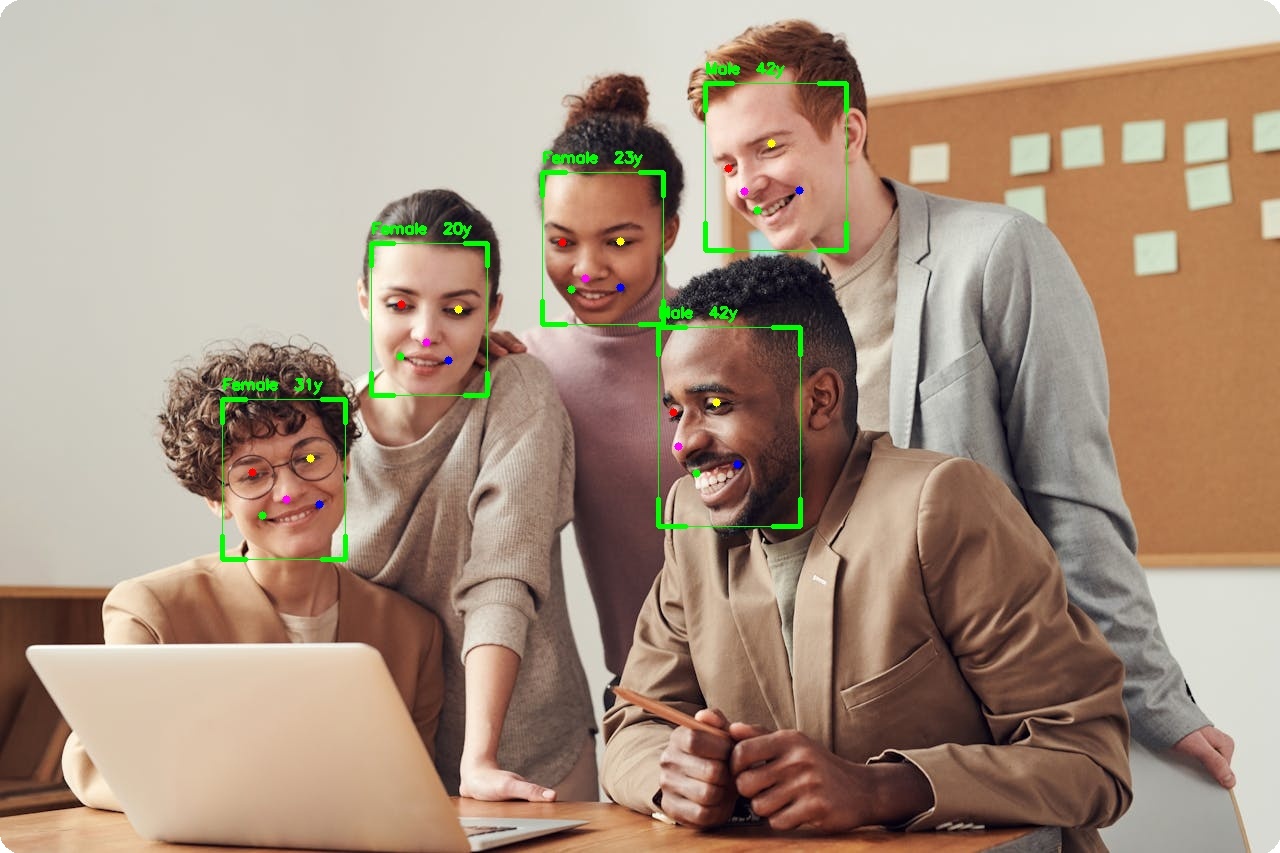{ width="100%" }- <figcaption>Age and gender prediction with detection bounding boxes</figcaption>+ 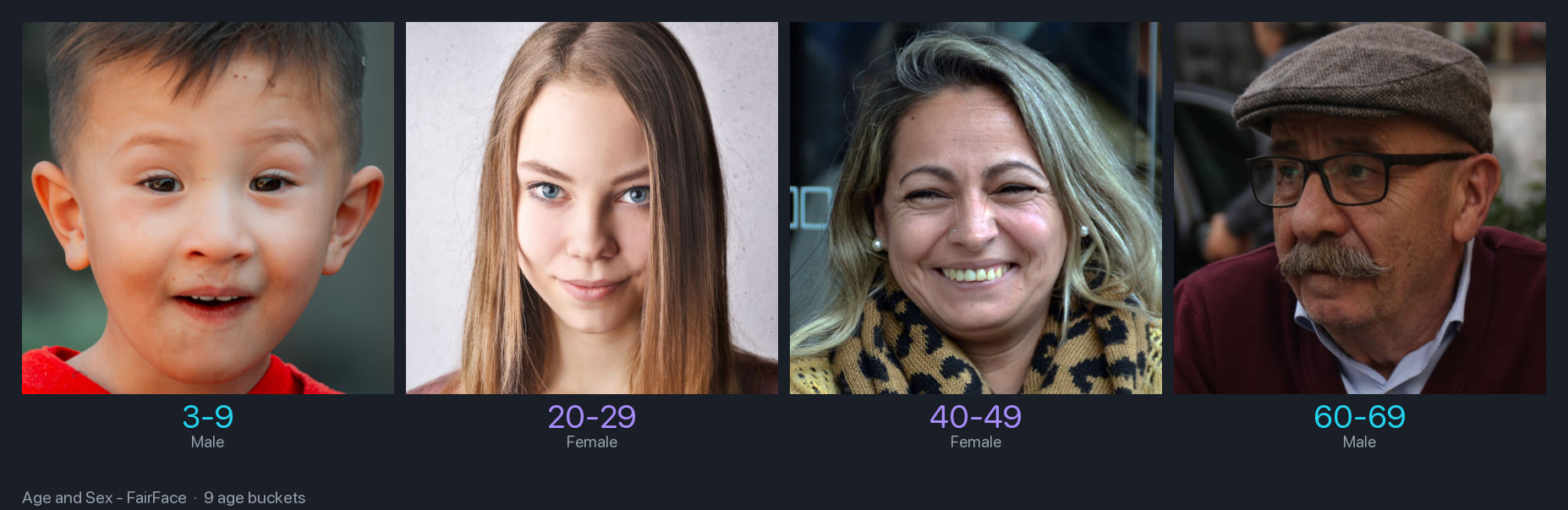{ width="100%" }+ <figcaption>FairFace: predicted age group and sex, ordered youngest to oldest</figcaption></figure>---@@ -101,6 +101,12 @@ result.race # Race/ethnicity label| Indian || Middle Eastern |+!!! note "FairFace orders ages more reliably than AgeGender"++ On four subjects spanning child to elderly, `AgeGender` put the child at 30 and returned Male+ for the elderly woman. FairFace's buckets ordered correctly on the same photographs. Prefer+ FairFace when the relative order matters more than an exact number.+### Age Groups| Group |@@ -119,6 +125,11 @@ result.race # Race/ethnicity label## Emotion+<figure markdown="span">+ 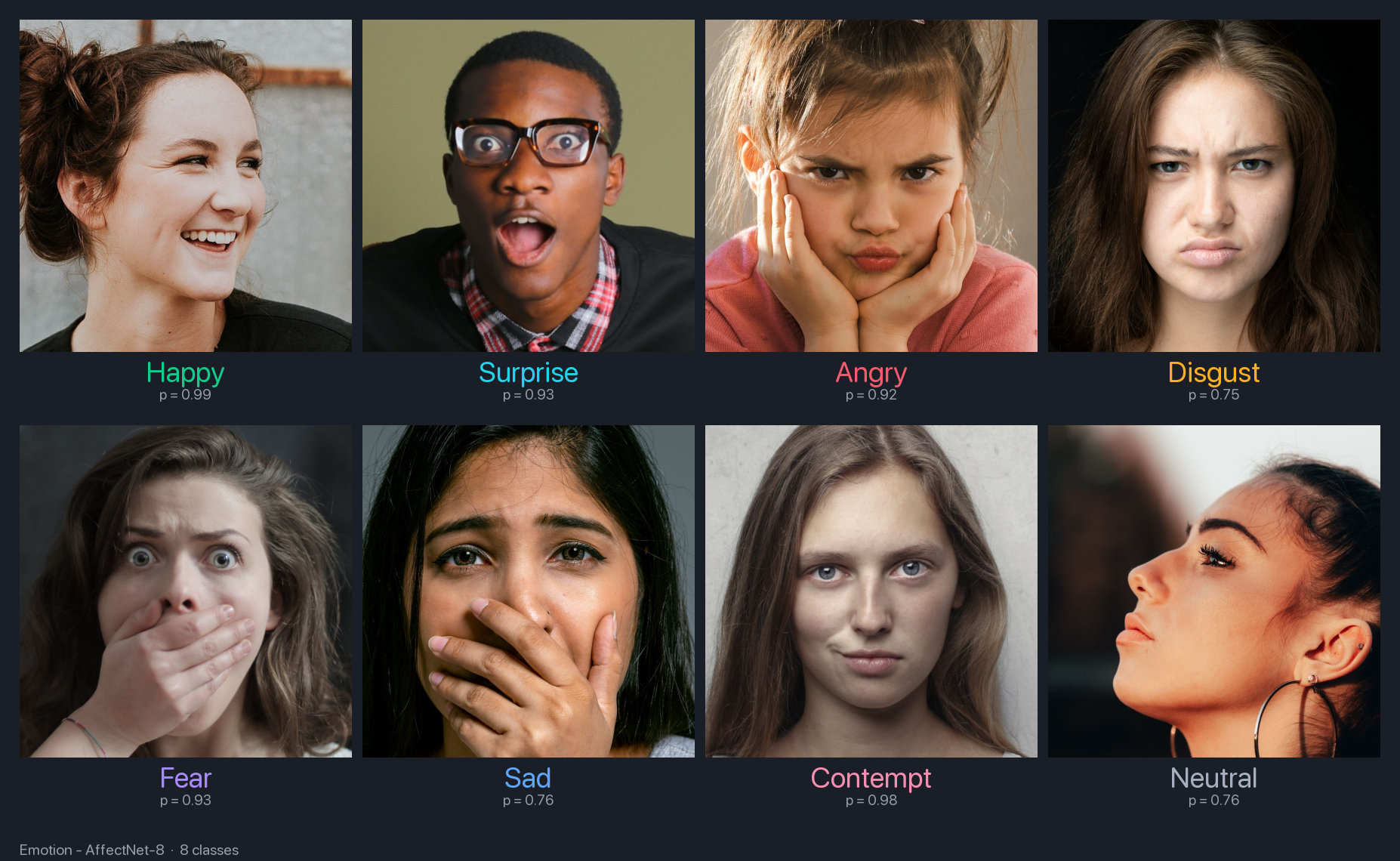{ width="100%" }+ <figcaption>AffectNet-8: one subject per predicted class</figcaption>+</figure>+Predicts facial emotions. Requires PyTorch.!!! warning "Optional Dependency"@@ -192,7 +203,7 @@ emotion = Emotion(model_name=EmotionWeights.AFFECNET8)Predicts five independent binary face states from a face crop: left/right eye openness, eyeglasses, face mask, and sunglasses. Based on Qualcomm's [Facial-Attribute-Detection](https://github.com/qualcomm/ai-hub-models/tree/main/src/qai_hub_models/models/face_attrib_net) model.<figure markdown="span">- { width="100%" }+ 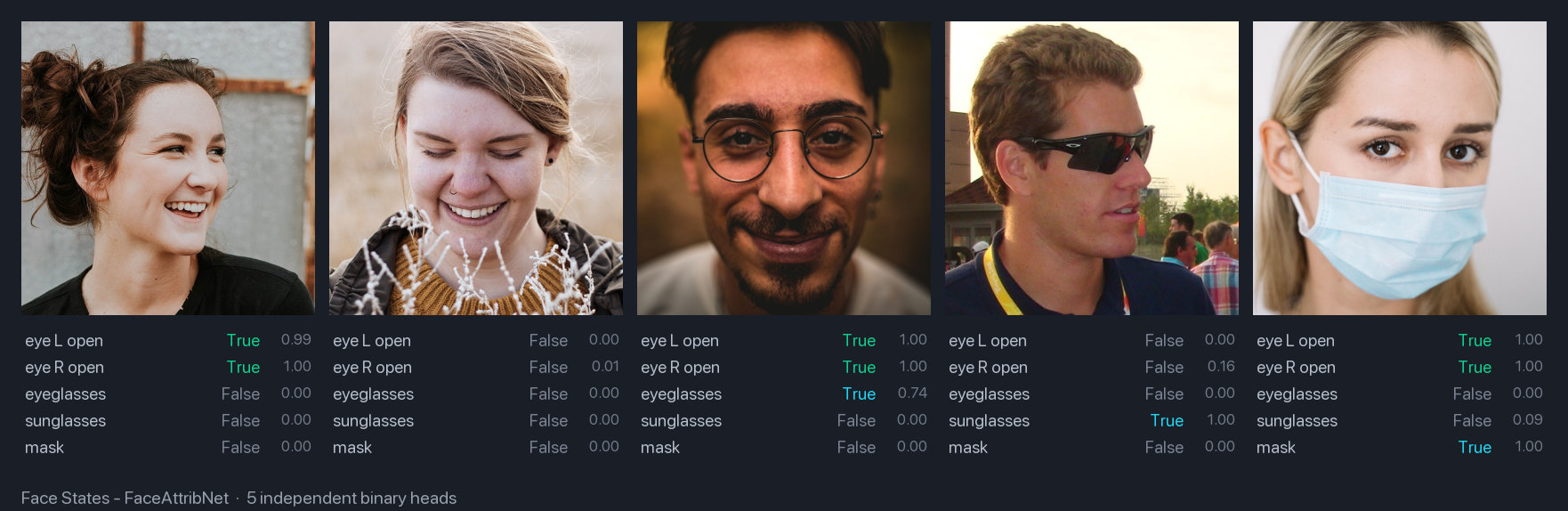{ width="100%" }<figcaption>Face state prediction: per-attribute True/False with probabilities</figcaption></figure>@@ -234,6 +245,14 @@ result.as_dict() # name -> probability mappingresult.labels(threshold) # names of attributes above the threshold```+<figure markdown="span">+ 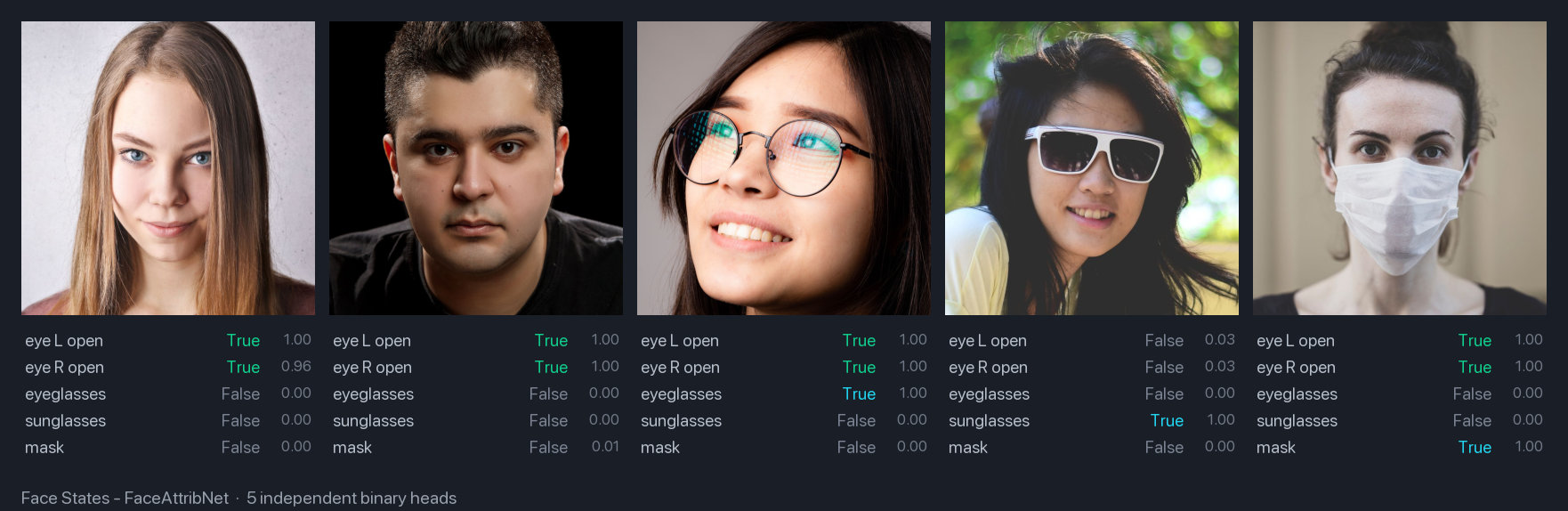{ width="100%" }+ <figcaption>The five heads are independent, so more than one can fire. The sunglasses face reads <code>sunglasses</code> True with both eyes False, because the lenses hide the eyes</figcaption>+</figure>++The heads do not compete: nothing stops `eyeglasses` and `mask` from both clearing 0.5 on the+same face. Read each probability on its own rather than picking a single winning label.+---## Available Attribute Modelsdiff --git a/docs/modules/detection.md b/docs/modules/detection.mdindex 19dbdc1..cddf4b1 100644--- a/docs/modules/detection.md+++ b/docs/modules/detection.md@@ -3,7 +3,7 @@Face detection is the first step in any face analysis pipeline. UniFace provides six detection models.<figure markdown="span">- 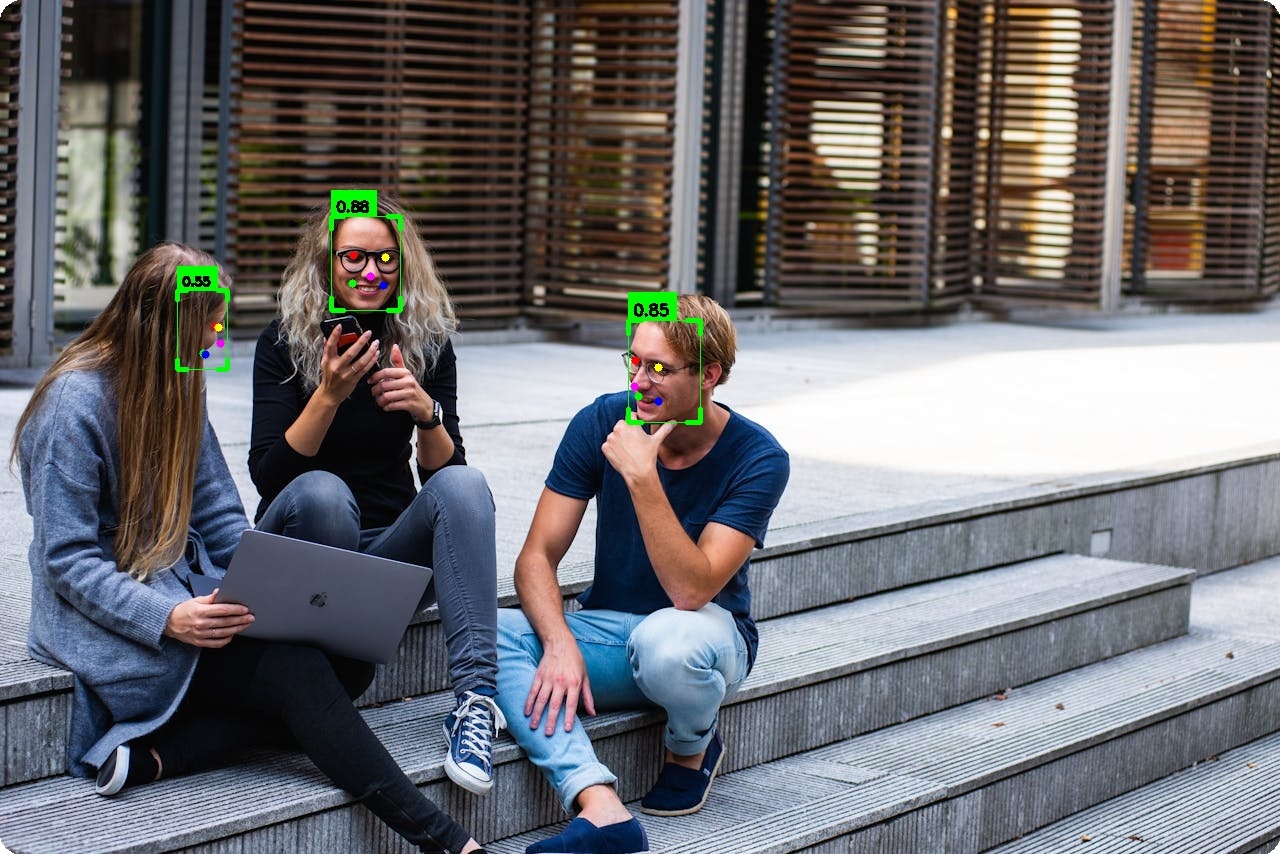{ width="100%" }+ 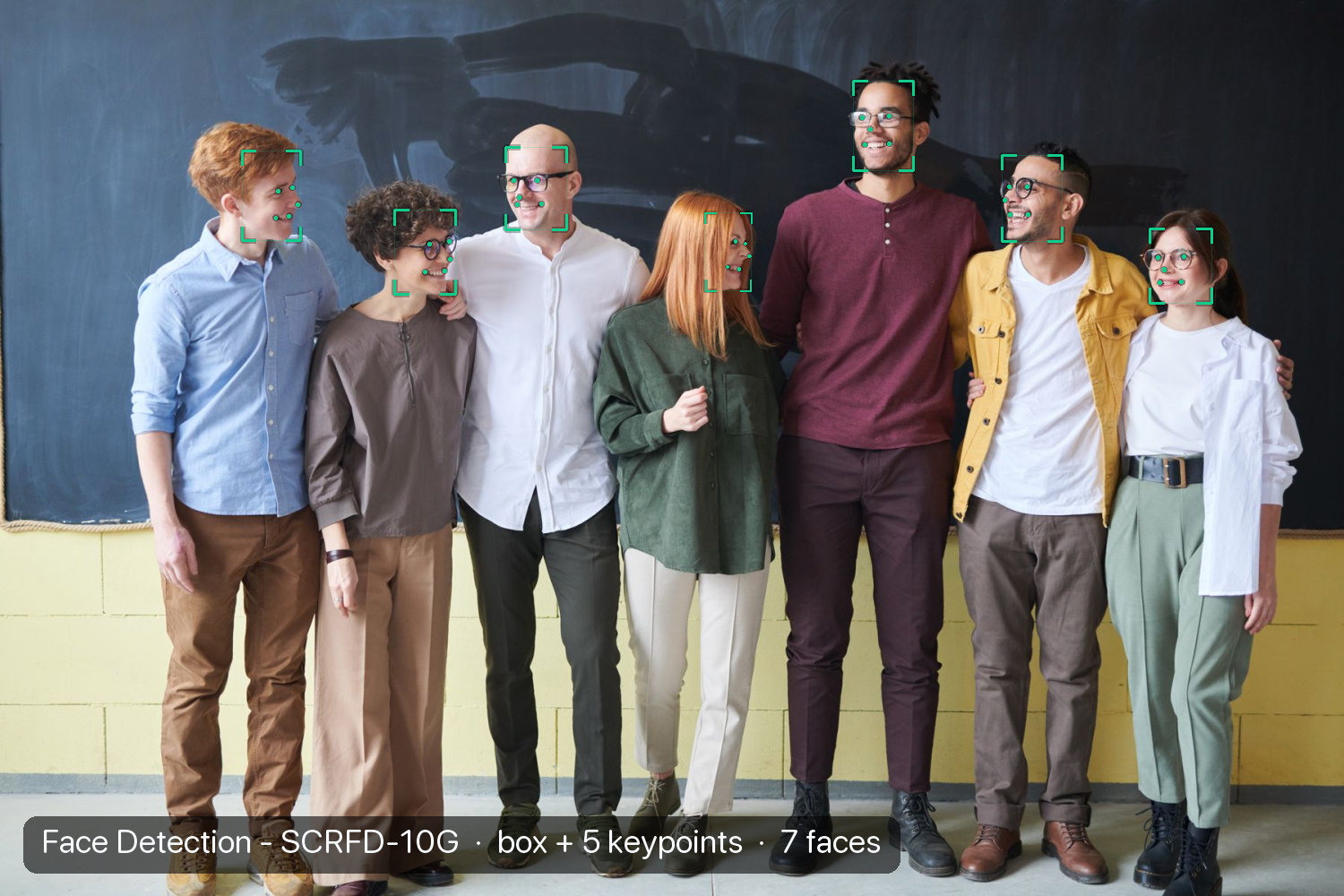{ width="100%" }<figcaption>SCRFD detection with corner-style bounding boxes and 5-point landmarks</figcaption></figure>@@ -140,6 +140,15 @@ detector = SCRFD(model_name=SCRFDWeights.SCRFD_10G_KPS)| SCRFD_500M_KPS | 0.6M | 2.5 MB | 90.6% | 88.1% | 68.5% || **SCRFD_10G_KPS** :material-check-circle: | 4.2M | 17 MB | 95.2% | 93.9% | 83.1% |+<figure markdown="span">+ 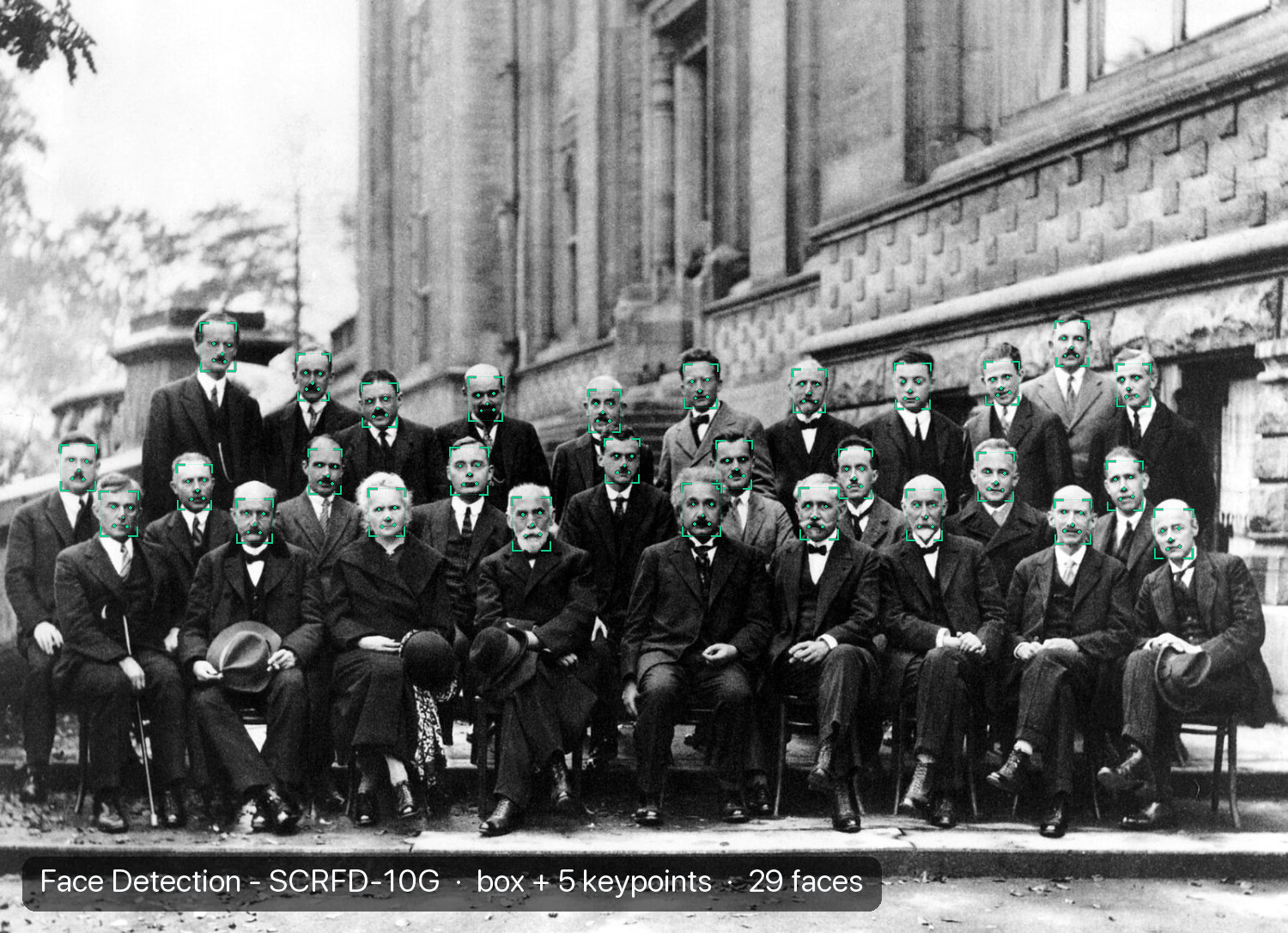{ width="100%" }+ <figcaption>SCRFD_10G_KPS on a 1500×1086 frame: 29 faces, each 37–46px wide (median 41px)</figcaption>+</figure>++Every face in the photograph above is found, and the same 29 come back at the default+640×640 `input_size`, where the letterboxed faces are only about 18px across.+`confidence_threshold=0.35` was used here, but the weakest of the 29 still scores 0.73.+### Configuration```python@@ -305,9 +314,9 @@ detector = YOLOv8Face(## BlazeFace-Google MediaPipe's short-range SSD detector — the one `mp.solutions.face_mesh` runs-internally. Pair it with [FaceMesh](landmarks.md#face-mesh-468-or-478-points-3d) to reproduce MediaPipe's-own output exactly.+Google MediaPipe's short-range SSD detector, the one that runs ahead of Face Mesh in+MediaPipe's own pipeline. Pair it with [FaceMesh](landmarks.md#face-mesh-468-or-478-points-3d) to+reproduce that output exactly.At 0.5 MB it is by far the smallest detector here, but it is tuned for faces withinroughly 2 m and is less accurate than SCRFD or YOLOv8 on small or distant faces.diff --git a/docs/modules/gaze.md b/docs/modules/gaze.mdindex 2f3811c..6696dfc 100644--- a/docs/modules/gaze.md+++ b/docs/modules/gaze.md@@ -3,7 +3,7 @@Gaze estimation predicts where a person is looking (pitch and yaw angles).<figure markdown="span">- 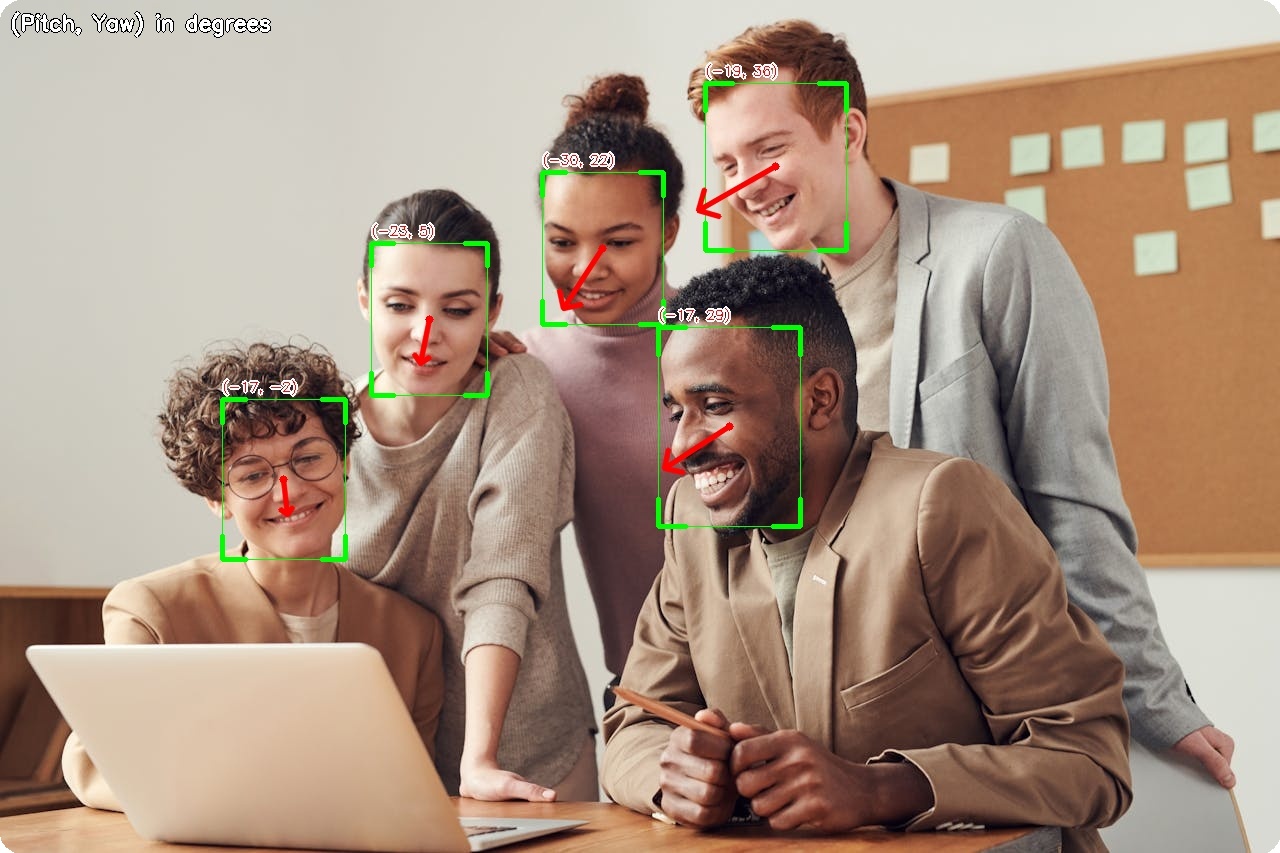{ width="100%" }+ 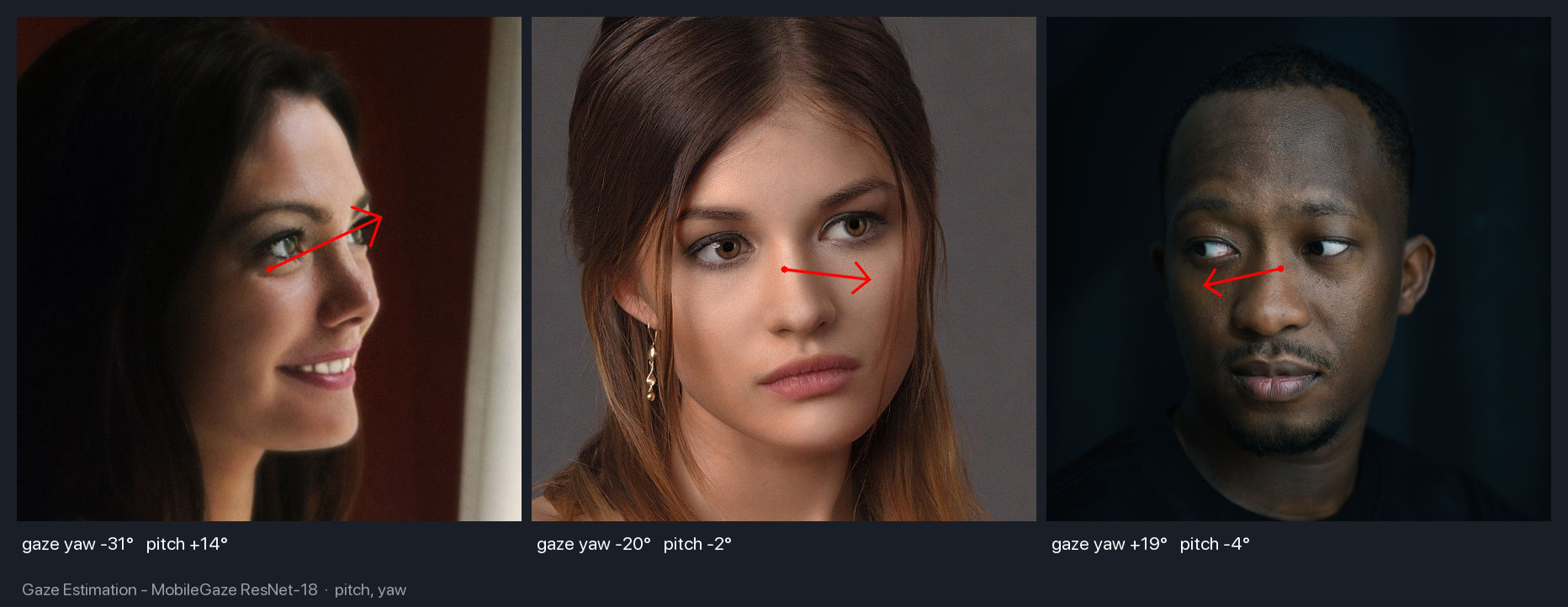{ width="100%" }<figcaption>Gaze direction arrows with pitch/yaw angle labels</figcaption></figure>@@ -21,6 +21,14 @@ Gaze estimation predicts where a person is looking (pitch and yaw angles).*MAE = Mean Absolute Error on Gaze360 test set (lower is better)+!!! note "The default is ResNet-34"++ `MobileGaze()` loads ResNet-34. On three subjects looking left, part-left and right,+ ResNet-18 was the only backbone that returned a positive yaw on the third face; the others+ read all three as leftward. Backbone choice changes the sign, not just the error, so test+ yours on faces like your own.++---## Basic Usagediff --git a/docs/modules/headpose.md b/docs/modules/headpose.mdindex 47604c7..d63f834 100644--- a/docs/modules/headpose.md+++ b/docs/modules/headpose.md@@ -3,7 +3,7 @@Head pose estimation predicts the 3D orientation of a person's head (pitch, yaw, and roll angles).<figure markdown="span">- 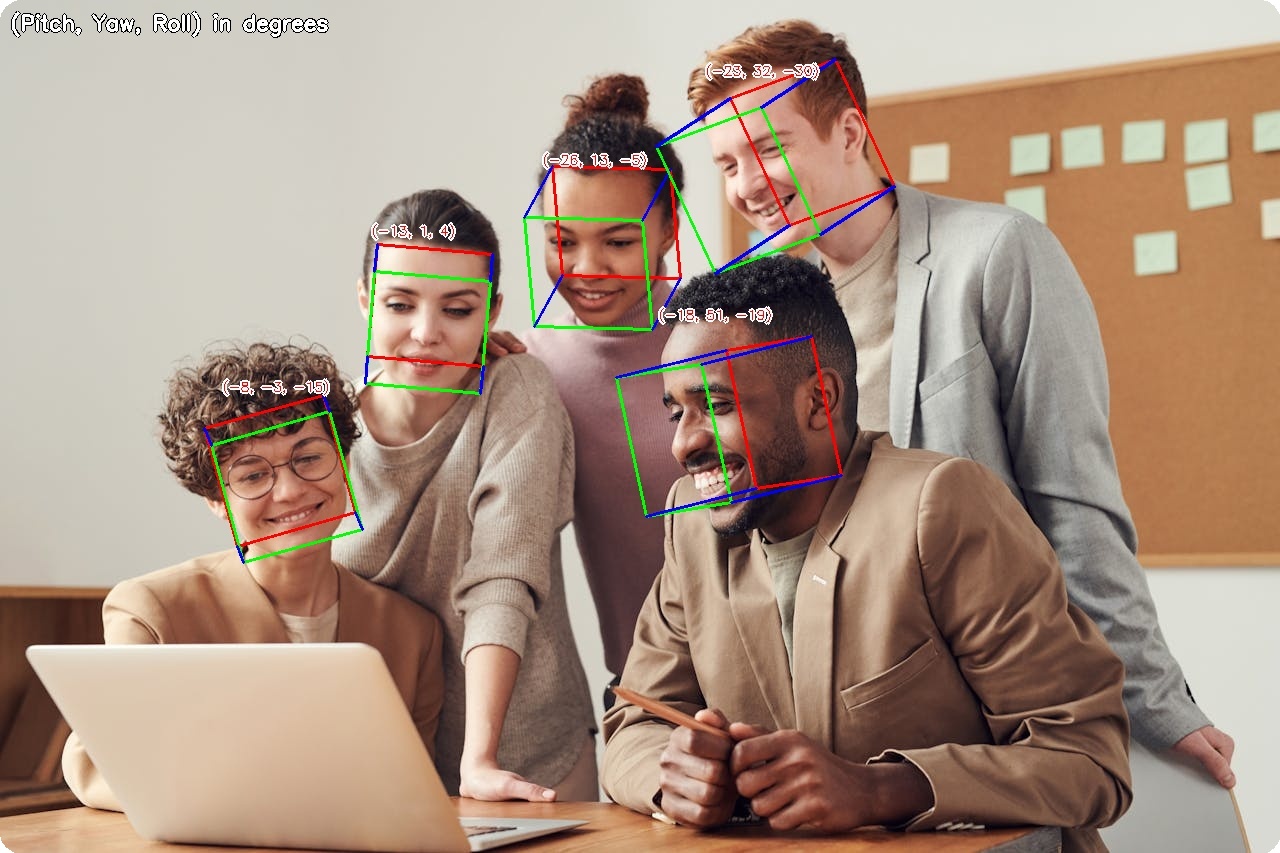{ width="100%" }+ 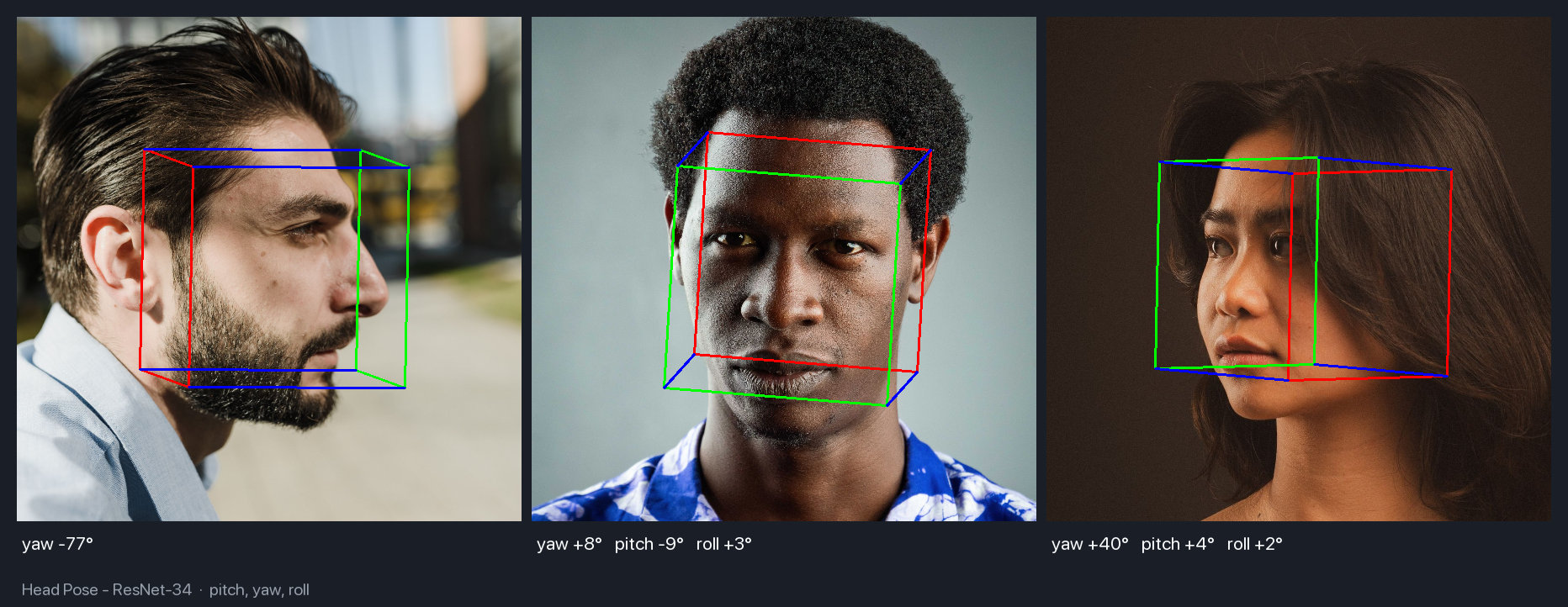{ width="100%" }<figcaption>3D head pose visualization with pitch, yaw, and roll angles</figcaption></figure>@@ -98,6 +98,12 @@ roll < 0 = counter-clockwise tilt- **Yaw**: Rotation around Y-axis (positive = looking right)- **Roll**: Rotation around Z-axis (positive = tilting clockwise)+!!! warning "Pitch and roll degrade past roughly 60° of yaw"++ Measured on five profile photographs of level heads, this model returned 35–82° of pitch and+ roll while yaw stayed believable. Treat all three angles as reliable only near frontal poses,+ and yaw alone beyond that.+---## Visualizationdiff --git a/docs/modules/landmarks.md b/docs/modules/landmarks.mdindex b8b9903..3e6237b 100644--- a/docs/modules/landmarks.md+++ b/docs/modules/landmarks.md@@ -3,9 +3,8 @@Facial landmark detection provides precise localization of facial features.<figure markdown="span">- 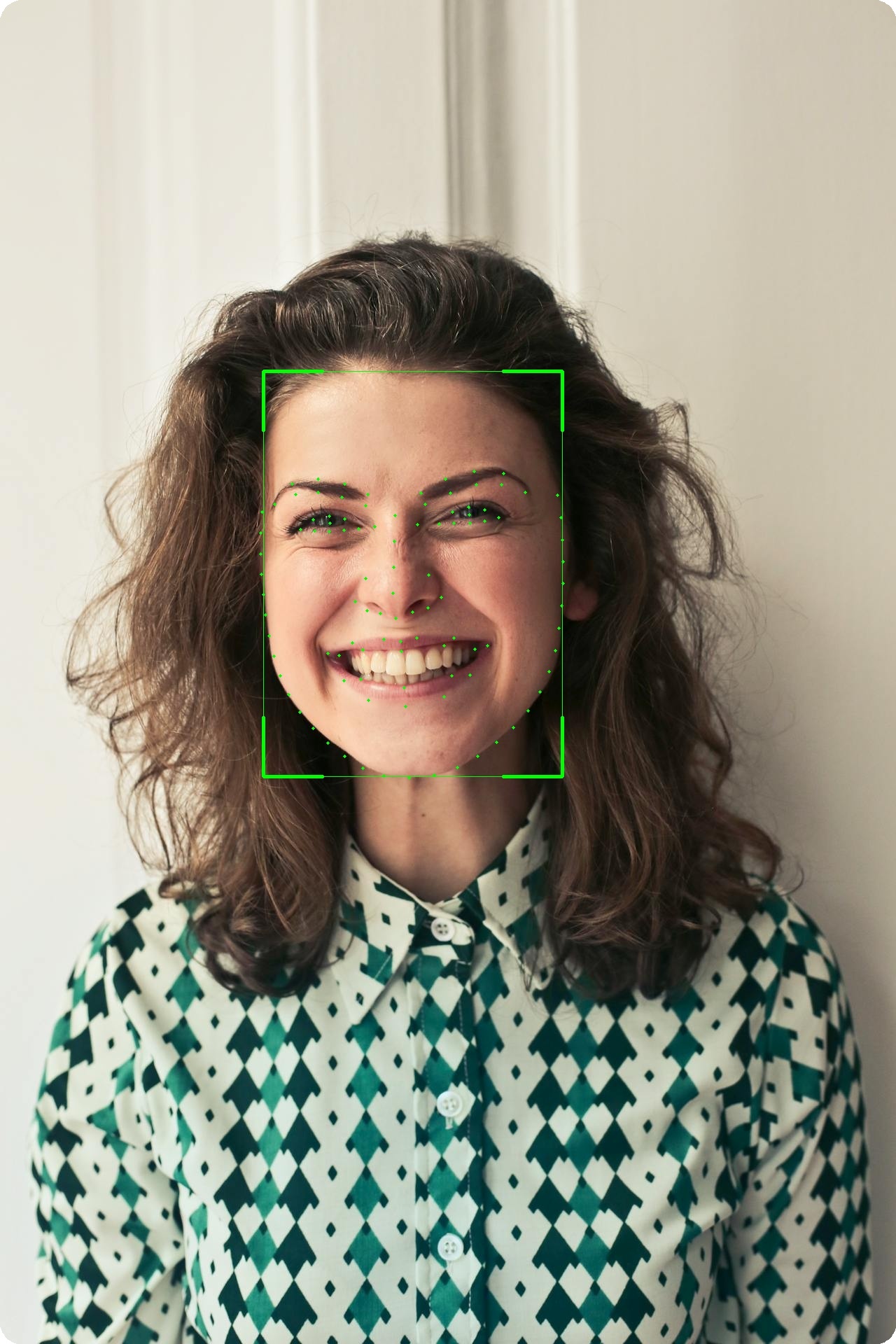{ width="40%" }- 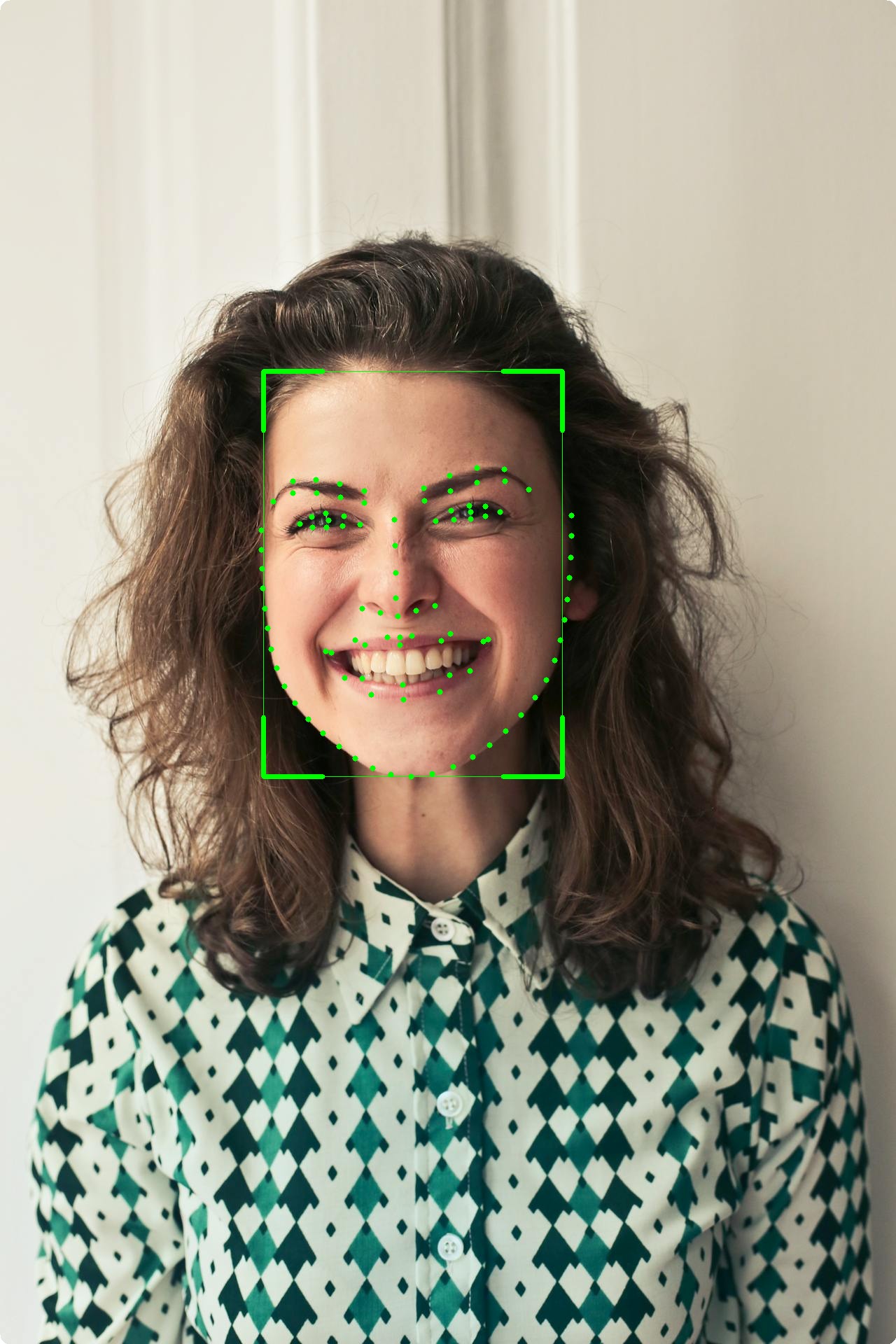{ width="40%" }- <figcaption>106-point (left) and PIPNet 98-point (right) facial landmark localization</figcaption>+ 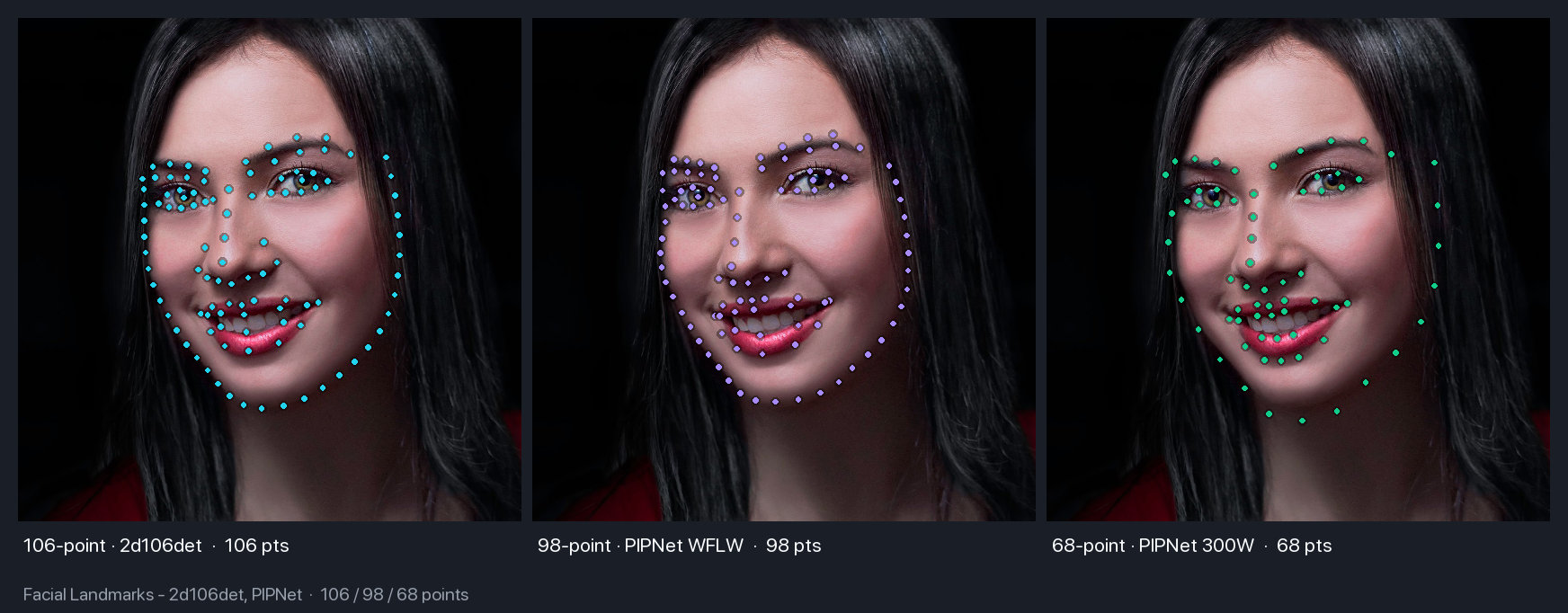{ width="100%" }+ <figcaption>106-point (2d106det), 98-point and 68-point (PIPNet) on the same face</figcaption></figure>---@@ -117,6 +116,10 @@ landmarks = landmarker.get_landmarks(image, face.bbox)print(landmarks.shape) # (68, 2)```+The 68-point 300W variant places its jaw contour more loosely than the other two, with outline+points that can drift off the silhouette. If you need a tight face boundary, prefer the 98-point+WFLW variant or the 106-point model.+### Notes- The number of landmarks is read from the ONNX output and the matching meanface@@ -129,6 +132,11 @@ print(landmarks.shape) # (68, 2)## Face Mesh (468 or 478 points, 3D)+<figure markdown="span">+ 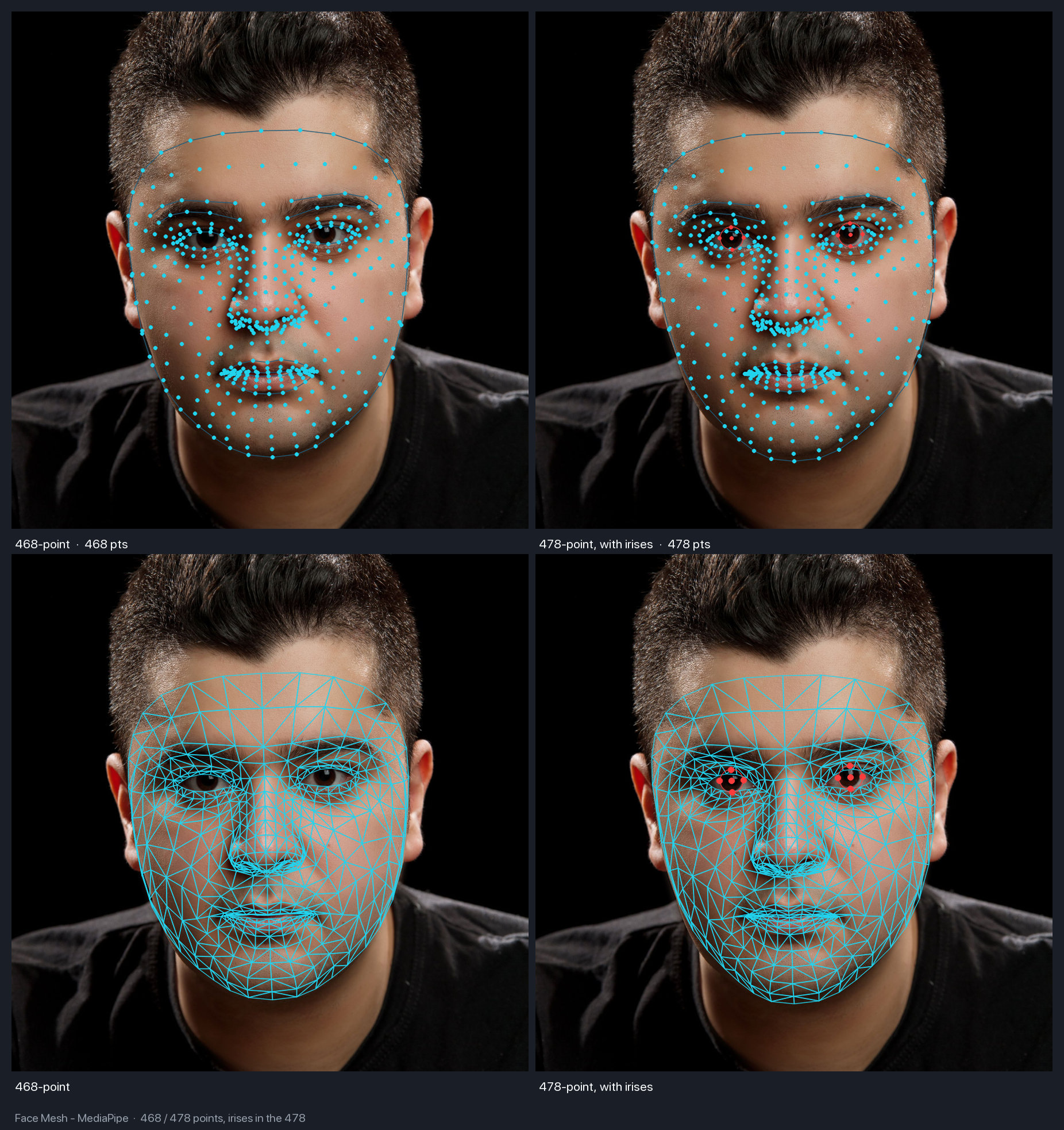{ width="100%" }+ <figcaption>468 beside 478 points, as landmarks above and as the full tessellation below. The 478 variant adds the iris points, in red</figcaption>+</figure>+Google MediaPipe's dense mesh. Unlike the other landmarkers it returns **3D** pointsand a face-presence score, and it processes every face in an image in a single batchedinference call.diff --git a/docs/modules/matting.md b/docs/modules/matting.mdindex 1c5f978..2ae555c 100644--- a/docs/modules/matting.md+++ b/docs/modules/matting.md@@ -3,7 +3,7 @@Portrait matting produces a soft alpha matte separating the foreground (person) from the background — no trimap needed.<figure markdown="span">- 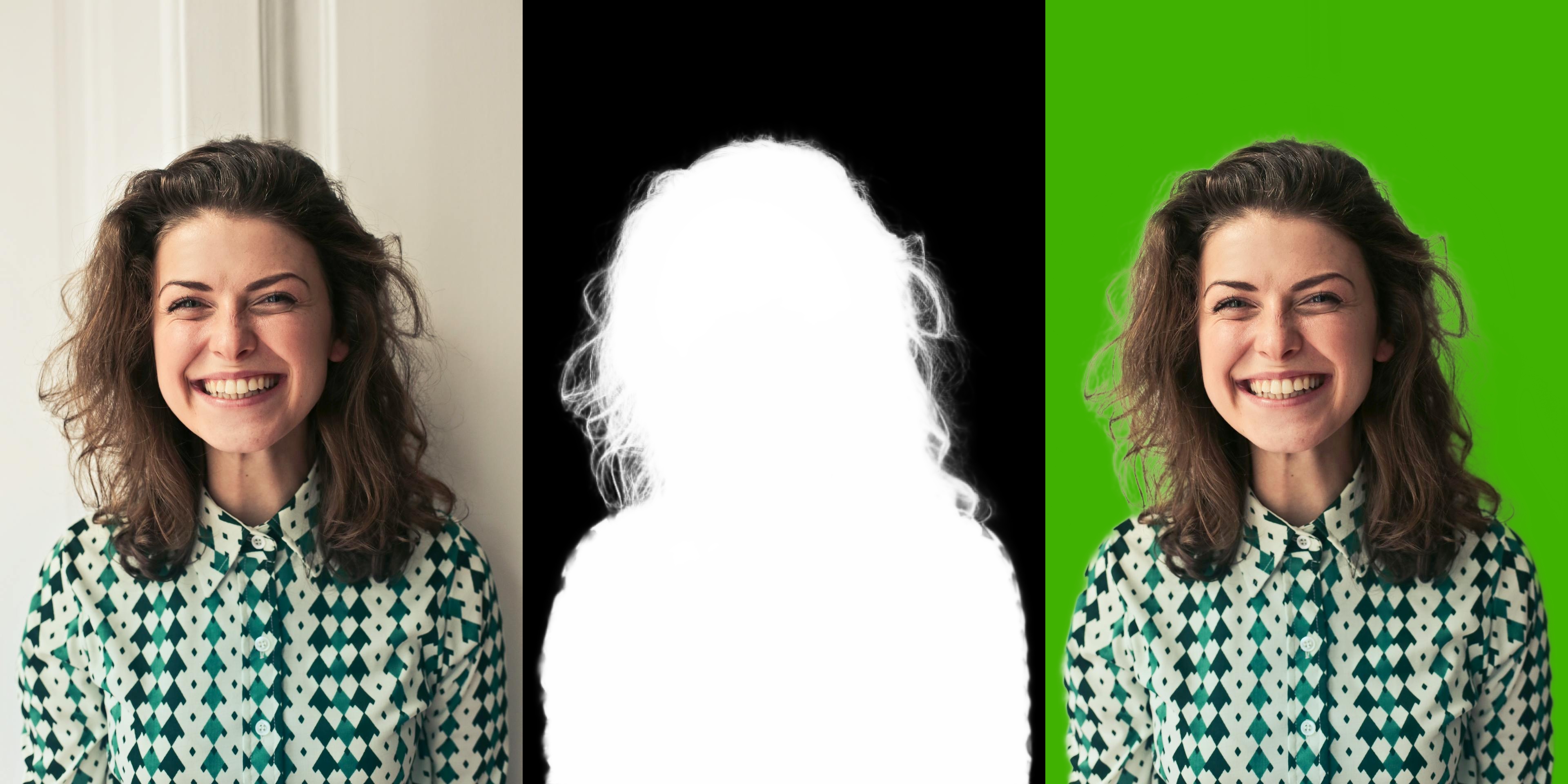{ width="100%" }+ 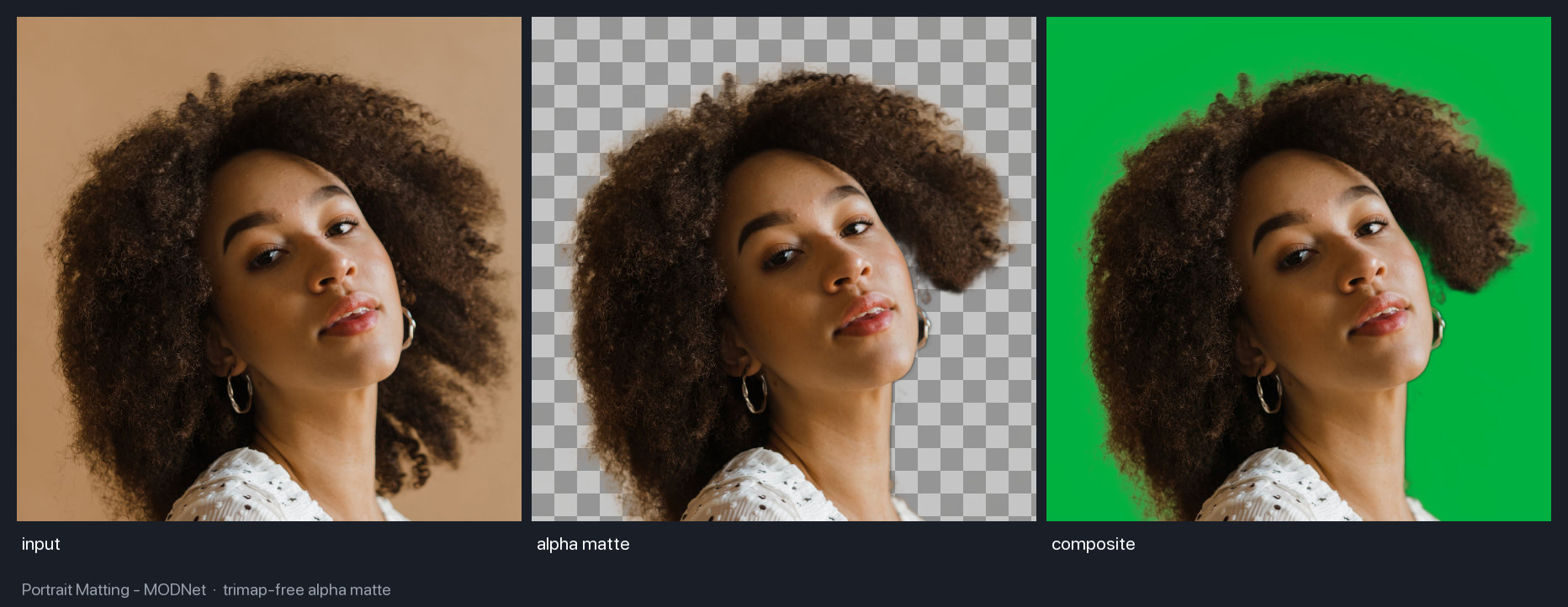{ width="100%" }<figcaption>MODNet: Input → Matte → Green Screen</figcaption></figure>@@ -88,6 +88,15 @@ green = (image * matte_3ch + bg * (1 - matte_3ch)).astype(np.uint8)cv2.imwrite("green_screen.jpg", green)```+<figure markdown="span">+ 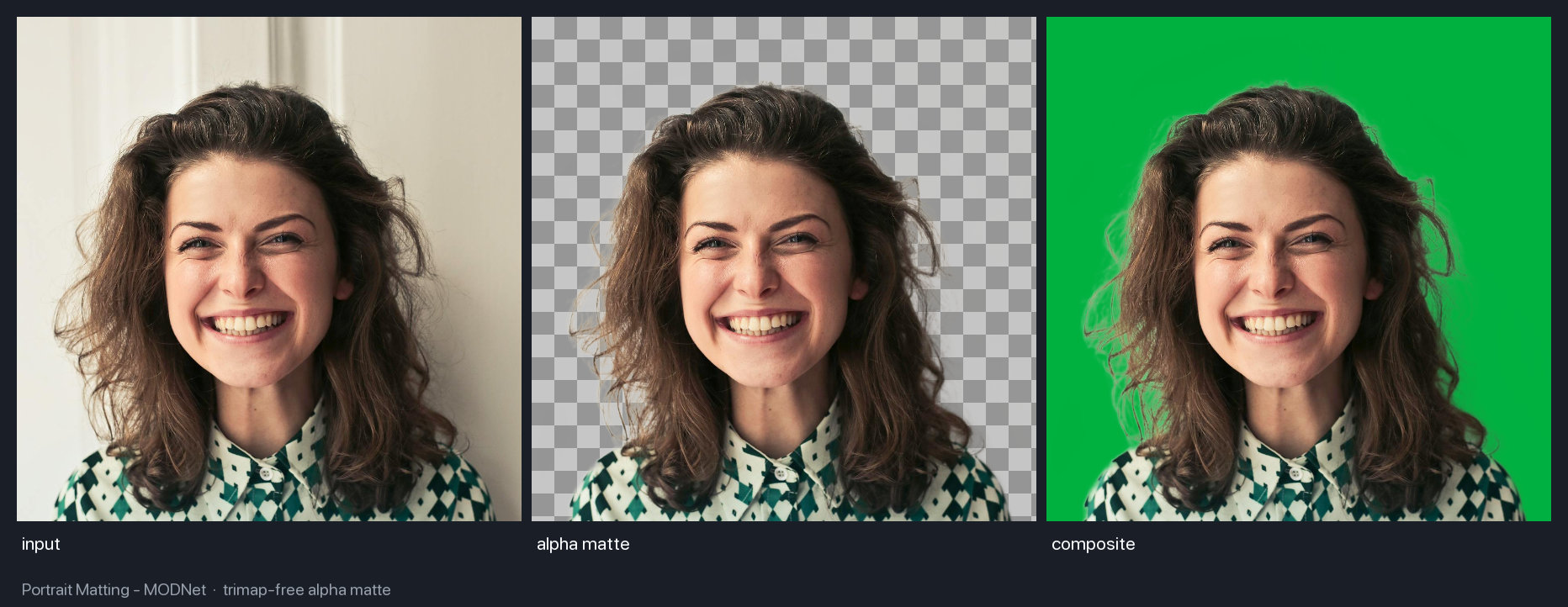{ width="100%" }+ <figcaption>A plain, low-contrast background: individual flyaway strands survive into the composite</figcaption>+</figure>++MODNet is trimap-free, so a background that competes with the subject in sharpness and contrast+is where the alpha edge softens. Compositing onto a blurred or plain background hides most of it;+if you need a clean cut, shoot against a plain wall.+### Custom Background```pythondiff --git a/docs/modules/parsing.md b/docs/modules/parsing.mdindex 37eecde..d7ca705 100644--- a/docs/modules/parsing.md+++ b/docs/modules/parsing.md@@ -3,12 +3,12 @@Face parsing segments faces into semantic components or face regions.<figure markdown="span">- 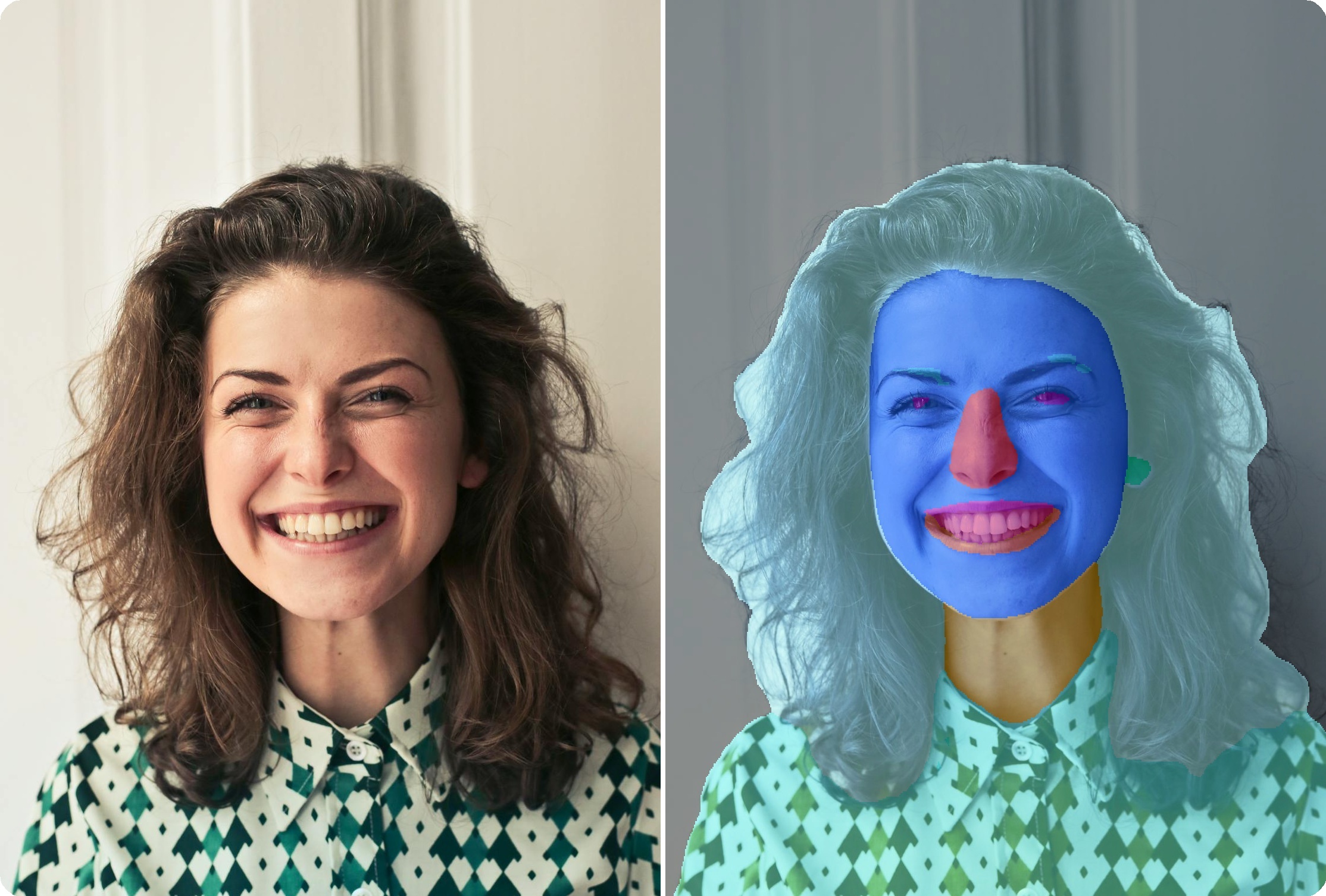{ width="80%" }+ 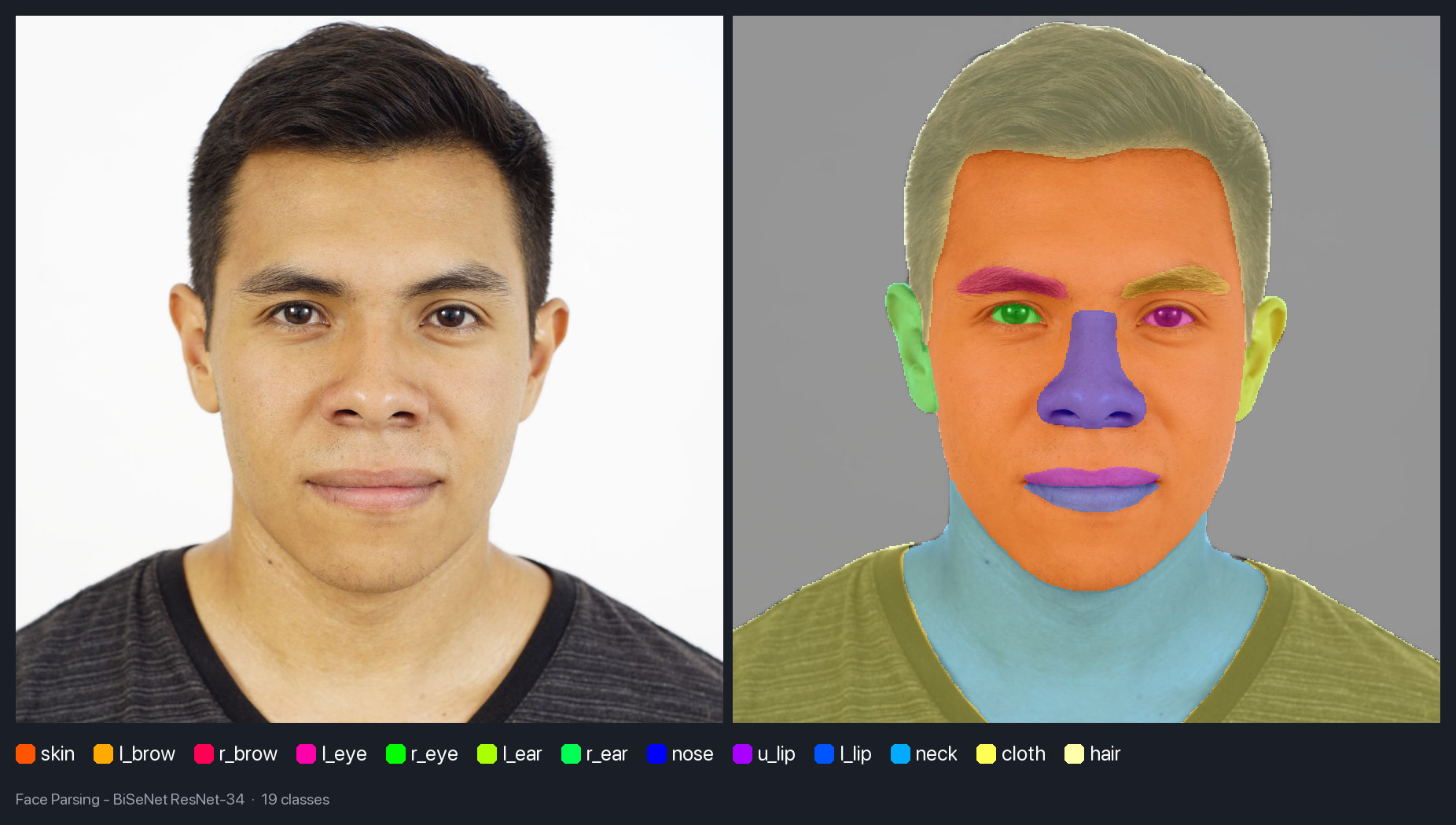{ width="100%" }<figcaption>BiSeNet face parsing with 19 semantic component classes</figcaption></figure><figure markdown="span">- 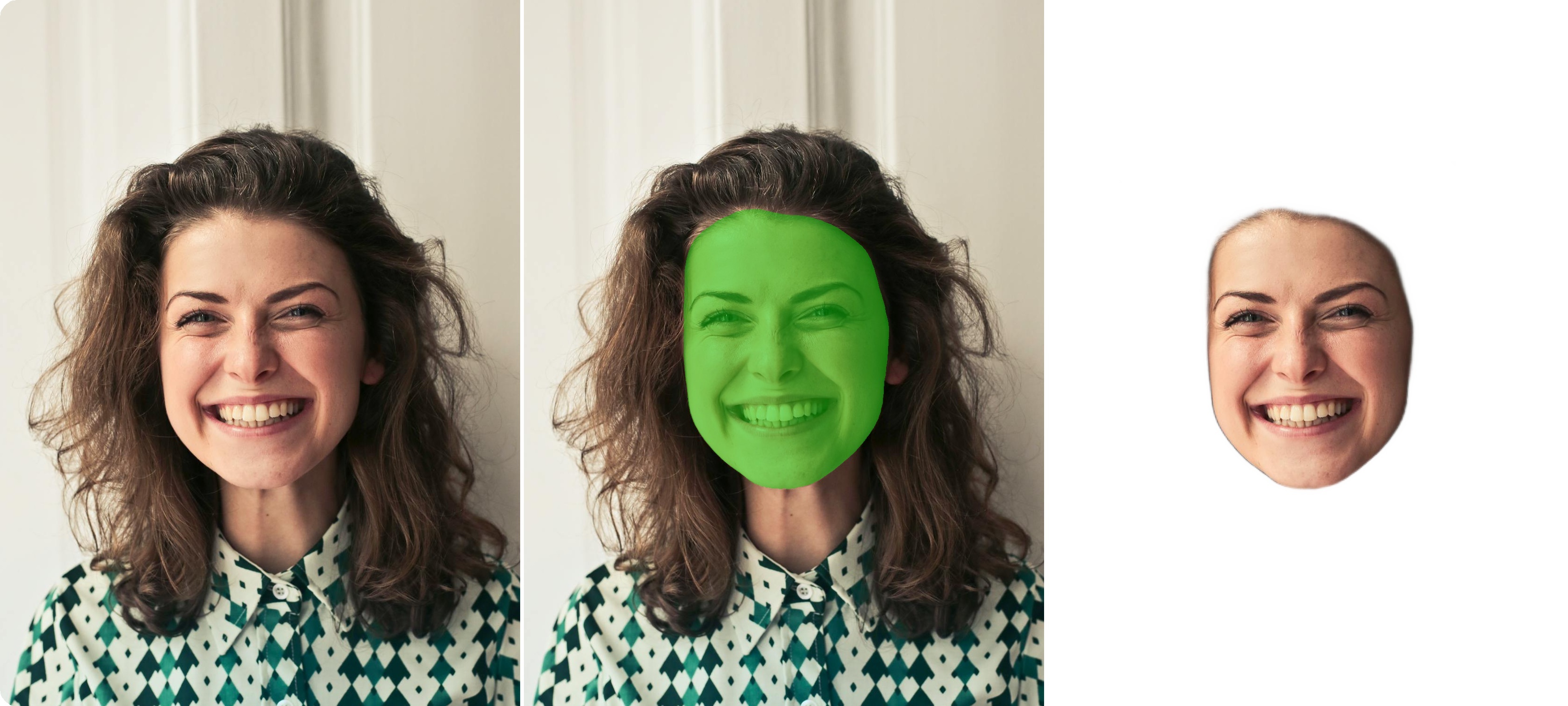{ width="80%" }+ 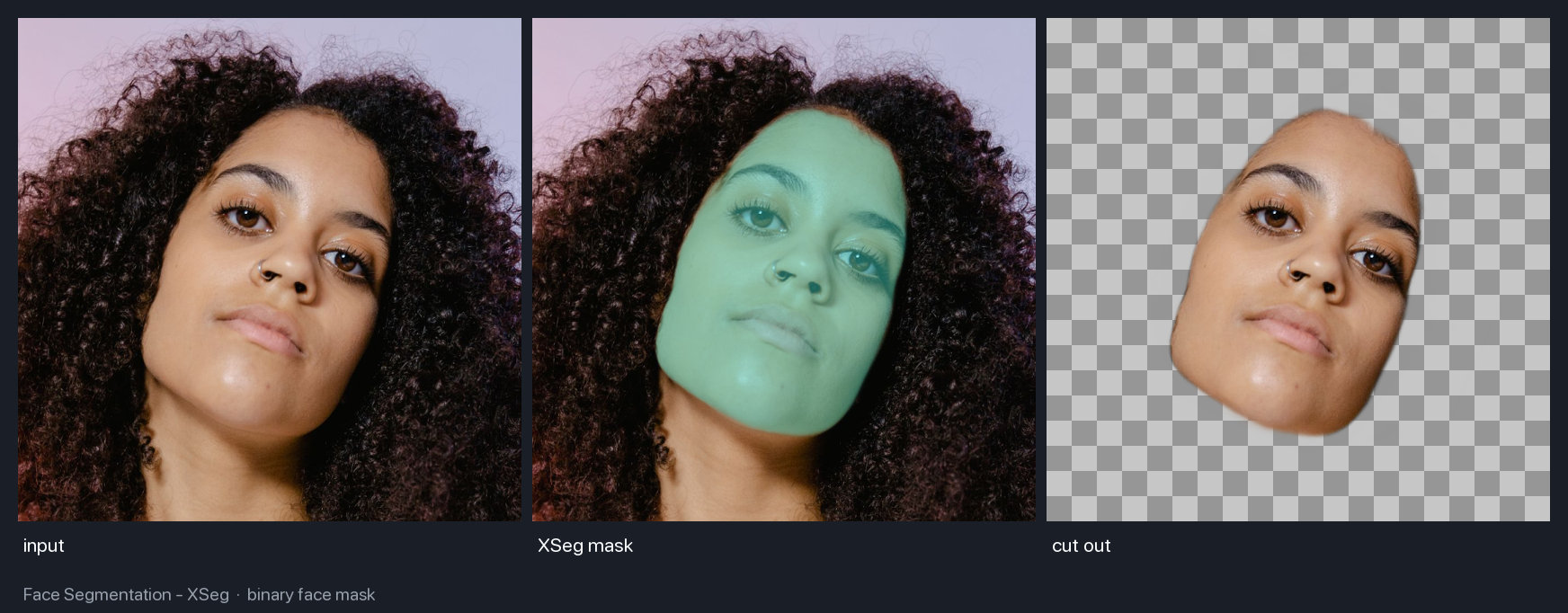{ width="100%" }<figcaption>XSeg face region segmentation mask</figcaption></figure>@@ -253,6 +253,11 @@ vis_result = vis_parsing_maps(## XSeg+<figure markdown="span">+ 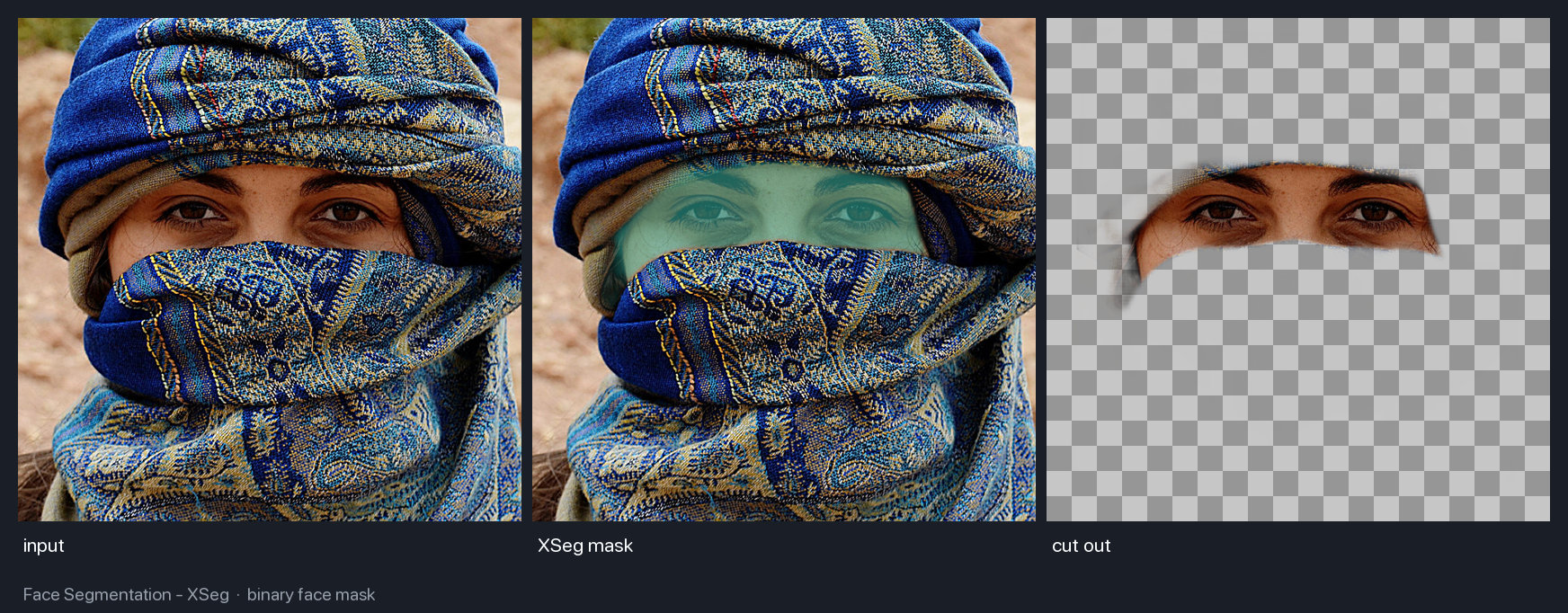{ width="100%" }+ <figcaption>An occluded face: only the exposed region is masked</figcaption>+</figure>+XSeg outputs a mask for face regions. Unlike BiSeNet which works on bbox crops, XSeg requires 5-point landmarks for face alignment.### Basic Usagediff --git a/docs/modules/privacy.md b/docs/modules/privacy.mdindex 92e29e5..0316ade 100644--- a/docs/modules/privacy.md+++ b/docs/modules/privacy.md@@ -3,7 +3,7 @@Face anonymization protects privacy by blurring or obscuring faces in images and videos.<figure markdown="span">- 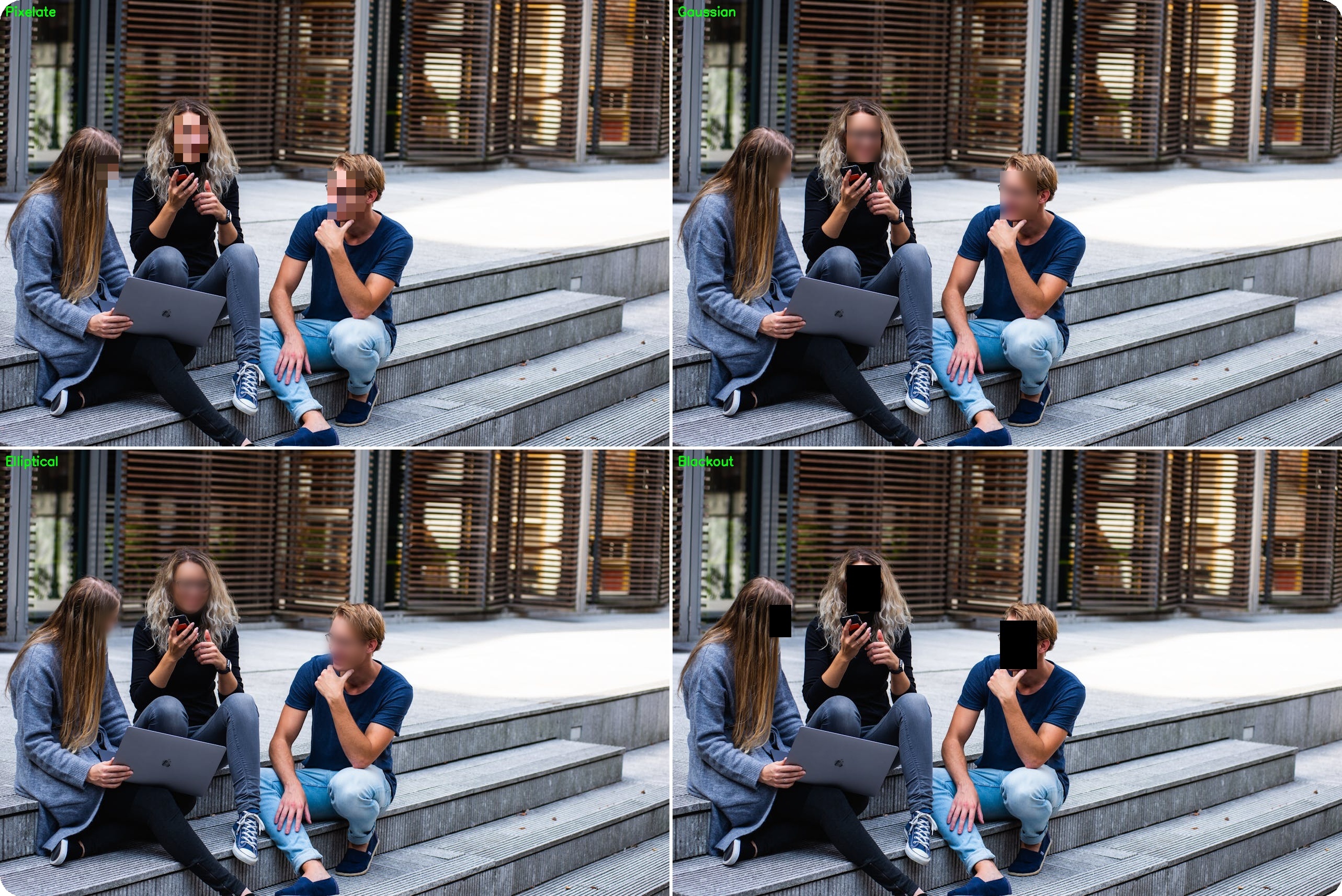{ width="100%" }+ 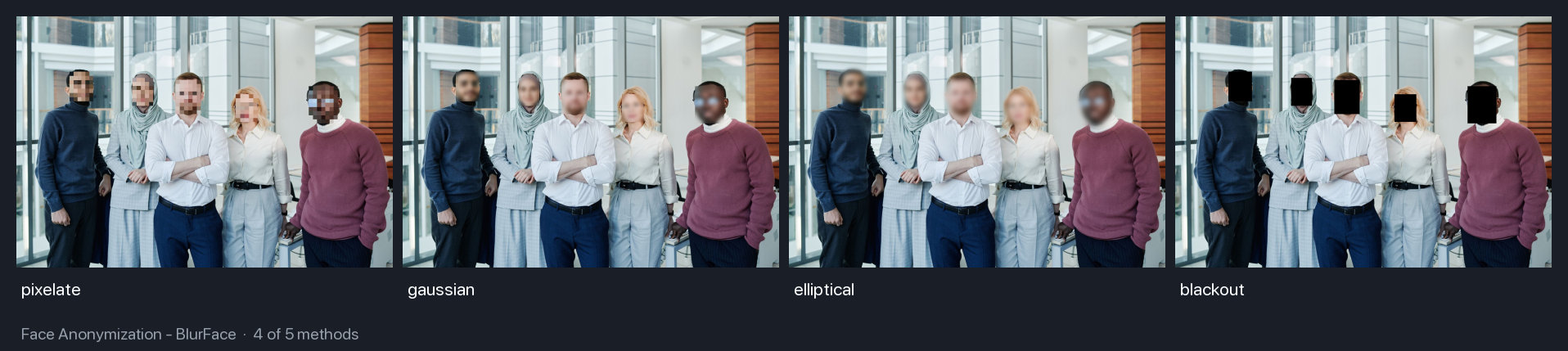{ width="100%" }<figcaption>Five anonymization methods: pixelate, gaussian, blackout, elliptical, and median</figcaption></figure>diff --git a/docs/modules/quality.md b/docs/modules/quality.mdindex eaae2d6..ac5412f 100644--- a/docs/modules/quality.md+++ b/docs/modules/quality.md@@ -19,6 +19,11 @@ All variants take an aligned 112x112 face crop and output a scalar score in roug---+<figure markdown="span">+ 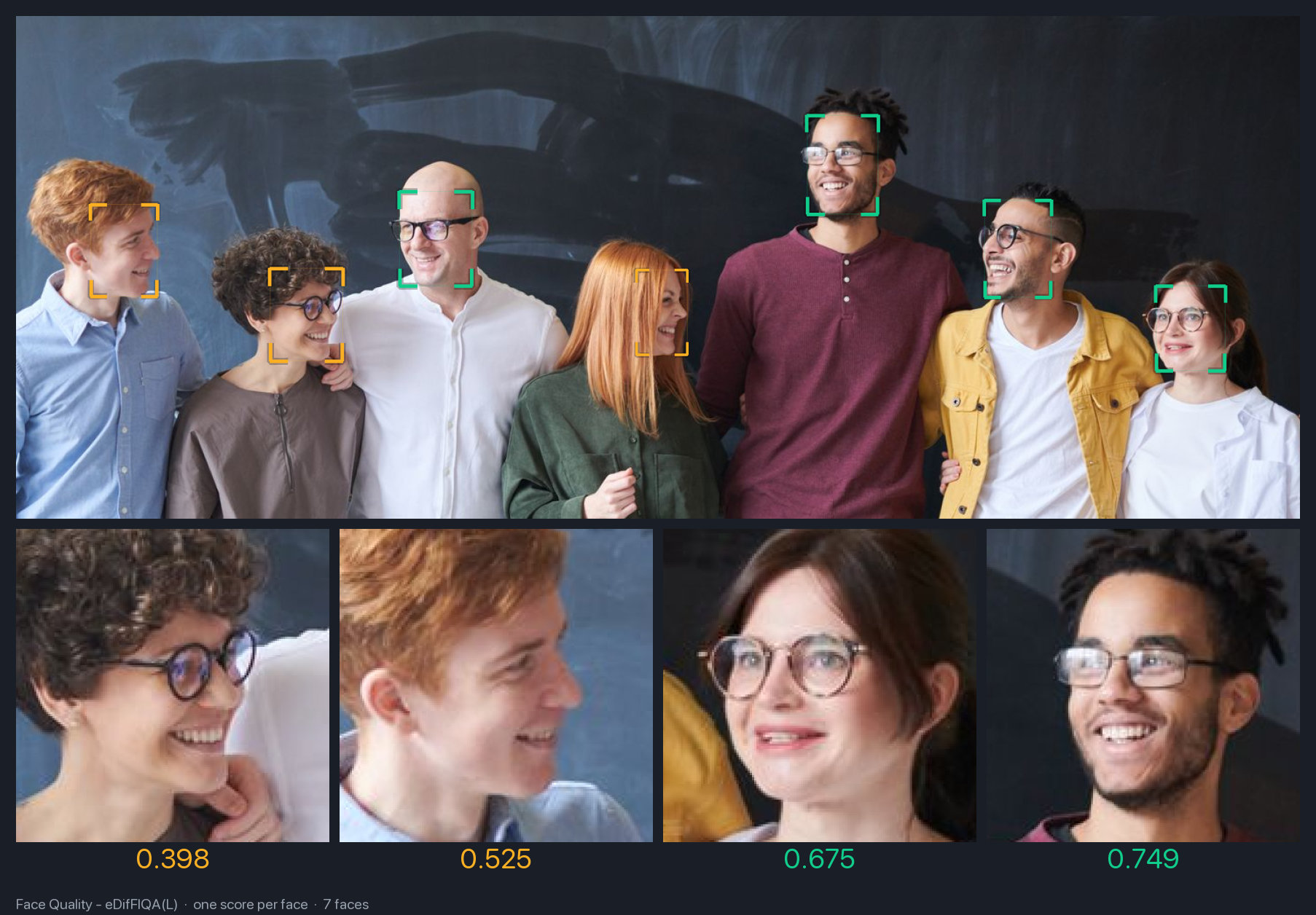{ width="100%" }+ <figcaption>eDifFIQA(L): faces from one photograph, ranked worst to best</figcaption>+</figure>+## Basic Usage```pythondiff --git a/docs/modules/recognition.md b/docs/modules/recognition.mdindex eda2683..913f0c2 100644--- a/docs/modules/recognition.md+++ b/docs/modules/recognition.md@@ -3,7 +3,7 @@Face recognition extracts embeddings for identity verification and face search.<figure markdown="span">- 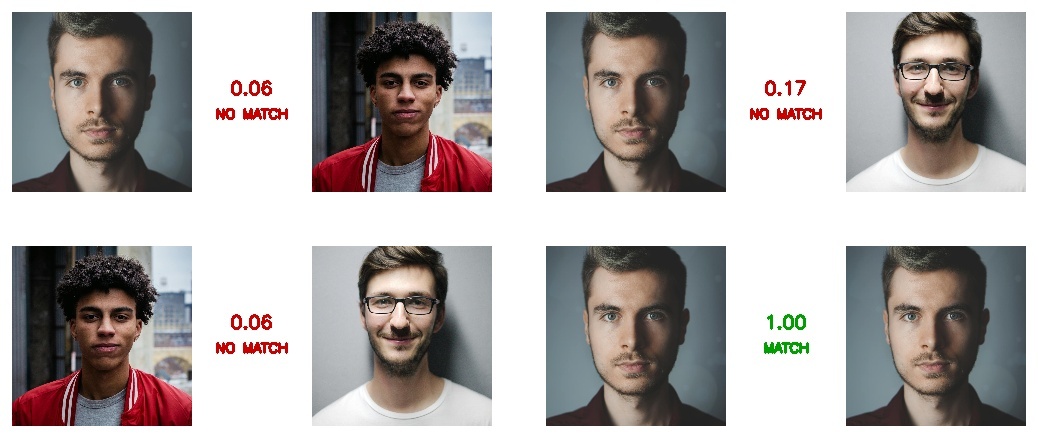{ width="80%" }+ 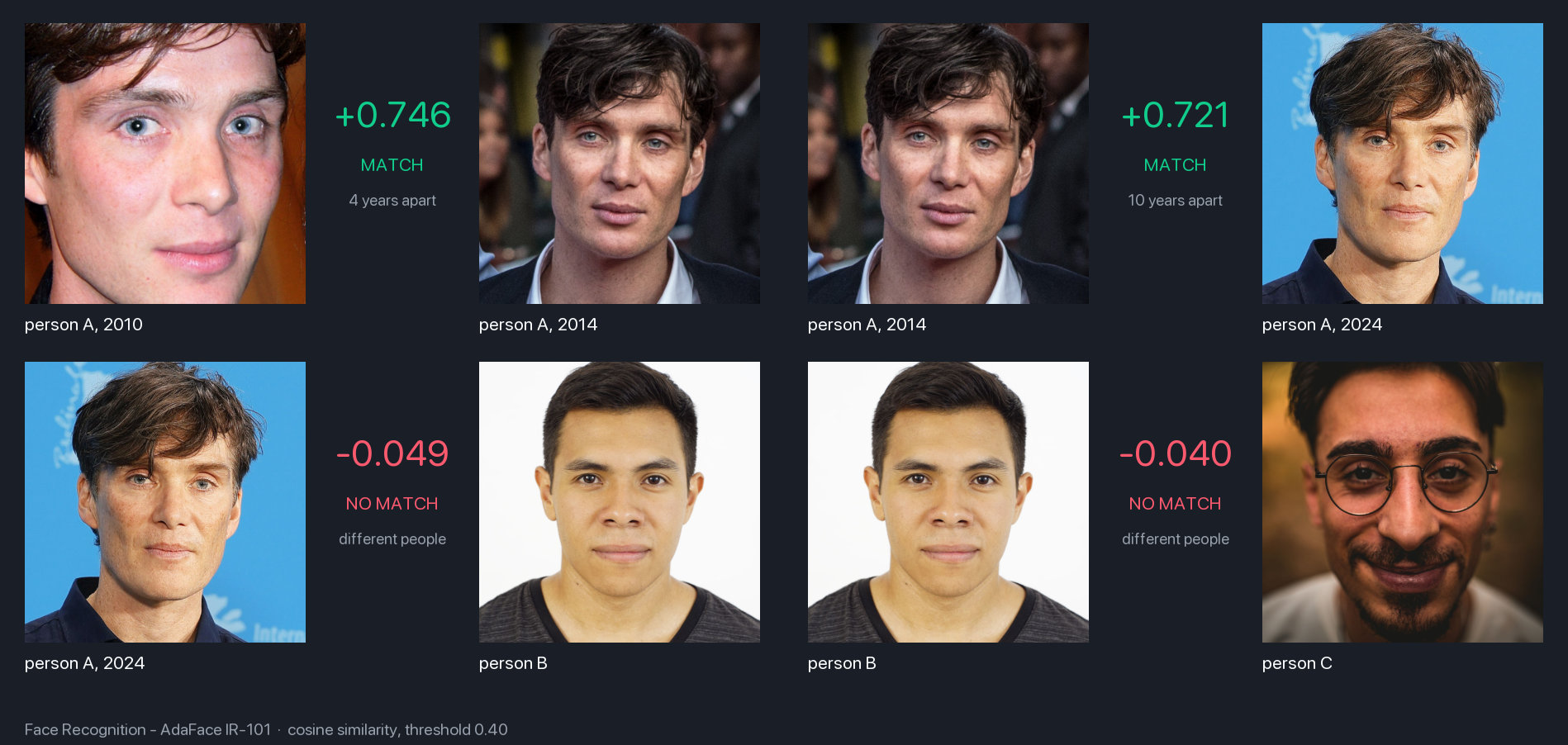{ width="100%" }<figcaption>Pairwise face verification with cosine similarity scores</figcaption></figure>@@ -266,6 +266,16 @@ print(f"Similarity: {similarity:.4f}")| 0.4 - 0.6 | Uncertain | Manual review needed || < 0.4 | Different people | Rejection |+<figure markdown="span">+ 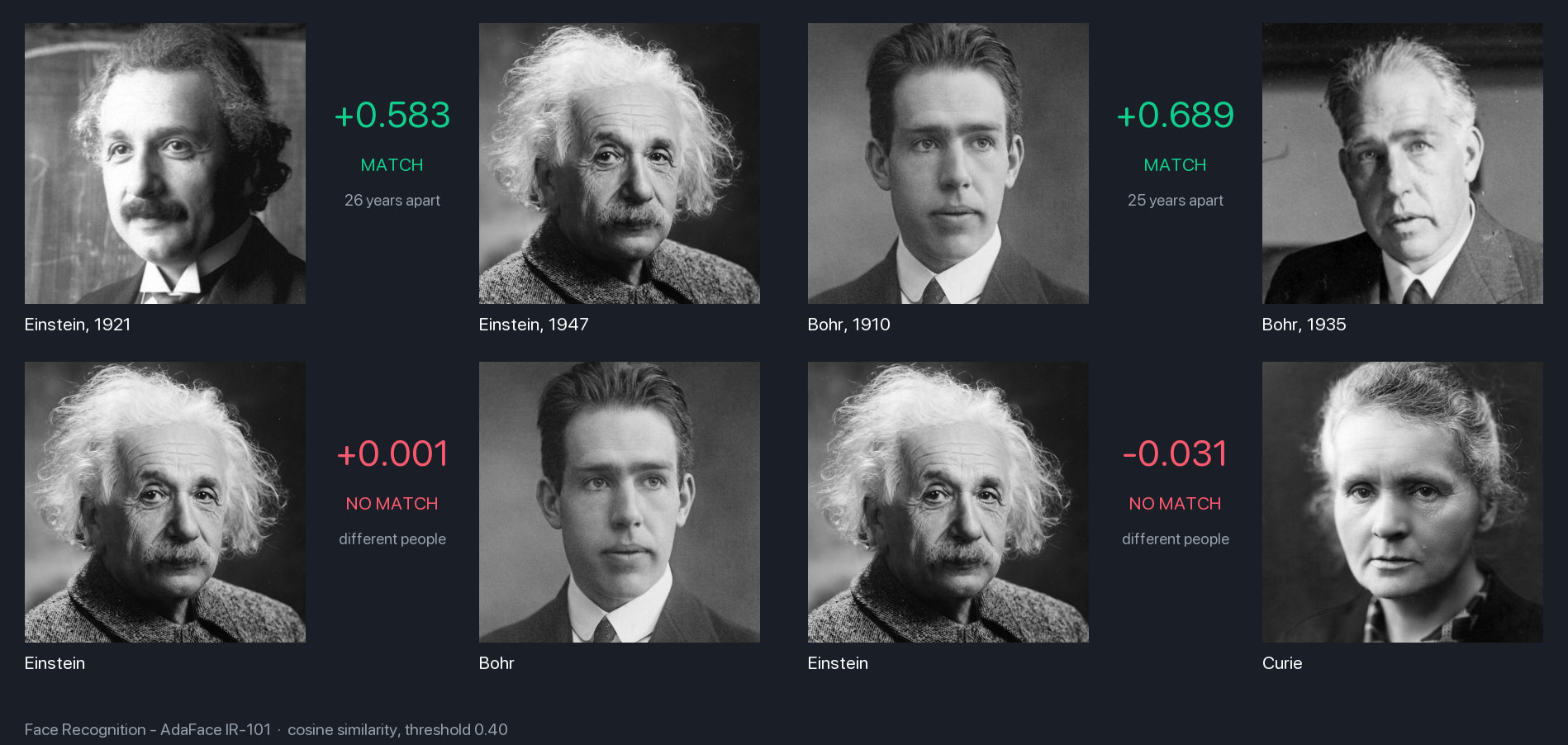{ width="100%" }+ <figcaption>AdaFace IR-101 on archival portraits. Genuine pairs 26 and 15 years apart score +0.583 and +0.623; impostor pairs score +0.047 and −0.031</figcaption>+</figure>++Those numbers show why the table above is a starting point, not a rule. A genuine pair 26 years+apart lands at 0.583, below the 0.6 "same person" row, while the impostor pairs sit near zero.+The gap between genuine and impostor stays wide, but the genuine floor drops with age gap, image+age and scan quality. Calibrate the threshold on pairs that look like your own data.+---## Face Alignmentdiff --git a/docs/modules/spoofing.md b/docs/modules/spoofing.mdindex c50bd1e..18f5a67 100644--- a/docs/modules/spoofing.md+++ b/docs/modules/spoofing.md@@ -4,6 +4,19 @@ Face anti-spoofing detects whether a face is real (live) or fake (photo, video r---+<figure markdown="span">+ 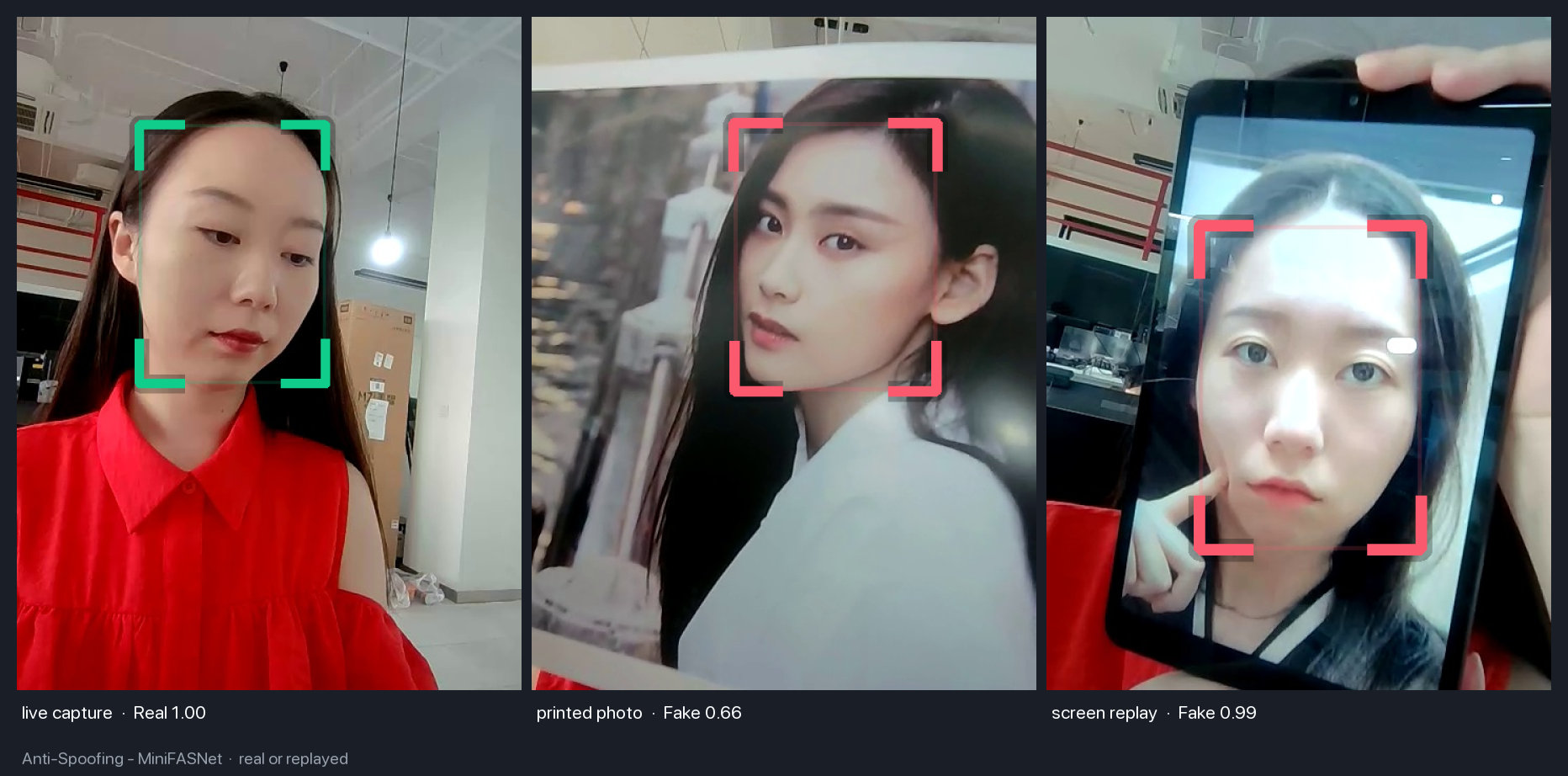{ width="100%" }+ <figcaption>MiniFASNet: the same setup captured live, then re-presented as a printed photo and on a tablet screen</figcaption>+</figure>++!!! info "Frames must come from the same setup"++ MiniFASNet judges presentation, not identity: it asks whether the camera saw a face or a+ picture of one. A photograph found online is a replay by definition, so it is out of domain.+ The figure above uses a live capture and two deliberate replays of it.++---+## Available Models| Model | Size |diff --git a/docs/quickstart.md b/docs/quickstart.mdindex 4dc9dfa..4684a78 100644--- a/docs/quickstart.md+++ b/docs/quickstart.md@@ -4,6 +4,40 @@ Get up and running with UniFace in 5 minutes. This guide covers the most common---+## Everything at Once: FaceAnalyzer++`FaceAnalyzer` runs detection, alignment and recognition in a single call, and any attribute+models you hand it. Start here if you want a whole pipeline rather than one model.++```python+import cv2+from uniface import FaceAnalyzer++analyzer = FaceAnalyzer() # SCRFD + ArcFace by default, no arguments needed+faces = analyzer.analyze(cv2.imread("photo.jpg"))++for face in faces:+ print(face.bbox, face.confidence, face.embedding.shape)+```++Attribute models are opt-in. Pass them as `predictors=` and their fields appear on every face:++```python+from uniface import FaceAnalyzer, FairFace++analyzer = FaceAnalyzer(predictors=[FairFace()])++for face in analyzer.analyze(image):+ print(f"{face.sex}, {face.age_group}, embedding {face.embedding.shape}")+```++!!! info "Which fields are populated"+ `bbox`, `confidence`, `landmarks` and `embedding` are always set. Everything else+ (`age`, `age_group`, `gender`, `race`, `emotion`, `quality`, the face states) stays `None`+ until you pass the predictor that fills it, so a bare `FaceAnalyzer()` returns `age=None`.++---+## Face DetectionDetect faces in an image:diff --git a/examples/01_face_detection.ipynb b/examples/01_face_detection.ipynbindex 501c0ce..aaf97f3 100644--- a/examples/01_face_detection.ipynb+++ b/examples/01_face_detection.ipynb@@ -6,23 +6,19 @@"source": ["# Face Detection with UniFace\n","\n",- "<div style=\"display:flex; flex-wrap:wrap; align-items:center;\">\n",- " <a style=\"margin-right:10px; margin-bottom:6px;\" href=\"https://pepy.tech/projects/uniface\"><img alt=\"PyPI Downloads\" src=\"https://static.pepy.tech/personalized-badge/uniface?period=total&units=international_system&left_color=grey&right_color=blue&left_text=Downloads\"></a>\n",- " <a style=\"margin-right:10px; margin-bottom:6px;\" href=\"https://pypi.org/project/uniface/\"><img alt=\"PyPI Version\" src=\"https://img.shields.io/pypi/v/uniface.svg\"></a>\n",- " <a style=\"margin-right:10px; margin-bottom:6px;\" href=\"https://opensource.org/licenses/MIT\"><img alt=\"License\" src=\"https://img.shields.io/badge/License-MIT-blue.svg\"></a>\n",- " <a style=\"margin-bottom:6px;\" href=\"https://github.com/yakhyo/uniface\"><img alt=\"GitHub Stars\" src=\"https://img.shields.io/github/stars/yakhyo/uniface.svg?style=social\"></a>\n",- "</div>\n",+ "[](https://colab.research.google.com/github/yakhyo/uniface/blob/main/examples/01_face_detection.ipynb)\n","\n",- "**UniFace** is a lightweight, production-ready Python library for face detection, recognition, tracking, landmark analysis, face parsing, gaze estimation, and face attributes.\n",+ "Detect faces in an image and read back their boxes, confidences and 5-point landmarks.\n","\n",- "🔗 **GitHub**: [github.com/yakhyo/uniface](https://github.com/yakhyo/uniface) | 📚 **Docs**: [yakhyo.github.io/uniface](https://yakhyo.github.io/uniface)\n",+ "<img src=\"https://raw.githubusercontent.com/yakhyo/uniface/main/assets/demo/detection.jpg\" width=\"100%\">\n","\n","---\n","\n",+ "**UniFace** is a lightweight, production-ready Python library for face detection, recognition, tracking, landmark analysis, face parsing, gaze estimation, and face attributes.\n","\n",- "This notebook demonstrates face detection using the **UniFace** library.\n",+ "GitHub: [github.com/yakhyo/uniface](https://github.com/yakhyo/uniface) | Docs: [yakhyo.github.io/uniface](https://yakhyo.github.io/uniface)\n","\n",- "## 1. Install UniFace"+ "## Setup\n"]},{@@ -41,13 +37,6 @@" os.chdir('uniface/examples')"]},- {- "cell_type": "markdown",- "metadata": {},- "source": [- "## 2. Import Libraries"- ]- },{"cell_type": "code","execution_count": null,@@ -65,13 +54,6 @@"print(uniface.__version__)"]},- {- "cell_type": "markdown",- "metadata": {},- "source": [- "## 3. Initialize the Detector"- ]- },{"cell_type": "code","execution_count": null,@@ -88,7 +70,7 @@"cell_type": "markdown","metadata": {},"source": [- "## 4. Load and Display Input Image"+ "## 1. Load and Display Input Image"]},{@@ -97,7 +79,7 @@"metadata": {},"outputs": [],"source": [- "image_path = '../assets/test.jpg'\n",+ "image_path = '../assets/source/detect_group.jpg'\n","pil_image = Image.open(image_path)\n","pil_image"]@@ -106,7 +88,7 @@"cell_type": "markdown","metadata": {},"source": [- "## 5. Detect Faces"+ "## 2. Detect Faces"]},{@@ -134,11 +116,11 @@"cell_type": "markdown","metadata": {},"source": [- "## 6. Detect Top-K Faces\n",+ "## 3. Detect Top-K Faces\n","\n","Use `max_num` to limit the number of detected faces.\n","\n",- "### Top-2 faces:"+ "**Top-2 faces**\n"]},{@@ -162,7 +144,7 @@"cell_type": "markdown","metadata": {},"source": [- "### Top-5 faces:"+ "**Top-5 faces**\n"]},{@@ -185,14 +167,14 @@{"cell_type": "markdown","metadata": {},- "source": "## Notes\n\n- `detect()` returns a list of `Face` objects with attributes: `bbox`, `confidence`, `landmarks`\n- Access attributes using dot notation: `face.bbox`, `face.confidence`, `face.landmarks`\n- Adjust `confidence_threshold` and `nms_threshold` for your use case\n- Use `max_num` to limit detected faces"- },- {- "cell_type": "code",- "execution_count": null,- "metadata": {},- "outputs": [],- "source": []+ "source": [+ "## Notes\n",+ "\n",+ "- `landmarks` are the 5-point alignment template (eyes, nose, mouth corners) that recognition\n",+ " and quality both consume. BlazeFace is the exception: it returns 6 MediaPipe keypoints whose\n",+ " fourth point is a mouth centre, so it cannot be used for alignment.\n",+ "- `detect(image, max_num=5)` keeps only the strongest faces."+ ]}],"metadata": {diff --git a/examples/02_face_alignment.ipynb b/examples/02_face_alignment.ipynbindex cecb754..23a22a0 100644--- a/examples/02_face_alignment.ipynb+++ b/examples/02_face_alignment.ipynb@@ -10,22 +10,17 @@"source": ["# Face Detection and Alignment with UniFace\n","\n",- "<div style=\"display:flex; flex-wrap:wrap; align-items:center;\">\n",- " <a style=\"margin-right:10px; margin-bottom:6px;\" href=\"https://pepy.tech/projects/uniface\"><img alt=\"PyPI Downloads\" src=\"https://static.pepy.tech/personalized-badge/uniface?period=total&units=international_system&left_color=grey&right_color=blue&left_text=Downloads\"></a>\n",- " <a style=\"margin-right:10px; margin-bottom:6px;\" href=\"https://pypi.org/project/uniface/\"><img alt=\"PyPI Version\" src=\"https://img.shields.io/pypi/v/uniface.svg\"></a>\n",- " <a style=\"margin-right:10px; margin-bottom:6px;\" href=\"https://opensource.org/licenses/MIT\"><img alt=\"License\" src=\"https://img.shields.io/badge/License-MIT-blue.svg\"></a>\n",- " <a style=\"margin-bottom:6px;\" href=\"https://github.com/yakhyo/uniface\"><img alt=\"GitHub Stars\" src=\"https://img.shields.io/github/stars/yakhyo/uniface.svg?style=social\"></a>\n",- "</div>\n",+ "[](https://colab.research.google.com/github/yakhyo/uniface/blob/main/examples/02_face_alignment.ipynb)\n","\n",- "**UniFace** is a lightweight, production-ready Python library for face detection, recognition, tracking, landmark analysis, face parsing, gaze estimation, and face attributes.\n",- "\n",- "🔗 **GitHub**: [github.com/yakhyo/uniface](https://github.com/yakhyo/uniface) | 📚 **Docs**: [yakhyo.github.io/uniface](https://yakhyo.github.io/uniface)\n",+ "Detect a face, then align and crop it to the 112x112 input that recognition models expect.\n","\n","---\n","\n",- "This notebook demonstrates face detection and alignment using the **UniFace** library.\n",+ "**UniFace** is a lightweight, production-ready Python library for face detection, recognition, tracking, landmark analysis, face parsing, gaze estimation, and face attributes.\n",+ "\n",+ "GitHub: [github.com/yakhyo/uniface](https://github.com/yakhyo/uniface) | Docs: [yakhyo.github.io/uniface](https://yakhyo.github.io/uniface)\n","\n",- "## 1. Install UniFace"+ "## Setup\n"]},{@@ -44,13 +39,6 @@" os.chdir('uniface/examples')"]},- {- "cell_type": "markdown",- "metadata": {},- "source": [- "## 2. Import Libraries"- ]- },{"cell_type": "code","execution_count": null,@@ -69,13 +57,6 @@"print(uniface.__version__)"]},- {- "cell_type": "markdown",- "metadata": {},- "source": [- "## 3. Initialize the Detector"- ]- },{"cell_type": "code","execution_count": null,@@ -92,7 +73,7 @@"cell_type": "markdown","metadata": {},"source": [- "## 4. Load Images and Perform Detection + Alignment"+ "## 1. Load Images and Perform Detection + Alignment"]},{@@ -102,11 +83,11 @@"outputs": [],"source": ["image_paths = [\n",- " '../assets/test_images/image0.jpg',\n",- " '../assets/test_images/image1.jpg',\n",- " '../assets/test_images/image2.jpg',\n",- " '../assets/test_images/image3.jpg',\n",- " '../assets/test_images/image4.jpg',\n",+ " '../assets/source/age_child.jpg',\n",+ " '../assets/source/age_adult.jpg',\n",+ " '../assets/source/age_middle.jpg',\n",+ " '../assets/source/age_senior.jpg',\n",+ " '../assets/source/landmarks_face.jpg',\n","]\n","\n","original_images = []\n",@@ -146,7 +127,7 @@"cell_type": "markdown","metadata": {},"source": [- "## 5. Visualize Results"+ "## 2. Visualize Results"]},{@@ -176,18 +157,9 @@"source": ["## Notes\n","\n",- "- `detect()` returns a list of `Face` objects with `bbox`, `confidence`, `landmarks` attributes\n",- "- Access attributes using dot notation: `face.bbox`, `face.landmarks`\n",- "- `face_alignment()` uses 5-point landmarks to align and crop the face\n",- "- Default output size is 112x112 (standard for face recognition models)\n"+ "- The 112x112 output size is what recognition models expect. Changing it will degrade embeddings.\n",+ "- Alignment needs the 5-point template, so BlazeFace cannot be used here."]- },- {- "cell_type": "code",- "execution_count": null,- "metadata": {},- "outputs": [],- "source": []}],"metadata": {diff --git a/examples/03_face_verification.ipynb b/examples/03_face_verification.ipynbindex f6585a2..af7920e 100644--- a/examples/03_face_verification.ipynb+++ b/examples/03_face_verification.ipynb@@ -6,22 +6,19 @@"source": ["# Face Verification: One-to-One Face Comparison\n","\n",- "<div style=\"display:flex; flex-wrap:wrap; align-items:center;\">\n",- " <a style=\"margin-right:10px; margin-bottom:6px;\" href=\"https://pepy.tech/projects/uniface\"><img alt=\"PyPI Downloads\" src=\"https://static.pepy.tech/personalized-badge/uniface?period=total&units=international_system&left_color=grey&right_color=blue&left_text=Downloads\"></a>\n",- " <a style=\"margin-right:10px; margin-bottom:6px;\" href=\"https://pypi.org/project/uniface/\"><img alt=\"PyPI Version\" src=\"https://img.shields.io/pypi/v/uniface.svg\"></a>\n",- " <a style=\"margin-right:10px; margin-bottom:6px;\" href=\"https://opensource.org/licenses/MIT\"><img alt=\"License\" src=\"https://img.shields.io/badge/License-MIT-blue.svg\"></a>\n",- " <a style=\"margin-bottom:6px;\" href=\"https://github.com/yakhyo/uniface\"><img alt=\"GitHub Stars\" src=\"https://img.shields.io/github/stars/yakhyo/uniface.svg?style=social\"></a>\n",- "</div>\n",+ "[](https://colab.research.google.com/github/yakhyo/uniface/blob/main/examples/03_face_verification.ipynb)\n","\n",- "**UniFace** is a lightweight, production-ready Python library for face detection, recognition, tracking, landmark analysis, face parsing, gaze estimation, and face attributes.\n",+ "Compare two face images and decide whether they show the same person.\n","\n",- "🔗 **GitHub**: [github.com/yakhyo/uniface](https://github.com/yakhyo/uniface) | 📚 **Docs**: [yakhyo.github.io/uniface](https://yakhyo.github.io/uniface)\n",+ "<img src=\"https://raw.githubusercontent.com/yakhyo/uniface/main/assets/demo/verification.jpg\" width=\"100%\">\n","\n","---\n","\n",- "This notebook demonstrates how to verify if two face images belong to the same person using **UniFace**.\n",+ "**UniFace** is a lightweight, production-ready Python library for face detection, recognition, tracking, landmark analysis, face parsing, gaze estimation, and face attributes.\n",+ "\n",+ "GitHub: [github.com/yakhyo/uniface](https://github.com/yakhyo/uniface) | Docs: [yakhyo.github.io/uniface](https://yakhyo.github.io/uniface)\n","\n",- "## 1. Install UniFace"+ "## Setup\n"]},{@@ -61,7 +58,6 @@"cell_type": "markdown","metadata": {},"source": [- "## 3. Initialize Face Analyzer\n","We need detection and recognition models for face verification.\n","\n"]@@ -78,14 +74,23 @@")"]},+ {+ "cell_type": "markdown",+ "metadata": {},+ "source": [+ "## 1. Load Two Faces\n",+ "\n",+ "Two photographs of the same person, fourteen years apart."+ ]+ },{"cell_type": "code","execution_count": null,"metadata": {},"outputs": [],"source": [- "image_path1 = '../assets/test_images/image0.jpg'\n",- "image_path2 = '../assets/test_images/image1.jpg'\n",+ "image_path1 = '../assets/source/verify_now_2010.jpg'\n",+ "image_path2 = '../assets/source/verify_now_2024.jpg'\n","\n","image1 = cv2.imread(image_path1)\n","image2 = cv2.imread(image_path2)\n",@@ -97,6 +102,13 @@"print(f'Detected {len(faces1)} and {len(faces2)} faces')"]},+ {+ "cell_type": "markdown",+ "metadata": {},+ "source": [+ "## 2. Look at Both Images"+ ]+ },{"cell_type": "code","execution_count": null,@@ -117,6 +129,16 @@"plt.show()"]},+ {+ "cell_type": "markdown",+ "metadata": {},+ "source": [+ "## 3. Compute Similarity\n",+ "\n",+ "`compute_similarity()` is a dot product between two normalised embeddings, so it returns\n",+ "the cosine similarity."+ ]+ },{"cell_type": "code","execution_count": null,@@ -133,13 +155,20 @@" print('Error: Could not detect faces')"]},+ {+ "cell_type": "markdown",+ "metadata": {},+ "source": [+ "## 4. Decide With a Threshold"+ ]+ },{"cell_type": "code","execution_count": null,"metadata": {},"outputs": [],"source": [- "THRESHOLD = 0.6\n",+ "THRESHOLD = 0.4 # the library default, matching FAISS.search\n","\n","if faces1 and faces2:\n"," is_same_person = similarity > THRESHOLD\n",@@ -149,6 +178,15 @@" print(f'Result: {\"Same person\" if is_same_person else \"Different people\"}')"]},+ {+ "cell_type": "markdown",+ "metadata": {},+ "source": [+ "## 5. Compare Several Pairs\n",+ "\n",+ "The same person against themselves, then each of them against a different person."+ ]+ },{"cell_type": "code","execution_count": null,@@ -156,9 +194,10 @@"outputs": [],"source": ["image_pairs = [\n",- " ('../assets/test_images/image0.jpg', '../assets/test_images/image1.jpg'),\n",- " ('../assets/test_images/image0.jpg', '../assets/test_images/image2.jpg'),\n",- " ('../assets/test_images/image1.jpg', '../assets/test_images/image2.jpg'),\n",+ " ('../assets/source/verify_now_2010.jpg', '../assets/source/verify_now_2014.jpg'),\n",+ " ('../assets/source/verify_now_2014.jpg', '../assets/source/verify_now_2024.jpg'),\n",+ " ('../assets/source/verify_now_2010.jpg', '../assets/source/verify_now_2024.jpg'),\n",+ " ('../assets/source/verify_now_2024.jpg', '../assets/source/age_adult.jpg'),\n","]\n","\n","print('Comparing multiple pairs:')\n",@@ -182,18 +221,13 @@"cell_type": "markdown","metadata": {},"source": [- "\n","## Notes\n","\n",- "- Similarity score ranges from -1 to 1 (higher = more similar)\n",- "- Threshold of 0.6 is commonly used (above = same person, below = different)\n",- "- Adjust threshold based on your use case (higher = stricter matching)"+ "- 0.4 is the library default, the same value `FAISS.search` uses.\n",+ "- No single threshold fits every dataset. Long time gaps, low resolution and scanned prints all\n",+ " pull genuine scores down, so a real match can land below 0.6. Measure a few known pairs from\n",+ " your own images before choosing a number."]- },- {- "cell_type": "markdown",- "metadata": {},- "source": []}],"metadata": {diff --git a/examples/04_face_search.ipynb b/examples/04_face_search.ipynbindex 0b848ba..a5bfee0 100644--- a/examples/04_face_search.ipynb+++ b/examples/04_face_search.ipynb@@ -6,20 +6,17 @@"source": ["# Face Search: One-to-Many Face Matching\n","\n",- "<div style=\"display:flex; flex-wrap:wrap; align-items:center;\">\n",- " <a style=\"margin-right:10px; margin-bottom:6px;\" href=\"https://pepy.tech/projects/uniface\"><img alt=\"PyPI Downloads\" src=\"https://static.pepy.tech/personalized-badge/uniface?period=total&units=international_system&left_color=grey&right_color=blue&left_text=Downloads\"></a>\n",- " <a style=\"margin-right:10px; margin-bottom:6px;\" href=\"https://pypi.org/project/uniface/\"><img alt=\"PyPI Version\" src=\"https://img.shields.io/pypi/v/uniface.svg\"></a>\n",- " <a style=\"margin-right:10px; margin-bottom:6px;\" href=\"https://opensource.org/licenses/MIT\"><img alt=\"License\" src=\"https://img.shields.io/badge/License-MIT-blue.svg\"></a>\n",- " <a style=\"margin-bottom:6px;\" href=\"https://github.com/yakhyo/uniface\"><img alt=\"GitHub Stars\" src=\"https://img.shields.io/github/stars/yakhyo/uniface.svg?style=social\"></a>\n",- "</div>\n",+ "[](https://colab.research.google.com/github/yakhyo/uniface/blob/main/examples/04_face_search.ipynb)\n","\n",- "**UniFace** is a lightweight, production-ready Python library for face detection, recognition, tracking, landmark analysis, face parsing, gaze estimation, and face attributes.\n",- "\n",- "🔗 **GitHub**: [github.com/yakhyo/uniface](https://github.com/yakhyo/uniface) | 📚 **Docs**: [yakhyo.github.io/uniface](https://yakhyo.github.io/uniface)\n",+ "Search a group photo for one known person by comparing embeddings.\n","\n","---\n","\n",- "This notebook demonstrates how to build a face database and search for matching faces - useful for photo organization, security systems, and social media applications."+ "**UniFace** is a lightweight, production-ready Python library for face detection, recognition, tracking, landmark analysis, face parsing, gaze estimation, and face attributes.\n",+ "\n",+ "GitHub: [github.com/yakhyo/uniface](https://github.com/yakhyo/uniface) | Docs: [yakhyo.github.io/uniface](https://yakhyo.github.io/uniface)\n",+ "\n",+ "## Setup\n"]},{@@ -38,13 +35,6 @@" os.chdir('uniface/examples')"]},- {- "cell_type": "markdown",- "metadata": {},- "source": [- "## 2. Import Libraries"- ]- },{"cell_type": "code","execution_count": null,@@ -62,6 +52,15 @@"print(uniface.__version__)"]},+ {+ "cell_type": "markdown",+ "metadata": {},+ "source": [+ "\n",+ "`FaceAnalyzer` bundles the detector and the recognizer, so one `analyze()` call\n",+ "returns faces that already carry embeddings.\n"+ ]+ },{"cell_type": "code","execution_count": null,@@ -74,6 +73,15 @@")"]},+ {+ "cell_type": "markdown",+ "metadata": {},+ "source": [+ "## 1. Embed the Face We Are Looking For\n",+ "\n",+ "The query only needs embedding once. Everything after this is a comparison against it."+ ]+ },{"cell_type": "code","execution_count": null,@@ -81,7 +89,7 @@"outputs": [],"source": ["# Load Einstein's photo\n",- "einstein_path = '../assets/einstein.png'\n",+ "einstein_path = '../assets/source/verify_einstein_1947.jpg'\n","einstein_image = cv2.imread(einstein_path)\n","\n","# Get Einstein's face features\n",@@ -92,6 +100,15 @@" print(f'Detected {len(einstein_faces)} face with {einstein_face.embedding.shape[0]}D features')\n"]},+ {+ "cell_type": "markdown",+ "metadata": {},+ "source": [+ "## 2. Find Every Face in the Group Photo\n",+ "\n",+ "The same call on the group photo gives one embedding per person."+ ]+ },{"cell_type": "code","execution_count": null,@@ -99,7 +116,7 @@"outputs": [],"source": ["# Load the group photo\n",- "group_photo_path = '../assets/scientists.png'\n",+ "group_photo_path = '../assets/source/detect_crowd.jpg'\n","group_photo = cv2.imread(group_photo_path)\n","\n","# Find all faces in the group photo\n",@@ -107,6 +124,13 @@"print(f'Detected {len(group_faces)} people in the group photo')"]},+ {+ "cell_type": "markdown",+ "metadata": {},+ "source": [+ "## 3. Look at Both Inputs"+ ]+ },{"cell_type": "code","execution_count": null,@@ -129,6 +153,16 @@"plt.show()"]},+ {+ "cell_type": "markdown",+ "metadata": {},+ "source": [+ "## 4. Compare and Rank\n",+ "\n",+ "`compute_similarity()` is a dot product between two normalised embeddings, so it is the\n",+ "cosine similarity. Sorting descending puts the likeliest person first."+ ]+ },{"cell_type": "code","execution_count": null,@@ -153,6 +187,13 @@" print(f'{rank}. Person #{person_idx + 1}: similarity = {similarity:.4f}')\n"]},+ {+ "cell_type": "markdown",+ "metadata": {},+ "source": [+ "## 5. Mark the Winner"+ ]+ },{"cell_type": "code","execution_count": null,@@ -191,6 +232,15 @@" plt.show()\n"]},+ {+ "cell_type": "markdown",+ "metadata": {},+ "source": [+ "## 6. Inspect the Top Three\n",+ "\n",+ "Seeing the runners-up is how you tell a confident match from a lucky one."+ ]+ },{"cell_type": "code","execution_count": null,@@ -227,14 +277,24 @@" plt.show()\n"]},+ {+ "cell_type": "markdown",+ "metadata": {},+ "source": [+ "## 7. Decide With a Threshold\n",+ "\n",+ "Ranking alone always returns a best match, even when the person is absent. A threshold is\n",+ "what turns the ranking into a yes or no answer."+ ]+ },{"cell_type": "code","execution_count": null,"metadata": {},"outputs": [],"source": [- "# Use threshold to determine if it's a match\n",- "THRESHOLD = 0.6\n",+ "# 0.4 is the library default, the value FAISS.search uses\n",+ "THRESHOLD = 0.4\n","\n","if einstein_faces and group_faces:\n"," best_match_idx, best_similarity = matches[0]\n",@@ -255,15 +315,10 @@"source": ["## Notes\n","\n",- "- Similarity score ranges from -1 to 1 (higher = more similar)\n",- "- Threshold of 0.6 is commonly used (above = match, below = no match)\n",- "- Adjust threshold based on your use case (higher = stricter matching)\n"+ "- Ranking always produces a best match, including when the person is absent. The threshold is\n",+ " what turns a ranking into a yes or no.\n",+ "- Past a few hundred faces, replace this loop with an index. Notebook 10 shows that."]- },- {- "cell_type": "markdown",- "metadata": {},- "source": []}],"metadata": {diff --git a/examples/05_face_analyzer.ipynb b/examples/05_face_analyzer.ipynbindex 331c2d8..33c95be 100644--- a/examples/05_face_analyzer.ipynb+++ b/examples/05_face_analyzer.ipynb@@ -6,22 +6,17 @@"source": ["# Face Analysis with UniFace\n","\n",- "<div style=\"display:flex; flex-wrap:wrap; align-items:center;\">\n",- " <a style=\"margin-right:10px; margin-bottom:6px;\" href=\"https://pepy.tech/projects/uniface\"><img alt=\"PyPI Downloads\" src=\"https://static.pepy.tech/personalized-badge/uniface?period=total&units=international_system&left_color=grey&right_color=blue&left_text=Downloads\"></a>\n",- " <a style=\"margin-right:10px; margin-bottom:6px;\" href=\"https://pypi.org/project/uniface/\"><img alt=\"PyPI Version\" src=\"https://img.shields.io/pypi/v/uniface.svg\"></a>\n",- " <a style=\"margin-right:10px; margin-bottom:6px;\" href=\"https://opensource.org/licenses/MIT\"><img alt=\"License\" src=\"https://img.shields.io/badge/License-MIT-blue.svg\"></a>\n",- " <a style=\"margin-bottom:6px;\" href=\"https://github.com/yakhyo/uniface\"><img alt=\"GitHub Stars\" src=\"https://img.shields.io/github/stars/yakhyo/uniface.svg?style=social\"></a>\n",- "</div>\n",+ "[](https://colab.research.google.com/github/yakhyo/uniface/blob/main/examples/05_face_analyzer.ipynb)\n","\n",- "**UniFace** is a lightweight, production-ready Python library for face detection, recognition, tracking, landmark analysis, face parsing, gaze estimation, and face attributes.\n",- "\n",- "🔗 **GitHub**: [github.com/yakhyo/uniface](https://github.com/yakhyo/uniface) | 📚 **Docs**: [yakhyo.github.io/uniface](https://yakhyo.github.io/uniface)\n",+ "`FaceAnalyzer` runs detection, alignment, recognition and any attribute predictors in a single call.\n","\n","---\n","\n",- "This notebook demonstrates comprehensive face analysis using the **FaceAnalyzer** class.\n",+ "**UniFace** is a lightweight, production-ready Python library for face detection, recognition, tracking, landmark analysis, face parsing, gaze estimation, and face attributes.\n",+ "\n",+ "GitHub: [github.com/yakhyo/uniface](https://github.com/yakhyo/uniface) | Docs: [yakhyo.github.io/uniface](https://yakhyo.github.io/uniface)\n","\n",- "## 1. Install UniFace"+ "## Setup\n"]},{@@ -40,13 +35,6 @@" os.chdir('uniface/examples')"]},- {- "cell_type": "markdown",- "metadata": {},- "source": [- "## 2. Import Libraries"- ]- },{"cell_type": "code","execution_count": null,@@ -70,9 +58,8 @@"cell_type": "markdown","metadata": {},"source": [- "## 3. Initialize FaceAnalyzer\n","\n",- "The `FaceAnalyzer` combines detection, recognition, and attribute prediction in one class."+ "The `FaceAnalyzer` combines detection, recognition, and attribute prediction in one class.\n"]},{@@ -92,7 +79,7 @@"cell_type": "markdown","metadata": {},"source": [- "## 4. Analyze Faces in Images"+ "## 1. Analyze Faces in Images"]},{@@ -102,9 +89,9 @@"outputs": [],"source": ["image_paths = [\n",- " '../assets/test_images/image0.jpg',\n",- " '../assets/test_images/image1.jpg',\n",- " '../assets/test_images/image2.jpg',\n",+ " '../assets/source/age_child.jpg',\n",+ " '../assets/source/age_middle.jpg',\n",+ " '../assets/source/detect_group.jpg',\n","]\n","\n","results = []\n",@@ -135,7 +122,7 @@"cell_type": "markdown","metadata": {},"source": [- "## 5. Visualize Results\n",+ "## 2. Visualize Results\n","\n","Display images with face information shown below each image."]@@ -172,7 +159,7 @@"cell_type": "markdown","metadata": {},"source": [- "## 6. Access Face Attributes\n",+ "## 3. Access Face Attributes\n","\n","Each `Face` object contains detection, recognition, and attribute data."]@@ -202,7 +189,7 @@"cell_type": "markdown","metadata": {},"source": [- "## 7. Compare Face Similarity\n",+ "## 4. Compare Face Similarity\n","\n","Use face embeddings to compute similarity between faces."]@@ -229,18 +216,12 @@"source": ["## Notes\n","\n",- "- `analyzer.analyze()` performs detection, recognition, and attribute prediction in one call\n",- "- Each `Face` object contains: `bbox`, `confidence`, `landmarks`, `embedding`, `age`, `gender`\n",- "- Gender is available as both ID (0=Female, 1=Male) and string via `face.sex` property\n",- "- Face embeddings are L2-normalized (norm ≈ 1.0) for similarity computation\n",- "- Use `face.compute_similarity(other_face)` to compare faces (returns cosine similarity)\n",- "- Typical similarity threshold: 0.6 (same person if similarity > 0.6)"+ "- `bbox`, `confidence`, `landmarks` and `embedding` are always filled in. Everything else\n",+ " (`age`, `age_group`, `gender`, `race`, `emotion`, `quality`, the face states) is only set when\n",+ " you pass the matching predictor.\n",+ "- `face.gender` is 0 or 1. `face.sex` is the string.\n",+ "- Embeddings are L2-normalised, so a dot product between two of them is the cosine similarity."]- },- {- "cell_type": "markdown",- "metadata": {},- "source": []}],"metadata": {diff --git a/examples/06_face_parsing.ipynb b/examples/06_face_parsing.ipynbindex ac024a8..76c8115 100644--- a/examples/06_face_parsing.ipynb+++ b/examples/06_face_parsing.ipynb@@ -6,24 +6,20 @@"source": ["# Face Parsing with UniFace\n","\n",- "<div style=\"display:flex; flex-wrap:wrap; align-items:center;\">\n",- " <a style=\"margin-right:10px; margin-bottom:6px;\" href=\"https://pepy.tech/projects/uniface\"><img alt=\"PyPI Downloads\" src=\"https://static.pepy.tech/personalized-badge/uniface?period=total&units=international_system&left_color=grey&right_color=blue&left_text=Downloads\"></a>\n",- " <a style=\"margin-right:10px; margin-bottom:6px;\" href=\"https://pypi.org/project/uniface/\"><img alt=\"PyPI Version\" src=\"https://img.shields.io/pypi/v/uniface.svg\"></a>\n",- " <a style=\"margin-right:10px; margin-bottom:6px;\" href=\"https://opensource.org/licenses/MIT\"><img alt=\"License\" src=\"https://img.shields.io/badge/License-MIT-blue.svg\"></a>\n",- " <a style=\"margin-bottom:6px;\" href=\"https://github.com/yakhyo/uniface\"><img alt=\"GitHub Stars\" src=\"https://img.shields.io/github/stars/yakhyo/uniface.svg?style=social\"></a>\n",- "</div>\n",+ "[](https://colab.research.google.com/github/yakhyo/uniface/blob/main/examples/06_face_parsing.ipynb)\n","\n",- "**UniFace** is a lightweight, production-ready Python library for face detection, recognition, tracking, landmark analysis, face parsing, gaze estimation, and face attributes.\n",+ "Label every pixel of a face as skin, eyes, nose, mouth, hair and so on, using BiSeNet.\n",+ "Face parsing segments a face image into different facial components such as skin, eyes, nose, mouth, hair, etc.\n","\n",- "🔗 **GitHub**: [github.com/yakhyo/uniface](https://github.com/yakhyo/uniface) | 📚 **Docs**: [yakhyo.github.io/uniface](https://yakhyo.github.io/uniface)\n",+ "<img src=\"https://raw.githubusercontent.com/yakhyo/uniface/main/assets/demo/parsing.jpg\" width=\"100%\">\n","\n","---\n","\n",- "This notebook demonstrates face parsing (semantic segmentation) using the **UniFace** library.\n",+ "**UniFace** is a lightweight, production-ready Python library for face detection, recognition, tracking, landmark analysis, face parsing, gaze estimation, and face attributes.\n","\n",- "Face parsing segments a face image into different facial components such as skin, eyes, nose, mouth, hair, etc.\n",+ "GitHub: [github.com/yakhyo/uniface](https://github.com/yakhyo/uniface) | Docs: [yakhyo.github.io/uniface](https://yakhyo.github.io/uniface)\n","\n",- "## 1. Install UniFace"+ "## Setup\n"]},{@@ -42,13 +38,6 @@" os.chdir('uniface/examples')"]},- {- "cell_type": "markdown",- "metadata": {},- "source": [- "## 2. Import Libraries"- ]- },{"cell_type": "code","execution_count": null,@@ -61,6 +50,7 @@"from pathlib import Path\n","\n","import uniface\n",+ "from uniface.detection import SCRFD\n","from uniface.parsing import BiSeNet\n","from uniface.constants import ParsingWeights\n","from uniface.draw import vis_parsing_maps\n",@@ -68,13 +58,6 @@"print(f\"UniFace version: {uniface.__version__}\")"]},- {- "cell_type": "markdown",- "metadata": {},- "source": [- "## 3. Initialize BiSeNet Model"- ]- },{"cell_type": "code","execution_count": null,@@ -82,14 +65,36 @@"outputs": [],"source": ["# Initialize face parser (uses ResNet18 by default)\n",- "parser = BiSeNet(model_name=ParsingWeights.RESNET34) # use resnet34 for better accuracy"+ "parser = BiSeNet(model_name=ParsingWeights.RESNET34) # use resnet34 for better accuracy\n",+ "detector = SCRFD()\n",+ "\n",+ "\n",+ "def face_crop(image, margin=0.6, size=512):\n",+ " \"\"\"Square crop centred on the largest face.\n",+ "\n",+ " BiSeNet is trained on CelebAMask-HQ, which is face-centred crops, so a full-body\n",+ " portrait leaves the face too small once the image is resized for inference. Cropping\n",+ " first is what makes the fine classes (eyes, brows, lips) come out cleanly.\n",+ " \"\"\"\n",+ " faces = detector.detect(image)\n",+ " if not faces:\n",+ " return image\n",+ " face = max(faces, key=lambda f: f.bbox[2] - f.bbox[0])\n",+ " x1, y1, x2, y2 = face.bbox\n",+ " cx, cy = (x1 + x2) / 2, (y1 + y2) / 2\n",+ " h, w = image.shape[:2]\n",+ " half = min(max(x2 - x1, y2 - y1) * (1 + margin) / 2, w / 2, h / 2)\n",+ " cx = min(max(cx, half), w - half)\n",+ " cy = min(max(cy, half), h - half)\n",+ " crop = image[int(cy - half):int(cy + half), int(cx - half):int(cx + half)]\n",+ " return cv2.resize(crop, (size, size), interpolation=cv2.INTER_CUBIC)"]},{"cell_type": "markdown","metadata": {},"source": [- "## 4. Face Parsing Classes\n",+ "## 1. Face Parsing Classes\n","\n","The BiSeNet model segments faces into **19 different classes**:\n","\n",@@ -111,7 +116,7 @@"cell_type": "markdown","metadata": {},"source": [- "## 5. Process Test Images\n",+ "## 2. Process Test Images\n","\n","The test images are already cropped face images, so we can directly parse them without face detection."]@@ -123,20 +128,19 @@"outputs": [],"source": ["# Get all test images\n",- "test_images_dir = Path('../assets/test_images')\n",- "test_images = sorted(test_images_dir.glob('*.jpg'))\n",+ "demo_dir = Path('../assets/source')\n",+ "demo_images = [demo_dir / n for n in ('parse_face.jpg', 'mesh_face.jpg', 'age_adult.jpg')]\n","\n","# Store original and processed images\n","original_images = []\n","parsed_images = []\n","\n",- "for image_path in test_images:\n",+ "for image_path in demo_images:\n"," print(f\"Processing: {image_path.name}\")\n","\n",- " # Load image (already a face crop)\n",- " image = cv2.imread(str(image_path))\n",+ " # Load the photo, then crop to the face before parsing\n",+ " image = face_crop(cv2.imread(str(image_path)))\n","\n",- " # Parse the face directly\n"," mask = parser.parse(image)\n"," unique_classes = len(set(mask.flatten()))\n"," print(f' Parsed with {unique_classes} unique classes')\n",@@ -148,14 +152,14 @@" original_images.append(image_rgb)\n"," parsed_images.append(vis_result)\n","\n",- "print(f\"\\nProcessed {len(test_images)} images\")"+ "print(f\"\\nProcessed {len(demo_images)} images\")"]},{"cell_type": "markdown","metadata": {},"source": [- "## 6. Visualize Results\n",+ "## 3. Visualize Results\n","\n","Display original images in the first row and parsed images in the second row."]@@ -191,7 +195,7 @@"cell_type": "markdown","metadata": {},"source": [- "## 7. Parse a Single Face (Detailed)\n",+ "## 4. Parse a Single Face (Detailed)\n","\n","Let's parse a single face and display the segmentation mask in detail."]@@ -203,8 +207,8 @@"outputs": [],"source": ["# Load a test image\n",- "image_path = '../assets/test_images/image1.jpg'\n",- "image = cv2.imread(image_path)\n",+ "image_path = '../assets/source/parse_face.jpg'\n",+ "image = face_crop(cv2.imread(image_path))\n","\n","# Parse the face\n","mask = parser.parse(image)\n",@@ -240,7 +244,7 @@"cell_type": "markdown","metadata": {},"source": [- "## 8. Extract Specific Facial Components\n",+ "## 5. Extract Specific Facial Components\n","\n","You can extract specific facial components using the mask."]@@ -252,8 +256,8 @@"outputs": [],"source": ["# Load image\n",- "image_path = '../assets/test_images/image0.jpg'\n",- "image = cv2.imread(image_path)\n",+ "image_path = '../assets/source/parse_face.jpg'\n",+ "image = face_crop(cv2.imread(image_path))\n","image_rgb = cv2.cvtColor(image, cv2.COLOR_BGR2RGB)\n","\n","# Parse the face\n",@@ -296,6 +300,17 @@"plt.tight_layout()\n","plt.show()"]+ },+ {+ "cell_type": "markdown",+ "metadata": {},+ "source": [+ "## Notes\n",+ "\n",+ "- `parse()` takes the full image and needs no detector.\n",+ "- The mask holds one class id per pixel, 0 being background. Use `np.isin(mask, ids)` to pull\n",+ " out one part or several at once."+ ]}],"metadata": {diff --git a/examples/07_face_anonymization.ipynb b/examples/07_face_anonymization.ipynbindex 4aaa611..b167bf7 100644--- a/examples/07_face_anonymization.ipynb+++ b/examples/07_face_anonymization.ipynb@@ -6,23 +6,19 @@"source": ["# Face Anonymization with UniFace\n","\n",- "<div style=\"display:flex; flex-wrap:wrap; align-items:center;\">\n",- " <a style=\"margin-right:10px; margin-bottom:6px;\" href=\"https://pepy.tech/projects/uniface\"><img alt=\"PyPI Downloads\" src=\"https://static.pepy.tech/personalized-badge/uniface?period=total&units=international_system&left_color=grey&right_color=blue&left_text=Downloads\"></a>\n",- " <a style=\"margin-right:10px; margin-bottom:6px;\" href=\"https://pypi.org/project/uniface/\"><img alt=\"PyPI Version\" src=\"https://img.shields.io/pypi/v/uniface.svg\"></a>\n",- " <a style=\"margin-right:10px; margin-bottom:6px;\" href=\"https://opensource.org/licenses/MIT\"><img alt=\"License\" src=\"https://img.shields.io/badge/License-MIT-blue.svg\"></a>\n",- " <a style=\"margin-bottom:6px;\" href=\"https://github.com/yakhyo/uniface\"><img alt=\"GitHub Stars\" src=\"https://img.shields.io/github/stars/yakhyo/uniface.svg?style=social\"></a>\n",- "</div>\n",+ "[](https://colab.research.google.com/github/yakhyo/uniface/blob/main/examples/07_face_anonymization.ipynb)\n","\n",- "**UniFace** is a lightweight, production-ready Python library for face detection, recognition, tracking, landmark analysis, face parsing, gaze estimation, and face attributes.\n",+ "Hide faces in an image using five blur methods.\n","\n",- "🔗 **GitHub**: [github.com/yakhyo/uniface](https://github.com/yakhyo/uniface) | 📚 **Docs**: [yakhyo.github.io/uniface](https://yakhyo.github.io/uniface)\n",+ "<img src=\"https://raw.githubusercontent.com/yakhyo/uniface/main/assets/demo/anonymization.jpg\" width=\"100%\">\n","\n","---\n","\n",+ "**UniFace** is a lightweight, production-ready Python library for face detection, recognition, tracking, landmark analysis, face parsing, gaze estimation, and face attributes.\n","\n",- "This notebook demonstrates face anonymization using various blur methods for privacy protection.\n",+ "GitHub: [github.com/yakhyo/uniface](https://github.com/yakhyo/uniface) | Docs: [yakhyo.github.io/uniface](https://yakhyo.github.io/uniface)\n","\n",- "## 1. Install UniFace\n"+ "## Setup\n"]},{@@ -41,13 +37,6 @@" os.chdir('uniface/examples')"]},- {- "cell_type": "markdown",- "metadata": {},- "source": [- "## 2. Import Libraries\n"- ]- },{"cell_type": "code","execution_count": null,@@ -70,7 +59,7 @@"cell_type": "markdown","metadata": {},"source": [- "## 3. Load Test Image\n",+ "## 1. Load Test Image\n","\n","We'll use a test image to demonstrate face anonymization.\n"]@@ -82,7 +71,7 @@"outputs": [],"source": ["# Load image\n",- "image_path = '../assets/test.jpg'\n",+ "image_path = '../assets/source/anon_group.jpg'\n","image = cv2.imread(image_path)\n","\n","# Display original image\n",@@ -95,7 +84,7 @@"cell_type": "markdown","metadata": {},"source": [- "## 4. Quick Start: Anonymization\n",+ "## 2. Quick Start: Anonymization\n","\n","Detect faces and blur them using `BlurFace`.\n"]@@ -122,7 +111,7 @@"cell_type": "markdown","metadata": {},"source": [- "## 5. Compare All Blur Methods\n",+ "## 3. Compare All Blur Methods\n","\n","UniFace provides 5 different blur methods. Let's compare them:\n"]@@ -132,32 +121,33 @@"execution_count": null,"metadata": {},"outputs": [],- "source": "# Initialize detector\ndetector = RetinaFace(confidence_threshold=0.5)\nfaces = detector.detect(image)\nprint(f'Detected {len(faces)} faces')\n\n# Test all blur methods\nmethods = ['gaussian', 'pixelate', 'blackout', 'elliptical', 'median']\n\nfor method in methods:\n blurrer = BlurFace(method=method)\n anonymized = blurrer.anonymize(image.copy(), faces)\n\n output = cv2.cvtColor(anonymized, cv2.COLOR_BGR2RGB)\n print(f'\\n{method.upper()}:')\n display.display(Image.fromarray(output))\n"+ "source": [+ "# Initialize detector\n",+ "detector = RetinaFace(confidence_threshold=0.5)\n",+ "faces = detector.detect(image)\n",+ "print(f'Detected {len(faces)} faces')\n",+ "\n",+ "# Test all blur methods\n",+ "methods = ['gaussian', 'pixelate', 'blackout', 'elliptical', 'median']\n",+ "\n",+ "for method in methods:\n",+ " blurrer = BlurFace(method=method)\n",+ " anonymized = blurrer.anonymize(image.copy(), faces)\n",+ "\n",+ " output = cv2.cvtColor(anonymized, cv2.COLOR_BGR2RGB)\n",+ " print(f'\\n{method.upper()}:')\n",+ " display.display(Image.fromarray(output))\n"+ ]},{"cell_type": "markdown","metadata": {},"source": [- "## 6. Summary\n",- "\n",- "This notebook demonstrated:\n",- "\n",- "- ✅ Five different blur methods (gaussian, pixelate, blackout, elliptical, median)\n",- "- ✅ Automatic face detection and blurring\n",- "\n",- "### Recommended Methods\n",- "\n",- "| Use Case | Method | Parameters |\n",- "|----------|--------|------------|\n",- "| News media / Publishing | `pixelate` | `pixel_blocks=10-15` |\n",- "| Social media | `gaussian` or `elliptical` | `blur_strength=3-5` |\n",- "| Maximum privacy | `blackout` | `color=(0,0,0)` |\n",- "| Natural appearance | `elliptical` | `blur_strength=3, margin=20` |\n",- "\n",- "### Further Resources\n",+ "## Notes\n","\n",- "- [UniFace Documentation](https://github.com/yakhyo/uniface)\n",- "- [Other Examples](https://github.com/yakhyo/uniface/tree/main/examples)\n"+ "- The blur is written into the pixels and cannot be undone. Pass `image.copy()` if you need the\n",+ " original afterwards.\n",+ "- Anything the detector misses stays visible, so recall matters more here than in most tasks."]}],diff --git a/examples/08_gaze_estimation.ipynb b/examples/08_gaze_estimation.ipynbindex f947119..ea5f9c2 100644--- a/examples/08_gaze_estimation.ipynb+++ b/examples/08_gaze_estimation.ipynb@@ -6,22 +6,19 @@"source": ["# Gaze Estimation with UniFace\n","\n",- "<div style=\"display:flex; flex-wrap:wrap; align-items:center;\">\n",- " <a style=\"margin-right:10px; margin-bottom:6px;\" href=\"https://pepy.tech/projects/uniface\"><img alt=\"PyPI Downloads\" src=\"https://static.pepy.tech/personalized-badge/uniface?period=total&units=international_system&left_color=grey&right_color=blue&left_text=Downloads\"></a>\n",- " <a style=\"margin-right:10px; margin-bottom:6px;\" href=\"https://pypi.org/project/uniface/\"><img alt=\"PyPI Version\" src=\"https://img.shields.io/pypi/v/uniface.svg\"></a>\n",- " <a style=\"margin-right:10px; margin-bottom:6px;\" href=\"https://opensource.org/licenses/MIT\"><img alt=\"License\" src=\"https://img.shields.io/badge/License-MIT-blue.svg\"></a>\n",- " <a style=\"margin-bottom:6px;\" href=\"https://github.com/yakhyo/uniface\"><img alt=\"GitHub Stars\" src=\"https://img.shields.io/github/stars/yakhyo/uniface.svg?style=social\"></a>\n",- "</div>\n",+ "[](https://colab.research.google.com/github/yakhyo/uniface/blob/main/examples/08_gaze_estimation.ipynb)\n","\n",- "**UniFace** is a lightweight, production-ready Python library for face detection, recognition, tracking, landmark analysis, face parsing, gaze estimation, and face attributes.\n",+ "Estimate which way a person is looking from a face crop.\n","\n",- "🔗 **GitHub**: [github.com/yakhyo/uniface](https://github.com/yakhyo/uniface) | 📚 **Docs**: [yakhyo.github.io/uniface](https://yakhyo.github.io/uniface)\n",+ "<img src=\"https://raw.githubusercontent.com/yakhyo/uniface/main/assets/demo/gaze.jpg\" width=\"100%\">\n","\n","---\n","\n",- "This notebook demonstrates gaze estimation using the **UniFace** library.\n",+ "**UniFace** is a lightweight, production-ready Python library for face detection, recognition, tracking, landmark analysis, face parsing, gaze estimation, and face attributes.\n",+ "\n",+ "GitHub: [github.com/yakhyo/uniface](https://github.com/yakhyo/uniface) | Docs: [yakhyo.github.io/uniface](https://yakhyo.github.io/uniface)\n","\n",- "## 1. Install UniFace"+ "## Setup\n"]},{@@ -40,13 +37,6 @@" os.chdir('uniface/examples')"]},- {- "cell_type": "markdown",- "metadata": {},- "source": [- "## 2. Import Libraries"- ]- },{"cell_type": "code","execution_count": null,@@ -67,13 +57,6 @@"print(f\"UniFace version: {uniface.__version__}\")"]},- {- "cell_type": "markdown",- "metadata": {},- "source": [- "## 3. Initialize Models"- ]- },{"cell_type": "code","execution_count": null,@@ -91,7 +74,7 @@"cell_type": "markdown","metadata": {},"source": [- "## 4. Process All Test Images\n",+ "## 1. Process All Test Images\n","\n","Display original images in the first row and gaze-annotated images in the second row."]@@ -103,14 +86,14 @@"outputs": [],"source": ["# Get all test images\n",- "test_images_dir = Path('../assets/test_images')\n",- "test_images = sorted(test_images_dir.glob('*.jpg'))\n",+ "demo_dir = Path('../assets/source')\n",+ "demo_images = [demo_dir / n for n in ('gaze_away.jpg', 'gaze_averted.jpg', 'gaze_right.jpg',)]\n","\n","# Store original and processed images\n","original_images = []\n","processed_images = []\n","\n",- "for image_path in test_images:\n",+ "for image_path in demo_images:\n"," print(f\"Processing: {image_path.name}\")\n","\n"," # Load image\n",@@ -143,14 +126,14 @@" original_images.append(original_rgb)\n"," processed_images.append(processed_rgb)\n","\n",- "print(f\"\\nProcessed {len(test_images)} images\")"+ "print(f\"\\nProcessed {len(demo_images)} images\")"]},{"cell_type": "markdown","metadata": {},"source": [- "## 5. Visualize Results\n",+ "## 2. Visualize Results\n","\n","**First row**: Original images \n","**Second row**: Images with gaze direction arrows"@@ -193,16 +176,10 @@"source": ["## Notes\n","\n",- "- **Input**: Gaze estimation requires a face crop (obtained from face detection)\n",- "- **Output**: Returns a `GazeResult` object with `pitch` and `yaw` attributes (angles in radians)\n",- "- **Visualization**: `draw_gaze()` automatically draws bounding box and gaze arrow\n",- "- **Models**: Trained on Gaze360 dataset with diverse head poses\n",- "- **Performance**: MAE (Mean Absolute Error) ranges from 11-13 degrees\n",- "\n",- "### Tips for Best Results\n",- "- Ensure faces are clearly visible and well-lit\n",- "- Works best with frontal to semi-profile faces\n",- "- Accuracy may vary with extreme head poses or occlusions"+ "- `pitch` and `yaw` come back in radians, not degrees. Use `np.degrees()` before printing them.\n",+ "- `MobileGaze()` loads ResNet-34. Pass `model_name=` for one of the other backbones.\n",+ "- Gaze is where the eyes point, which is not the same as where the head points. Notebook 11\n",+ " covers the latter."]}],diff --git a/examples/09_face_segmentation.ipynb b/examples/09_face_segmentation.ipynbindex 4a794f3..dbc55fa 100644--- a/examples/09_face_segmentation.ipynb+++ b/examples/09_face_segmentation.ipynb@@ -6,24 +6,20 @@"source": ["# XSeg Face Segmentation\n","\n",- "<div style=\"display:flex; flex-wrap:wrap; align-items:center;\">\n",- " <a style=\"margin-right:10px; margin-bottom:6px;\" href=\"https://pepy.tech/projects/uniface\"><img alt=\"PyPI Downloads\" src=\"https://static.pepy.tech/personalized-badge/uniface?period=total&units=international_system&left_color=grey&right_color=blue&left_text=Downloads\"></a>\n",- " <a style=\"margin-right:10px; margin-bottom:6px;\" href=\"https://pypi.org/project/uniface/\"><img alt=\"PyPI Version\" src=\"https://img.shields.io/pypi/v/uniface.svg\"></a>\n",- " <a style=\"margin-right:10px; margin-bottom:6px;\" href=\"https://opensource.org/licenses/MIT\"><img alt=\"License\" src=\"https://img.shields.io/badge/License-MIT-blue.svg\"></a>\n",- " <a style=\"margin-bottom:6px;\" href=\"https://github.com/yakhyo/uniface\"><img alt=\"GitHub Stars\" src=\"https://img.shields.io/github/stars/yakhyo/uniface.svg?style=social\"></a>\n",- "</div>\n",+ "[](https://colab.research.google.com/github/yakhyo/uniface/blob/main/examples/09_face_segmentation.ipynb)\n","\n",- "**UniFace** is a lightweight, production-ready Python library for face detection, recognition, tracking, landmark analysis, face parsing, gaze estimation, and face attributes.\n",+ "Produce one soft face mask with XSeg, which aligns on landmarks before segmenting.\n",+ "XSeg outputs a mask for face regions. Unlike BiSeNet which works on bbox crops, XSeg requires 5-point landmarks for face alignment.\n","\n",- "🔗 **GitHub**: [github.com/yakhyo/uniface](https://github.com/yakhyo/uniface) | 📚 **Docs**: [yakhyo.github.io/uniface](https://yakhyo.github.io/uniface)\n",+ "<img src=\"https://raw.githubusercontent.com/yakhyo/uniface/main/assets/demo/segmentation.jpg\" width=\"100%\">\n","\n","---\n","\n",- "This notebook demonstrates face segmentation using the **XSeg** model from DeepFaceLab.\n",+ "**UniFace** is a lightweight, production-ready Python library for face detection, recognition, tracking, landmark analysis, face parsing, gaze estimation, and face attributes.\n","\n",- "XSeg outputs a mask for face regions. Unlike BiSeNet which works on bbox crops, XSeg requires 5-point landmarks for face alignment.\n",+ "GitHub: [github.com/yakhyo/uniface](https://github.com/yakhyo/uniface) | Docs: [yakhyo.github.io/uniface](https://yakhyo.github.io/uniface)\n","\n",- "## 1. Install UniFace"+ "## Setup\n"]},{@@ -42,13 +38,6 @@" os.chdir('uniface/examples')"]},- {- "cell_type": "markdown",- "metadata": {},- "source": [- "## 2. Import Libraries"- ]- },{"cell_type": "code","execution_count": null,@@ -71,9 +60,8 @@"cell_type": "markdown","metadata": {},"source": [- "## 3. Initialize Models\n","\n",- "XSeg requires face detection with landmarks. We use RetinaFace for detection and XSeg for segmentation."+ "XSeg requires face detection with landmarks. We use RetinaFace for detection and XSeg for segmentation.\n"]},{@@ -95,7 +83,7 @@"cell_type": "markdown","metadata": {},"source": [- "## 4. Helper Functions"+ "## 1. Helper Functions"]},{@@ -143,7 +131,7 @@"cell_type": "markdown","metadata": {},"source": [- "## 5. Process Single Image"+ "## 2. Process Single Image"]},{@@ -153,7 +141,7 @@"outputs": [],"source": ["# Load image\n",- "image_path = \"../assets/einstein.png\"\n",+ "image_path = \"../assets/source/seg_face.jpg\"\n","image = cv2.imread(image_path)\n","print(f\"Image shape: {image.shape}\")\n","\n",@@ -178,7 +166,7 @@"cell_type": "markdown","metadata": {},"source": [- "## 6. Configurable Parameters\n",+ "## 3. Configurable Parameters\n","\n","XSeg has two main parameters:\n","- `align_size`: Face alignment output size (default: 256)\n",@@ -192,7 +180,7 @@"outputs": [],"source": ["# Load image\n",- "image_path = \"../assets/einstein.png\"\n",+ "image_path = \"../assets/source/seg_face.jpg\"\n","image = cv2.imread(image_path)\n","\n","# Detect face\n",@@ -221,7 +209,7 @@"cell_type": "markdown","metadata": {},"source": [- "## 7. Using parse_aligned\n",+ "## 4. Using parse_aligned\n","\n","If you already have aligned face crops, use `parse_aligned()` directly."]@@ -235,7 +223,7 @@"from uniface.face_utils import face_alignment\n","\n","# Load and detect\n",- "image = cv2.imread(\"../assets/einstein.png\")\n",+ "image = cv2.imread(\"../assets/source/seg_face.jpg\")\n","faces = detector.detect(image)\n","landmarks = faces[0].landmarks\n","\n",@@ -272,7 +260,7 @@"cell_type": "markdown","metadata": {},"source": [- "## 8. XSeg vs BiSeNet\n",+ "## 5. XSeg vs BiSeNet\n","\n","| Feature | XSeg | BiSeNet |\n","|---------|------|--------|\n",@@ -292,7 +280,7 @@"from uniface.draw import vis_parsing_maps\n","\n","# Load image and detect\n",- "image = cv2.imread(\"../assets/einstein.png\")\n",+ "image = cv2.imread(\"../assets/source/seg_face.jpg\")\n","faces = detector.detect(image)\n","face = faces[0]\n","\n",@@ -331,7 +319,7 @@"cell_type": "markdown","metadata": {},"source": [- "## 9. Application: Face Masking\n",+ "## 6. Application: Face Masking\n","\n","Use XSeg mask to extract or replace face regions."]@@ -343,7 +331,7 @@"outputs": [],"source": ["# Load image\n",- "image = cv2.imread(\"../assets/einstein.png\")\n",+ "image = cv2.imread(\"../assets/source/seg_face.jpg\")\n","faces = detector.detect(image)\n","mask = parser.parse(image, landmarks=faces[0].landmarks)\n","\n",@@ -379,17 +367,12 @@"cell_type": "markdown","metadata": {},"source": [- "## Summary\n",- "\n",- "XSeg provides face segmentation using landmark-based alignment:\n",- "\n",- "- **`parse(image, landmarks=landmarks)`** - Full pipeline: align, segment, warp back\n",- "- **`parse_aligned(face_crop)`** - For pre-aligned crops\n",- "- **`parse_with_inverse(image, landmarks)`** - Returns mask + crop + inverse matrix\n",+ "## Notes\n","\n",- "Parameters:\n",- "- `align_size` - Face alignment size (default: 256)\n",- "- `blur_sigma` - Mask smoothing (default: 0 = raw)"+ "- `parse()` aligns, segments, then warps the mask back to the original frame. Use\n",+ " `parse_aligned()` if your crop is already aligned, or `parse_with_inverse()` if you need the\n",+ " transform back.\n",+ "- `blur_sigma` defaults to 0, which gives a hard mask edge. Raise it to soften the boundary."]}],diff --git a/examples/10_face_vector_store.ipynb b/examples/10_face_vector_store.ipynbindex d9b3de6..4475405 100644--- a/examples/10_face_vector_store.ipynb+++ b/examples/10_face_vector_store.ipynb@@ -6,25 +6,19 @@"source": ["# Face Vector Store with FAISS\n","\n",- "<div style=\"display:flex; flex-wrap:wrap; align-items:center;\">\n",- " <a style=\"margin-right:10px; margin-bottom:6px;\" href=\"https://pepy.tech/projects/uniface\"><img alt=\"PyPI Downloads\" src=\"https://static.pepy.tech/personalized-badge/uniface?period=total&units=international_system&left_color=grey&right_color=blue&left_text=Downloads\"></a>\n",- " <a style=\"margin-right:10px; margin-bottom:6px;\" href=\"https://pypi.org/project/uniface/\"><img alt=\"PyPI Version\" src=\"https://img.shields.io/pypi/v/uniface.svg\"></a>\n",- " <a style=\"margin-right:10px; margin-bottom:6px;\" href=\"https://opensource.org/licenses/MIT\"><img alt=\"License\" src=\"https://img.shields.io/badge/License-MIT-blue.svg\"></a>\n",- " <a style=\"margin-bottom:6px;\" href=\"https://github.com/yakhyo/uniface\"><img alt=\"GitHub Stars\" src=\"https://img.shields.io/github/stars/yakhyo/uniface.svg?style=social\"></a>\n",- "</div>\n",+ "[](https://colab.research.google.com/github/yakhyo/uniface/blob/main/examples/10_face_vector_store.ipynb)\n","\n",- "**UniFace** is a lightweight, production-ready Python library for face detection, recognition, tracking, landmark analysis, face parsing, gaze estimation, and face attributes.\n",- "\n",- "🔗 **GitHub**: [github.com/yakhyo/uniface](https://github.com/yakhyo/uniface) | 📚 **Docs**: [yakhyo.github.io/uniface](https://yakhyo.github.io/uniface)\n",+ "Enrol faces into a FAISS index, search it, and save it to disk.\n",+ "Unlike direct pairwise comparison (see `04_face_search`), a vector store lets you efficiently index\n",+ "thousands of face embeddings and retrieve the closest match in sub-millisecond time.\n","\n","---\n","\n",- "This notebook demonstrates how to build a persistent face database using the **FAISS** vector store in UniFace.\n",+ "**UniFace** is a lightweight, production-ready Python library for face detection, recognition, tracking, landmark analysis, face parsing, gaze estimation, and face attributes.\n","\n",- "Unlike direct pairwise comparison (see `04_face_search`), a vector store lets you efficiently index\n",- "thousands of face embeddings and retrieve the closest match in sub-millisecond time.\n",+ "GitHub: [github.com/yakhyo/uniface](https://github.com/yakhyo/uniface) | Docs: [yakhyo.github.io/uniface](https://yakhyo.github.io/uniface)\n","\n",- "## 1. Install UniFace"+ "## Setup\n"]},{@@ -43,13 +37,6 @@" os.chdir('uniface/examples')"]},- {- "cell_type": "markdown",- "metadata": {},- "source": [- "## 2. Import Libraries"- ]- },{"cell_type": "code","execution_count": null,@@ -69,13 +56,6 @@"print(f'UniFace version: {uniface.__version__}')"]},- {- "cell_type": "markdown",- "metadata": {},- "source": [- "## 3. Initialize Models and Vector Store"- ]- },{"cell_type": "code","execution_count": null,@@ -96,7 +76,7 @@"cell_type": "markdown","metadata": {},"source": [- "## 4. Enroll Faces into the Store\n",+ "## 1. Enroll Faces into the Store\n","\n","We detect faces in the test images and add each embedding with metadata."]@@ -108,11 +88,11 @@"outputs": [],"source": ["enrollment_images = {\n",- " '../assets/test_images/image0.jpg': 'person_0',\n",- " '../assets/test_images/image1.jpg': 'person_1',\n",- " '../assets/test_images/image2.jpg': 'person_2',\n",- " '../assets/test_images/image3.jpg': 'person_3',\n",- " '../assets/test_images/image4.jpg': 'person_4',\n",+ " '../assets/source/verify_now_2010.jpg': 'person_a',\n",+ " '../assets/source/age_child.jpg': 'person_b',\n",+ " '../assets/source/age_adult.jpg': 'person_c',\n",+ " '../assets/source/age_middle.jpg': 'person_d',\n",+ " '../assets/source/age_senior.jpg': 'person_e',\n","}\n","\n","for path, label in enrollment_images.items():\n",@@ -132,7 +112,7 @@"cell_type": "markdown","metadata": {},"source": [- "## 5. Search the Store\n",+ "## 2. Search the Store\n","\n","Use a query image to find the closest match in the database."]@@ -143,7 +123,7 @@"metadata": {},"outputs": [],"source": [- "query_image = cv2.imread('../assets/test_images/image0.jpg')\n",+ "query_image = cv2.imread('../assets/source/verify_now_2024.jpg')\n","query_faces = analyzer.analyze(query_image)\n","\n","if query_faces:\n",@@ -151,7 +131,7 @@"\n"," if result:\n"," print(f'Match found: {result[\"label\"]} (similarity: {similarity:.4f})')\n",- " print(f'Source: {result[\"source\"]}')\n",+ " print(f'Source: {result[\"source\"]}')\n"," else:\n"," print(f'No match above threshold (best similarity: {similarity:.4f})')"]@@ -180,7 +160,7 @@"cell_type": "markdown","metadata": {},"source": [- "## 6. Save and Reload the Index\n",+ "## 3. Save and Reload the Index\n","\n","The index and metadata can be persisted to disk and loaded later."]@@ -210,7 +190,7 @@"cell_type": "markdown","metadata": {},"source": [- "## 7. Remove Entries\n",+ "## 4. Remove Entries\n","\n","Remove all entries matching a metadata key-value pair."]@@ -225,7 +205,7 @@"\n","removed = store.remove(key='label', value='person_0')\n","print(f'Removed {removed} entry')\n",- "print(f'After removal: {store.size} vectors')\n",+ "print(f'After removal: {store.size} vectors')\n","\n","# Searching for the removed person should now return a different (lower) match\n","if query_faces:\n",@@ -240,7 +220,7 @@"cell_type": "markdown","metadata": {},"source": [- "## 8. Cleanup"+ "## 5. Cleanup"]},{@@ -259,11 +239,9 @@"source": ["## Notes\n","\n",- "- Embeddings **must** be L2-normalised before adding (ArcFace already produces normalised embeddings)\n",- "- The default threshold of `0.4` works for most cases; raise it for stricter matching\n",- "- `save()` / `load()` persist the FAISS index and metadata as files in `db_path`\n",- "- For GPU-accelerated search install `faiss-gpu` instead of `faiss-cpu`\n",- "- The store uses `IndexFlatIP` (inner product = cosine similarity for normalised vectors)"+ "- Embeddings must be L2-normalised before you add them. ArcFace already returns normalised ones.\n",+ "- The index is `IndexFlatIP`, so an inner product equals the cosine similarity.\n",+ "- `search()` returns only the single best match above the threshold, or `None`."]}],diff --git a/examples/11_head_pose_estimation.ipynb b/examples/11_head_pose_estimation.ipynbindex 939cc92..cc8c757 100644--- a/examples/11_head_pose_estimation.ipynb+++ b/examples/11_head_pose_estimation.ipynb@@ -6,22 +6,19 @@"source": ["# Head Pose Estimation with UniFace\n","\n",- "<div style=\"display:flex; flex-wrap:wrap; align-items:center;\">\n",- " <a style=\"margin-right:10px; margin-bottom:6px;\" href=\"https://pepy.tech/projects/uniface\"><img alt=\"PyPI Downloads\" src=\"https://static.pepy.tech/personalized-badge/uniface?period=total&units=international_system&left_color=grey&right_color=blue&left_text=Downloads\"></a>\n",- " <a style=\"margin-right:10px; margin-bottom:6px;\" href=\"https://pypi.org/project/uniface/\"><img alt=\"PyPI Version\" src=\"https://img.shields.io/pypi/v/uniface.svg\"></a>\n",- " <a style=\"margin-right:10px; margin-bottom:6px;\" href=\"https://opensource.org/licenses/MIT\"><img alt=\"License\" src=\"https://img.shields.io/badge/License-MIT-blue.svg\"></a>\n",- " <a style=\"margin-bottom:6px;\" href=\"https://github.com/yakhyo/uniface\"><img alt=\"GitHub Stars\" src=\"https://img.shields.io/github/stars/yakhyo/uniface.svg?style=social\"></a>\n",- "</div>\n",+ "[](https://colab.research.google.com/github/yakhyo/uniface/blob/main/examples/11_head_pose_estimation.ipynb)\n","\n",- "**UniFace** is a lightweight, production-ready Python library for face detection, recognition, tracking, landmark analysis, face parsing, gaze estimation, and face attributes.\n",+ "Read the pitch, yaw and roll of a head from a face crop.\n","\n",- "🔗 **GitHub**: [github.com/yakhyo/uniface](https://github.com/yakhyo/uniface) | 📚 **Docs**: [yakhyo.github.io/uniface](https://yakhyo.github.io/uniface)\n",+ "<img src=\"https://raw.githubusercontent.com/yakhyo/uniface/main/assets/demo/headpose.jpg\" width=\"100%\">\n","\n","---\n","\n",- "This notebook demonstrates head pose estimation using the **UniFace** library.\n",+ "**UniFace** is a lightweight, production-ready Python library for face detection, recognition, tracking, landmark analysis, face parsing, gaze estimation, and face attributes.\n",+ "\n",+ "GitHub: [github.com/yakhyo/uniface](https://github.com/yakhyo/uniface) | Docs: [yakhyo.github.io/uniface](https://yakhyo.github.io/uniface)\n","\n",- "## 1. Install UniFace"+ "## Setup\n"]},{@@ -40,13 +37,6 @@" os.chdir('uniface/examples')"]},- {- "cell_type": "markdown",- "metadata": {},- "source": [- "## 2. Import Libraries"- ]- },{"cell_type": "code","execution_count": null,@@ -67,13 +57,6 @@"print(f\"UniFace version: {uniface.__version__}\")"]},- {- "cell_type": "markdown",- "metadata": {},- "source": [- "## 3. Initialize Models"- ]- },{"cell_type": "code","execution_count": null,@@ -93,7 +76,7 @@"cell_type": "markdown","metadata": {},"source": [- "## 4. Process All Test Images\n",+ "## 1. Process All Test Images\n","\n","Display original images in the first row and head-pose-annotated images in the second row."]@@ -105,13 +88,13 @@"outputs": [],"source": ["# Get all test images\n",- "test_images_dir = Path('../assets/test_images')\n",- "test_images = sorted(test_images_dir.glob('*.jpg'))\n",+ "demo_dir = Path('../assets/source')\n",+ "demo_images = [demo_dir / n for n in ('pose_left.jpg', 'pose_center.jpg', 'pose_right.jpg',)]\n","\n","original_images = []\n","annotated_images = []\n","\n",- "for img_path in test_images:\n",+ "for img_path in demo_images:\n"," image = cv2.imread(str(img_path))\n"," if image is None:\n"," continue\n",@@ -143,7 +126,7 @@"cell_type": "markdown","metadata": {},"source": [- "## 5. Visualize Results\n",+ "## 2. Visualize Results\n","\n","**First row**: Original images \n","**Second row**: Images with head pose 3D cube overlay"@@ -182,20 +165,9 @@"source": ["## Notes\n","\n",- "- **Input**: Head pose estimation requires a face crop (obtained from face detection)\n",- "- **Output**: `HeadPoseResult` with pitch, yaw, and roll angles in **degrees**\n",- "- **Visualization**: Two modes available — `'cube'` (3D wireframe) and `'axis'` (X/Y/Z coordinate axes)\n",- "- **Models**: 6 backbone variants available via `HeadPoseWeights` enum\n",- "- **Method**: Uses 6D rotation representation converted to Euler angles\n",- "\n",- "### Available Backbones\n",- "\n",- "```python\n",- "from uniface.constants import HeadPoseWeights\n",- "\n",- "# Options: RESNET18, RESNET34, RESNET50, MOBILENET_V2, MOBILENET_V3_SMALL, MOBILENET_V3_LARGE\n",- "head_pose = HeadPose(model_name=HeadPoseWeights.RESNET50)\n",- "```"+ "- `pitch`, `yaw` and `roll` come back in degrees, unlike gaze, which uses radians.\n",+ "- Yaw stays believable across a wide range, but pitch and roll degrade once a face turns much\n",+ " past 60 degrees, because too little of it remains visible."]}],diff --git a/examples/12_face_recognition.ipynb b/examples/12_face_recognition.ipynbindex 1c1926c..7cd1262 100644--- a/examples/12_face_recognition.ipynb+++ b/examples/12_face_recognition.ipynb@@ -7,40 +7,29 @@"source": ["# Face Recognition: RetinaFace → Align → ArcFace\n","\n",- "<div style=\"display:flex; flex-wrap:wrap; align-items:center;\">\n",- " <a style=\"margin-right:10px; margin-bottom:6px;\" href=\"https://pepy.tech/projects/uniface\"><img alt=\"PyPI Downloads\" src=\"https://static.pepy.tech/personalized-badge/uniface?period=total&units=international_system&left_color=grey&right_color=blue&left_text=Downloads\"></a>\n",- " <a style=\"margin-right:10px; margin-bottom:6px;\" href=\"https://pypi.org/project/uniface/\"><img alt=\"PyPI Version\" src=\"https://img.shields.io/pypi/v/uniface.svg\"></a>\n",- " <a style=\"margin-right:10px; margin-bottom:6px;\" href=\"https://opensource.org/licenses/MIT\"><img alt=\"License\" src=\"https://img.shields.io/badge/License-MIT-blue.svg\"></a>\n",- " <a style=\"margin-bottom:6px;\" href=\"https://github.com/yakhyo/uniface\"><img alt=\"GitHub Stars\" src=\"https://img.shields.io/github/stars/yakhyo/uniface.svg?style=social\"></a>\n",- "</div>\n",+ "[](https://colab.research.google.com/github/yakhyo/uniface/blob/main/examples/12_face_recognition.ipynb)\n","\n",- "**UniFace** is a lightweight, production-ready Python library for face detection, recognition, tracking, landmark analysis, face parsing, gaze estimation, and face attributes.\n",+ "Run recognition step by step, without the `FaceAnalyzer` wrapper:\n",+ "1. **RetinaFace**: Detects faces and extracts 5-point landmarks.\n",+ "2. **Face Alignment**: Warps each face into a standardized 112x112 crop using the landmarks.\n",+ "3. **ArcFace**: Generates a 512-D L2-normalized embedding from the aligned crop.\n",+ "We compare three test images: `image0.jpg`, `image1.jpg`, and `image5.jpg`.\n","\n",- "🔗 **GitHub**: [github.com/yakhyo/uniface](https://github.com/yakhyo/uniface) | 📚 **Docs**: [yakhyo.github.io/uniface](https://yakhyo.github.io/uniface)\n",+ "<img src=\"https://raw.githubusercontent.com/yakhyo/uniface/main/assets/demo/verification.jpg\" width=\"100%\">\n","\n","---\n","\n",- "This notebook demonstrates face recognition **without** the high-level `FaceAnalyzer` wrapper. Each step is handled manually:\n",+ "**UniFace** is a lightweight, production-ready Python library for face detection, recognition, tracking, landmark analysis, face parsing, gaze estimation, and face attributes.\n","\n",- "1. **RetinaFace**: Detects faces and extracts 5-point landmarks.\n",- "2. **Face Alignment**: Warps each face into a standardized 112x112 crop using the landmarks.\n",- "3. **ArcFace**: Generates a 512-D L2-normalized embedding from the aligned crop.\n",+ "GitHub: [github.com/yakhyo/uniface](https://github.com/yakhyo/uniface) | Docs: [yakhyo.github.io/uniface](https://yakhyo.github.io/uniface)\n","\n",- "We compare three test images: `image0.jpg`, `image1.jpg`, and `image5.jpg`."- ]- },- {- "cell_type": "markdown",- "id": "1",- "metadata": {},- "source": [- "## 1. Install UniFace"+ "## Setup\n"]},{"cell_type": "code","execution_count": null,- "id": "2",+ "id": "1","metadata": {},"outputs": [],"source": [@@ -54,18 +43,10 @@" os.chdir('uniface/examples')"]},- {- "cell_type": "markdown",- "id": "3",- "metadata": {},- "source": [- "## 2. Import Libraries"- ]- },{"cell_type": "code","execution_count": null,- "id": "4",+ "id": "2","metadata": {},"outputs": [],"source": [@@ -82,41 +63,26 @@"print(f\"UniFace version: {uniface.__version__}\")"]},- {- "cell_type": "markdown",- "id": "5",- "metadata": {},- "source": [- "## 3. Configuration"- ]- },{"cell_type": "code","execution_count": null,- "id": "6",+ "id": "3","metadata": {},"outputs": [],"source": ["IMAGE_PATHS = {\n",- " \"image0\": \"../assets/test_images/image0.jpg\",\n",- " \"image1\": \"../assets/test_images/image1.jpg\",\n",- " \"image5\": \"../assets/test_images/image5.jpg\",\n",+ " \"person_a_2010\": \"../assets/source/verify_now_2010.jpg\",\n",+ " \"person_a_2014\": \"../assets/source/verify_now_2014.jpg\",\n",+ " \"person_a_2024\": \"../assets/source/verify_now_2024.jpg\",\n",+ " \"person_b\": \"../assets/source/age_child.jpg\",\n","}\n","THRESHOLD = 0.4 # Cosine similarity threshold for \"same person\""]},- {- "cell_type": "markdown",- "id": "7",- "metadata": {},- "source": [- "## 4. Initialize Models"- ]- },{"cell_type": "code","execution_count": null,- "id": "8",+ "id": "4","metadata": {},"outputs": [],"source": [@@ -126,10 +92,10 @@},{"cell_type": "markdown",- "id": "9",+ "id": "5","metadata": {},"source": [- "## 5. Load Images & Detect Faces\n",+ "## 1. Load Images & Detect Faces\n","\n","We use the detector to find faces and their landmarks in each image."]@@ -137,7 +103,7 @@{"cell_type": "code","execution_count": null,- "id": "10",+ "id": "6","metadata": {},"outputs": [],"source": [@@ -155,21 +121,21 @@"\n"," images[name] = img\n"," faces[name] = detected[0] # Keep highest-confidence face\n",- " print(f\"{name:8s} | {len(detected)} face(s) detected | confidence={faces[name].confidence:.3f}\")"+ " print(f\"{name} | {len(detected)} face(s) detected | confidence={faces[name].confidence:.3f}\")"]},{"cell_type": "markdown",- "id": "11",+ "id": "7","metadata": {},"source": [- "## 6. Visualize Detections"+ "## 2. Visualize Detections"]},{"cell_type": "code","execution_count": null,- "id": "12",+ "id": "8","metadata": {},"outputs": [],"source": [@@ -200,10 +166,10 @@},{"cell_type": "markdown",- "id": "13",+ "id": "9","metadata": {},"source": [- "## 7. Face Alignment\n",+ "## 3. Face Alignment\n","\n","We warp the detected faces into a standardized 112x112 size. This improves recognition accuracy."]@@ -211,7 +177,7 @@{"cell_type": "code","execution_count": null,- "id": "14",+ "id": "10","metadata": {},"outputs": [],"source": [@@ -236,10 +202,10 @@},{"cell_type": "markdown",- "id": "15",+ "id": "11","metadata": {},"source": [- "## 8. Extract Embeddings\n",+ "## 4. Extract Embeddings\n","\n","We pass the aligned crops to ArcFace to get the 512-D vectors."]@@ -247,7 +213,7 @@{"cell_type": "code","execution_count": null,- "id": "16",+ "id": "12","metadata": {},"outputs": [],"source": [@@ -257,15 +223,15 @@" # landmarks=None because image is already aligned\n"," emb = recognizer.get_normalized_embedding(crop, landmarks=None)\n"," embeddings[name] = emb\n",- " print(f\"{name:8s} | embedding shape={emb.shape} | L2-norm={np.linalg.norm(emb):.4f}\")"+ " print(f\"{name} | embedding shape={emb.shape} | L2-norm={np.linalg.norm(emb):.4f}\")"]},{"cell_type": "markdown",- "id": "17",+ "id": "13","metadata": {},"source": [- "## 9. Pairwise Cosine Similarity\n",+ "## 5. Pairwise Cosine Similarity\n","\n","Since embeddings are normalized, cosine similarity is just the dot product."]@@ -273,7 +239,7 @@{"cell_type": "code","execution_count": null,- "id": "18",+ "id": "14","metadata": {},"outputs": [],"source": [@@ -296,16 +262,16 @@},{"cell_type": "markdown",- "id": "19",+ "id": "15","metadata": {},"source": [- "## 10. Similarity Heatmap"+ "## 6. Similarity Heatmap"]},{"cell_type": "code","execution_count": null,- "id": "20",+ "id": "16","metadata": {},"outputs": [],"source": [@@ -330,6 +296,18 @@"plt.tight_layout()\n","plt.show()"]+ },+ {+ "cell_type": "markdown",+ "id": "17",+ "metadata": {},+ "source": [+ "## Notes\n",+ "\n",+ "- The diagonal of the matrix is each face against itself, so it reads 1.00. The gap between the\n",+ " genuine pairs and the impostor pairs is the number that matters, not any single score.\n",+ "- Pick the threshold from known pairs in your own data."+ ]}],"metadata": {diff --git a/examples/13_portrait_matting.ipynb b/examples/13_portrait_matting.ipynbindex 34f6da5..9795fe5 100644--- a/examples/13_portrait_matting.ipynb+++ b/examples/13_portrait_matting.ipynb@@ -6,22 +6,19 @@"source": ["# Portrait Matting with MODNet\n","\n",- "<div style=\"display:flex; flex-wrap:wrap; align-items:center;\">\n",- " <a style=\"margin-right:10px; margin-bottom:6px;\" href=\"https://pepy.tech/projects/uniface\"><img alt=\"PyPI Downloads\" src=\"https://static.pepy.tech/personalized-badge/uniface?period=total&units=international_system&left_color=grey&right_color=blue&left_text=Downloads\"></a>\n",- " <a style=\"margin-right:10px; margin-bottom:6px;\" href=\"https://pypi.org/project/uniface/\"><img alt=\"PyPI Version\" src=\"https://img.shields.io/pypi/v/uniface.svg\"></a>\n",- " <a style=\"margin-right:10px; margin-bottom:6px;\" href=\"https://opensource.org/licenses/MIT\"><img alt=\"License\" src=\"https://img.shields.io/badge/License-MIT-blue.svg\"></a>\n",- " <a style=\"margin-bottom:6px;\" href=\"https://github.com/yakhyo/uniface\"><img alt=\"GitHub Stars\" src=\"https://img.shields.io/github/stars/yakhyo/uniface.svg?style=social\"></a>\n",- "</div>\n",+ "[](https://colab.research.google.com/github/yakhyo/uniface/blob/main/examples/13_portrait_matting.ipynb)\n","\n",- "**UniFace** is a lightweight, production-ready Python library for face detection, recognition, tracking, landmark analysis, face parsing, gaze estimation, and face attributes.\n",+ "MODNet produces a soft alpha matte from a full image. It is trimap-free, so it needs no face detection and no cropping.\n","\n",- "🔗 **GitHub**: [github.com/yakhyo/uniface](https://github.com/yakhyo/uniface) | 📚 **Docs**: [yakhyo.github.io/uniface](https://yakhyo.github.io/uniface)\n",+ "<img src=\"https://raw.githubusercontent.com/yakhyo/uniface/main/assets/demo/matting.jpg\" width=\"100%\">\n","\n","---\n","\n",- "This notebook demonstrates portrait matting using **MODNet** — a trimap-free model that produces soft alpha mattes from full images. No face detection or cropping required.\n",+ "**UniFace** is a lightweight, production-ready Python library for face detection, recognition, tracking, landmark analysis, face parsing, gaze estimation, and face attributes.\n",+ "\n",+ "GitHub: [github.com/yakhyo/uniface](https://github.com/yakhyo/uniface) | Docs: [yakhyo.github.io/uniface](https://yakhyo.github.io/uniface)\n","\n",- "## 1. Install UniFace"+ "## Setup\n"]},{@@ -40,13 +37,6 @@" os.chdir('uniface/examples')"]},- {- "cell_type": "markdown",- "metadata": {},- "source": [- "## 2. Import Libraries"- ]- },{"cell_type": "code","execution_count": null,@@ -67,11 +57,10 @@"cell_type": "markdown","metadata": {},"source": [- "## 3. Initialize Model\n","\n","MODNet has two variants:\n","- **PHOTOGRAPHIC** (default): optimized for high-quality portrait photos\n",- "- **WEBCAM**: optimized for real-time webcam feeds"+ "- **WEBCAM**: optimized for real-time webcam feeds\n"]},{@@ -91,7 +80,7 @@"cell_type": "markdown","metadata": {},"source": [- "## 4. Helper Functions"+ "## 1. Helper Functions"]},{@@ -130,7 +119,7 @@"cell_type": "markdown","metadata": {},"source": [- "## 5. Basic Matting"+ "## 2. Basic Matting"]},{@@ -139,7 +128,7 @@"metadata": {},"outputs": [],"source": [- "image = cv2.imread(\"../assets/demos/src_portrait1.jpg\")\n",+ "image = cv2.imread(\"../assets/source/matte_face.jpg\")\n","print(f\"Image shape: {image.shape}\")\n","\n","matte = matting.predict(image)\n",@@ -154,7 +143,7 @@"cell_type": "markdown","metadata": {},"source": [- "## 6. Transparent Background (RGBA)"+ "## 3. Transparent Background (RGBA)"]},{@@ -196,7 +185,7 @@"cell_type": "markdown","metadata": {},"source": [- "## 7. Custom Background"+ "## 4. Custom Background"]},{@@ -228,16 +217,11 @@"cell_type": "markdown","metadata": {},"source": [- "## Summary\n",- "\n",- "MODNet provides trimap-free portrait matting:\n",- "\n",- "- **`predict(image)`** — returns `(H, W)` float32 alpha matte in `[0, 1]`\n",- "- **No face detection needed** — works on full images directly\n",- "- **Two variants** — `PHOTOGRAPHIC` for photos, `WEBCAM` for real-time\n",- "- **Compositing** — use the matte for transparent PNGs, green screen, or custom backgrounds\n",+ "## Notes\n","\n",- "For more details, see the [Matting docs](https://yakhyo.github.io/uniface/modules/matting/)."+ "- MODNet runs on the whole image and needs no detector.\n",+ "- A sharp, high-contrast background is the hard case, and it shows up as a faint halo along the\n",+ " shoulders. A plain background gives a clean edge."]}],diff --git a/examples/14_face_attributes.ipynb b/examples/14_face_attributes.ipynbindex fa49aca..8e830df 100644--- a/examples/14_face_attributes.ipynb+++ b/examples/14_face_attributes.ipynb@@ -6,22 +6,19 @@"source": ["# Face Attribute Detection with UniFace\n","\n",- "<div style=\"display:flex; flex-wrap:wrap; align-items:center;\">\n",- " <a style=\"margin-right:10px; margin-bottom:6px;\" href=\"https://pepy.tech/projects/uniface\"><img alt=\"PyPI Downloads\" src=\"https://static.pepy.tech/personalized-badge/uniface?period=total&units=international_system&left_color=grey&right_color=blue&left_text=Downloads\"></a>\n",- " <a style=\"margin-right:10px; margin-bottom:6px;\" href=\"https://pypi.org/project/uniface/\"><img alt=\"PyPI Version\" src=\"https://img.shields.io/pypi/v/uniface.svg\"></a>\n",- " <a style=\"margin-right:10px; margin-bottom:6px;\" href=\"https://opensource.org/licenses/MIT\"><img alt=\"License\" src=\"https://img.shields.io/badge/License-MIT-blue.svg\"></a>\n",- " <a style=\"margin-bottom:6px;\" href=\"https://github.com/yakhyo/uniface\"><img alt=\"GitHub Stars\" src=\"https://img.shields.io/github/stars/yakhyo/uniface.svg?style=social\"></a>\n",- "</div>\n",+ "[](https://colab.research.google.com/github/yakhyo/uniface/blob/main/examples/14_face_attributes.ipynb)\n","\n",- "**UniFace** is a lightweight, production-ready Python library for face detection, recognition, tracking, landmark analysis, face parsing, gaze estimation, and face attributes.\n",+ "FaceAttribNet reads five independent binary states per face: left and right eye openness, eyeglasses, face mask, and sunglasses.\n","\n",- "🔗 **GitHub**: [github.com/yakhyo/uniface](https://github.com/yakhyo/uniface) | 📚 **Docs**: [yakhyo.github.io/uniface](https://yakhyo.github.io/uniface)\n",+ "<img src=\"https://raw.githubusercontent.com/yakhyo/uniface/main/assets/demo/face_states_alt.jpg\" width=\"100%\">\n","\n","---\n","\n",- "This notebook demonstrates face attribute detection with **FaceAttribNet** — five independent binary face states per face: left/right eye openness, eyeglasses, face mask, and sunglasses.\n",+ "**UniFace** is a lightweight, production-ready Python library for face detection, recognition, tracking, landmark analysis, face parsing, gaze estimation, and face attributes.\n",+ "\n",+ "GitHub: [github.com/yakhyo/uniface](https://github.com/yakhyo/uniface) | Docs: [yakhyo.github.io/uniface](https://yakhyo.github.io/uniface)\n","\n",- "## 1. Install UniFace"+ "## Setup\n"]},{@@ -40,13 +37,6 @@" os.chdir('uniface/examples')"]},- {- "cell_type": "markdown",- "metadata": {},- "source": [- "## 2. Import Libraries"- ]- },{"cell_type": "code","execution_count": null,@@ -64,13 +54,6 @@"print(f\"UniFace version: {uniface.__version__}\")"]},- {- "cell_type": "markdown",- "metadata": {},- "source": [- "## 3. Initialize Models"- ]- },{"cell_type": "code","execution_count": null,@@ -90,11 +73,11 @@"cell_type": "markdown","metadata": {},"source": [- "## 4. Process All Test Images\n",+ "## 1. Process All Test Images\n","\n","Each face gets a `FaceStateResult` with five **independent** probabilities: `left_eye_open`, `right_eye_open`, `eyeglasses`, `mask`, `sunglasses`.\n","\n",- "> ⚠️ These come from independent binary heads — they do not sum to 1 and several can be high at once (a face can wear both sunglasses and a mask). Threshold each attribute separately; never `argmax`."+ "> These come from independent binary heads. They do not sum to 1 and several can be high at once (a face can wear both sunglasses and a mask). Threshold each attribute separately; never `argmax`."]},{@@ -104,51 +87,55 @@"outputs": [],"source": ["THRESHOLD = 0.5\n",- "\n",- "\n",- "def annotate(image, face, result):\n",- " \"\"\"Draw the face box and the attributes that exceed THRESHOLD.\"\"\"\n",- " x1, y1, x2, y2 = map(int, face.bbox)\n",- " cv2.rectangle(image, (x1, y1), (x2, y2), (0, 255, 0), 2)\n",- "\n",- " scale = max(0.6, (x2 - x1) / 250)\n",- " for i, label in enumerate(result.labels(THRESHOLD)):\n",- " y_text = y1 + int((i + 1) * 32 * scale)\n",- " cv2.putText(image, label, (x2 + 8, y_text), cv2.FONT_HERSHEY_SIMPLEX, scale, (0, 255, 0), 2, cv2.LINE_AA)\n",- "\n",- "\n",- "test_images_dir = Path('../assets/test_images/attributes')\n",- "test_images = sorted(test_images_dir.glob('*.jpg'))\n",- "\n",- "original_images = []\n",- "annotated_images = []\n",- "titles = []\n",- "\n",- "for img_path in test_images:\n",- " image = cv2.imread(str(img_path))\n",- " if image is None:\n",- " continue\n",- "\n",- " original_images.append(cv2.cvtColor(image, cv2.COLOR_BGR2RGB))\n",- "\n",+ "CROP = 512\n",+ "\n",+ "# the source photos differ in aspect ratio and framing, so crop each to the same square\n",+ "SUBJECTS = [\n",+ " ('age_adult.jpg', 'eyes open'),\n",+ " ('mesh_face.jpg', 'no accessories'),\n",+ " ('state_b_glasses.jpg', 'glasses'),\n",+ " ('state_b_sunglasses.jpg', 'sunglasses'),\n",+ " ('state_b_mask.jpg', 'mask'),\n",+ "]\n",+ "demo_dir = Path('../assets/source')\n",+ "\n",+ "\n",+ "def face_panel(path, margin=0.5):\n",+ " \"\"\"Square crop centred on the largest face, so every panel is the same size.\"\"\"\n",+ " image = cv2.imread(str(path))\n"," faces = detector.detect(image)\n",- " for face in faces:\n",- " result = face_attrib.predict(image, face)\n",- " active = ', '.join(result.labels(THRESHOLD)) or 'none'\n",- " print(f\"{img_path.name}: {active}\")\n",- " annotate(image, face, result)\n",- "\n",- " annotated_images.append(cv2.cvtColor(image, cv2.COLOR_BGR2RGB))\n",- " titles.append(img_path.stem)\n",- "\n",- "print(f\"\\nProcessed {len(original_images)} images\")"+ " if not faces:\n",+ " return None, None\n",+ " face = max(faces, key=lambda f: f.bbox[2] - f.bbox[0])\n",+ " x1, y1, x2, y2 = face.bbox\n",+ " cx, cy = (x1 + x2) / 2, (y1 + y2) / 2\n",+ " h, w = image.shape[:2]\n",+ " half = min(max(x2 - x1, y2 - y1) * (1 + margin) / 2, w / 2, h / 2)\n",+ " cx = min(max(cx, half), w - half)\n",+ " cy = min(max(cy, half), h - half)\n",+ " crop = image[int(cy - half):int(cy + half), int(cx - half):int(cx + half)]\n",+ " crop = cv2.resize(crop, (CROP, CROP), interpolation=cv2.INTER_CUBIC)\n",+ " faces = detector.detect(crop)\n",+ " if not faces:\n",+ " return None, None\n",+ " return crop, face_attrib.predict(crop, max(faces, key=lambda f: f.bbox[2] - f.bbox[0]))\n",+ "\n",+ "\n",+ "panels = []\n",+ "for name, label in SUBJECTS:\n",+ " crop, result = face_panel(demo_dir / name)\n",+ " if crop is None:\n",+ " print(f'{name}: no face found')\n",+ " continue\n",+ " panels.append((cv2.cvtColor(crop, cv2.COLOR_BGR2RGB), result, label))\n",+ " print(f'{label:<12} {\", \".join(result.labels(THRESHOLD)) or \"none\"}')"]},{"cell_type": "markdown","metadata": {},"source": [- "## 5. Visualize Results\n",+ "## 2. Visualize Results\n","\n","**First row**: Original images\n","**Second row**: Faces annotated with the attributes above the threshold"@@ -160,21 +147,21 @@"metadata": {},"outputs": [],"source": [- "num_images = len(original_images)\n",- "\n",- "fig, axes = plt.subplots(2, num_images, figsize=(4 * num_images, 9))\n",- "\n",- "if num_images == 1:\n",- " axes = axes.reshape(2, 1)\n",- "\n",- "for i in range(num_images):\n",- " axes[0, i].imshow(original_images[i])\n",- " axes[0, i].set_title(titles[i], fontsize=12)\n",- " axes[0, i].axis('off')\n",- "\n",- " axes[1, i].imshow(annotated_images[i])\n",- " axes[1, i].set_title('Attributes', fontsize=12)\n",- " axes[1, i].axis('off')\n",+ "fig, axes = plt.subplots(1, len(panels), figsize=(2.9 * len(panels), 4.6))\n",+ "\n",+ "for ax, (crop, result, label) in zip(axes, panels):\n",+ " ax.imshow(crop)\n",+ " ax.set_title(label, fontsize=12)\n",+ " ax.axis('off')\n",+ "\n",+ " # the five heads are independent, so print every probability rather than a winner\n",+ " for i, (name, prob) in enumerate(result.as_dict().items()):\n",+ " on = prob > THRESHOLD\n",+ " ax.text(0.0, -0.05 - i * 0.075, name, transform=ax.transAxes, fontsize=9,\n",+ " family='monospace', color='#111' if on else '#999', va='top')\n",+ " ax.text(1.0, -0.05 - i * 0.075, f'{\"True \" if on else \"False\"} {prob:.2f}',\n",+ " transform=ax.transAxes, fontsize=9, family='monospace',\n",+ " color='#0a7d3f' if on else '#999', va='top', ha='right')\n","\n","plt.tight_layout()\n","plt.show()"@@ -184,7 +171,7 @@"cell_type": "markdown","metadata": {},"source": [- "## 6. Inspect a Single Prediction\n",+ "## 3. Inspect a Single Prediction\n","\n","`predict()` returns a `FaceStateResult` and also writes the probabilities back onto the `Face` object (`face.left_eye_open`, `face.right_eye_open`, `face.eyeglasses`, `face.mask`, `face.sunglasses`)."]@@ -195,7 +182,7 @@"metadata": {},"outputs": [],"source": [- "image = cv2.imread(str(test_images_dir / 'sunglasses.jpg'))\n",+ "image = cv2.imread(str(demo_dir / 'state_b_sunglasses.jpg'))\n","face = detector.detect(image)[0]\n","\n","result = face_attrib.predict(image, face)\n",@@ -204,7 +191,7 @@"print()\n","for name, prob in result.as_dict().items():\n"," marker = '✔' if prob > THRESHOLD else '✘'\n",- " print(f\" {marker} {name:15s} {prob:.4f}\")\n",+ " print(f\" {marker} {name} {prob:.4f}\")\n","\n","print()\n","print(f\"Face enriched: sunglasses={face.sunglasses:.4f}, left_eye_open={face.left_eye_open:.4f}\")"@@ -216,23 +203,10 @@"source": ["## Notes\n","\n",- "- **Input**: full image + detected `Face` (the model crops by `face.bbox` internally, letterboxes to 128×128)\n",- "- **Output**: `FaceStateResult` with five independent probabilities in `[0, 1]`\n",- "- **Multi-label**: threshold each attribute separately (`result.labels(threshold)`); never `argmax`\n",- "- **Face enrichment**: `predict()` also sets `face.left_eye_open`, `face.right_eye_open`, `face.eyeglasses`, `face.mask`, `face.sunglasses`\n",- "- **Model**: Qualcomm's [FaceAttribNet](https://github.com/qualcomm/ai-hub-models/tree/main/src/qai_hub_models/models/face_attrib_net) (\"Facial-Attribute-Detection\"), ONNX export from [yakhyo/face-attribute](https://github.com/yakhyo/face-attribute)\n",- "\n",- "### With FaceAnalyzer\n",- "\n",- "```python\n",- "from uniface import FaceAnalyzer, FaceAttribNet\n",- "\n",- "analyzer = FaceAnalyzer(predictors=[FaceAttribNet()])\n",- "faces = analyzer.analyze(image)\n",- "\n",- "for face in faces:\n",- " print(face.eyeglasses, face.mask, face.sunglasses)\n",- "```"+ "- The five values come from independent binary heads. They do not sum to 1, and more than one\n",+ " can be high at once, so threshold each separately and never use `argmax`.\n",+ "- A face in sunglasses usually reads `sunglasses` true and both eyes false, because the lenses\n",+ " hide the eyes."]}],diff --git a/examples/15_face_mesh.ipynb b/examples/15_face_mesh.ipynbindex 085089f..a0a34d2 100644--- a/examples/15_face_mesh.ipynb+++ b/examples/15_face_mesh.ipynb@@ -6,24 +6,20 @@"source": ["# Dense Face Mesh with UniFace\n","\n",- "<div style=\"display:flex; flex-wrap:wrap; align-items:center;\">\n",- " <a style=\"margin-right:10px; margin-bottom:6px;\" href=\"https://pepy.tech/projects/uniface\"><img alt=\"PyPI Downloads\" src=\"https://static.pepy.tech/personalized-badge/uniface?period=total&units=international_system&left_color=grey&right_color=blue&left_text=Downloads\"></a>\n",- " <a style=\"margin-right:10px; margin-bottom:6px;\" href=\"https://pypi.org/project/uniface/\"><img alt=\"PyPI Version\" src=\"https://img.shields.io/pypi/v/uniface.svg\"></a>\n",- " <a style=\"margin-right:10px; margin-bottom:6px;\" href=\"https://opensource.org/licenses/MIT\"><img alt=\"License\" src=\"https://img.shields.io/badge/License-MIT-blue.svg\"></a>\n",- " <a style=\"margin-bottom:6px;\" href=\"https://github.com/yakhyo/uniface\"><img alt=\"GitHub Stars\" src=\"https://img.shields.io/github/stars/yakhyo/uniface.svg?style=social\"></a>\n",- "</div>\n",+ "[](https://colab.research.google.com/github/yakhyo/uniface/blob/main/examples/15_face_mesh.ipynb)\n","\n",- "**UniFace** is a lightweight, production-ready Python library for face detection, recognition, tracking, landmark analysis, face parsing, gaze estimation, and face attributes.\n",+ "MediaPipe Face Mesh fits 468 dense 3D landmarks to a face, or 478 with the irises.\n",+ "Unlike the other landmark models it returns **three** coordinates per point and a face-presence score, and it runs every face in an image through a **single batched inference call**.\n","\n",- "🔗 **GitHub**: [github.com/yakhyo/uniface](https://github.com/yakhyo/uniface) | 📚 **Docs**: [yakhyo.github.io/uniface](https://yakhyo.github.io/uniface)\n",+ "<img src=\"https://raw.githubusercontent.com/yakhyo/uniface/main/assets/demo/face_mesh.jpg\" width=\"100%\">\n","\n","---\n","\n",- "This notebook demonstrates **MediaPipe Face Mesh** — 468 dense 3D landmarks per face.\n",+ "**UniFace** is a lightweight, production-ready Python library for face detection, recognition, tracking, landmark analysis, face parsing, gaze estimation, and face attributes.\n","\n",- "Unlike the other landmark models it returns **three** coordinates per point and a face-presence score, and it runs every face in an image through a **single batched inference call**.\n",+ "GitHub: [github.com/yakhyo/uniface](https://github.com/yakhyo/uniface) | Docs: [yakhyo.github.io/uniface](https://yakhyo.github.io/uniface)\n","\n",- "## 1. Install UniFace"+ "## Setup\n"]},{@@ -42,13 +38,6 @@" os.chdir('uniface/examples')"]},- {- "cell_type": "markdown",- "metadata": {},- "source": [- "## 2. Import Libraries"- ]- },{"cell_type": "code","execution_count": null,@@ -68,13 +57,6 @@"print(f\"UniFace version: {uniface.__version__}\")"]},- {- "cell_type": "markdown",- "metadata": {},- "source": [- "## 3. Initialize Models"- ]- },{"cell_type": "code","execution_count": null,@@ -93,7 +75,7 @@"cell_type": "markdown","metadata": {},"source": [- "## 4. Detect and Mesh\n",+ "## 1. Detect and Mesh\n","\n","Face Mesh needs a bounding box plus the first two landmarks (the eyes), which it uses to rotate the crop so the eye line is horizontal. Passing `Face` objects does this automatically."]@@ -104,7 +86,7 @@"metadata": {},"outputs": [],"source": [- "image = cv2.imread('../assets/einstein.png')\n",+ "image = cv2.imread('../assets/source/mesh_face.jpg')\n","\n","faces = detector.detect(image)\n","print(f\"Detected {len(faces)} face(s)\")\n",@@ -114,17 +96,17 @@"\n","result = results[0]\n","print(f\"Landmarks shape: {result.landmarks.shape}\") # (468, 3)\n",- "print(f\"2D only: {result.points_2d.shape}\") # (468, 2)\n",- "print(f\"Presence score: {result.score:.4f}\")"+ "print(f\"2D only: {result.points_2d.shape}\") # (468, 2)\n",+ "print(f\"Presence score: {result.score:.4f}\")"]},{"cell_type": "markdown","metadata": {},"source": [- "## 5. Visualize\n",+ "## 2. Visualize\n","\n",- "`draw_mesh` has three render modes. `full` draws the dense 2556-edge tessellation — the most detailed, but noticeably slower. Prefer `partial` or `points` for video."+ "`draw_mesh` has three render modes. `full` draws the dense 2556-edge tessellation, the most detailed but noticeably slower. Prefer `partial` or `points` for video."]},{@@ -150,9 +132,9 @@"cell_type": "markdown","metadata": {},"source": [- "## 6. The Depth Coordinate\n",+ "## 3. The Depth Coordinate\n","\n",- "`z` is **relative** depth on the same pixel scale as `x`/`y`, where smaller is closer to the camera. It has no absolute origin, so it is only meaningful *within* one face — not between faces or between images."+ "`z` is **relative** depth on the same pixel scale as `x`/`y`, where smaller is closer to the camera. It has no absolute origin, so it is only meaningful *within* one face, not between faces or between images."]},{@@ -179,7 +161,71 @@"cell_type": "markdown","metadata": {},"source": [- "## 7. MediaPipe Parity\n",+ "## 4. The 478-Point Variant: Irises\n",+ "\n",+ "`V2_478` returns the same 468 mesh points in the same order, plus ten iris points. Switching\n",+ "is a one-word change, and region membership lives in named constants rather than magic indices."+ ]+ },+ {+ "cell_type": "code",+ "execution_count": null,+ "metadata": {},+ "outputs": [],+ "source": [+ "from uniface.constants import FaceMeshWeights\n",+ "from uniface.landmark import IRIS_LEFT, IRIS_RIGHT, NUM_MESH_LANDMARKS\n",+ "\n",+ "iris_mesher = FaceMesh(model_name=FaceMeshWeights.V2_478)\n",+ "iris_result = iris_mesher.predict(image, faces)[0]\n",+ "\n",+ "print(f\"landmarks: {iris_result.landmarks.shape}\")\n",+ "print(f\"the first {NUM_MESH_LANDMARKS} are exactly what V1_468 returns\")\n",+ "print(f\"left iris: {iris_result.landmarks[IRIS_LEFT].shape} (centre, right, top, left, bottom)\")\n",+ "print(f\"right iris: {iris_result.landmarks[IRIS_RIGHT].shape}\")\n",+ "\n",+ "left_pupil = iris_result.landmarks[IRIS_LEFT][0, :2]\n",+ "print(f\"left pupil at: ({left_pupil[0]:.0f}, {left_pupil[1]:.0f})\")\n",+ "\n",+ "# Each iris is centre-first, so the mean distance from point 0 to the other four is its radius.\n",+ "# A human iris is close to 11.7 mm across whoever you measure, which turns that radius into\n",+ "# a real-world scale reference.\n",+ "iris = iris_result.landmarks[IRIS_LEFT]\n",+ "radius_px = np.mean(np.linalg.norm(iris[1:, :2] - iris[0, :2], axis=1))\n",+ "print(f\"iris radius: {radius_px:.1f} px -> {11.7 / (2 * radius_px):.4f} mm per pixel\")"+ ]+ },+ {+ "cell_type": "code",+ "execution_count": null,+ "metadata": {},+ "outputs": [],+ "source": [+ "fig, axes = plt.subplots(1, 2, figsize=(14, 7))\n",+ "\n",+ "for ax, (res, title) in zip(axes, [(result, f\"V1_468 - {len(result.landmarks)} points\"),\n",+ " (iris_result, f\"V2_478 - {len(iris_result.landmarks)} points\")]):\n",+ " canvas = image.copy()\n",+ " draw_mesh(canvas, res.landmarks, mode=\"partial\")\n",+ " # mark the ten iris points in red, so the difference is visible\n",+ " if len(res.landmarks) > NUM_MESH_LANDMARKS:\n",+ " # IRIS_LEFT / IRIS_RIGHT are slices, so index with them and iterate the points\n",+ " iris_points = np.vstack([res.landmarks[IRIS_LEFT], res.landmarks[IRIS_RIGHT]])\n",+ " for x, y in iris_points[:, :2]:\n",+ " cv2.circle(canvas, (int(x), int(y)), 4, (0, 0, 255), -1)\n",+ " ax.imshow(cv2.cvtColor(canvas, cv2.COLOR_BGR2RGB))\n",+ " ax.set_title(title, fontsize=13)\n",+ " ax.axis(\"off\")\n",+ "\n",+ "plt.tight_layout()\n",+ "plt.show()"+ ]+ },+ {+ "cell_type": "markdown",+ "metadata": {},+ "source": [+ "## 5. MediaPipe Parity\n","\n","Seeding the mesh with **BlazeFace** reproduces MediaPipe's own pipeline exactly.\n","\n",@@ -192,14 +238,14 @@"metadata": {},"outputs": [],"source": [- "# BlazeFace is the detector mp.solutions.face_mesh runs internally\n",+ "# MediaPipe runs BlazeFace ahead of Face Mesh in its own pipeline\n","blazeface = BlazeFace()\n","\n","bf_faces = blazeface.detect(image)\n","bf_results = mesher.predict(image, bf_faces)\n","\n","print(f\"BlazeFace keypoints: {bf_faces[0].landmarks.shape}\") # (6, 2), not (5, 2)\n",- "print(f\"supports_alignment: {blazeface.supports_alignment}\") # False\n",+ "print(f\"supports_alignment: {blazeface.supports_alignment}\") # False\n","\n","canvas = image.copy()\n","draw_mesh(canvas, bf_results[0].landmarks, mode='full')\n",@@ -215,7 +261,7 @@"cell_type": "markdown","metadata": {},"source": [- "## 8. Other Ways to Call It"+ "## 6. Other Ways to Call It"]},{@@ -242,24 +288,13 @@"cell_type": "markdown","metadata": {},"source": [- "## Summary\n",- "\n",- "| | |\n",- "|---|---|\n",- "| **Output** | `(468, 3)` — `x`/`y` in image pixels, `z` relative depth on the same scale |\n",- "| **Presence score** | Saturates near 1.0; confirms the model ran, not a discriminative confidence |\n",- "| **Detectors** | Works with any of them — needs a box plus the two eye points |\n",- "| **Batching** | `predict()` runs all faces in one inference call |\n",- "| **Drop-in** | `get_landmarks()` matches `Landmark106` / `PIPNet` |\n",- "\n",- "### Next steps\n",- "\n",- "- [Landmarks documentation](https://yakhyo.github.io/uniface/modules/landmarks/)\n",- "- [Detection documentation](https://yakhyo.github.io/uniface/modules/detection/) — BlazeFace and the 6-keypoint layout\n",- "- [Coordinate systems](https://yakhyo.github.io/uniface/concepts/coordinate-systems/) — what `z` means\n",+ "## Notes\n","\n",- "> Face Mesh and BlazeFace weights originate from Google MediaPipe and are Apache-2.0 licensed.\n",- "> See [Licenses & Attribution](https://yakhyo.github.io/uniface/license-attribution/)."+ "- `z` is a relative depth on the same scale as `x` and `y`, not a distance in millimetres.\n",+ "- The presence score saturates near 1.0, so it tells you the model ran rather than how well the\n",+ " mesh fits.\n",+ "- `IRIS_LEFT` and `IRIS_RIGHT` are slices, not index lists. Index the array with them.\n",+ "- Face Mesh and BlazeFace weights come from Google MediaPipe and are Apache-2.0 licensed."]}],diff --git a/tests/test_blazeface.py b/tests/test_blazeface.pyindex 482a901..37552ac 100644--- a/tests/test_blazeface.py+++ b/tests/test_blazeface.py@@ -15,7 +15,7 @@ from uniface.constants import BlazeFaceWeightsfrom uniface.detection import BlazeFacefrom uniface.detection.blazeface import _weighted_nms-TEST_IMAGE = Path(__file__).resolve().parent.parent / 'assets' / 'einstein.png'+TEST_IMAGE = Path(__file__).resolve().parent.parent / 'assets' / 'source' / 'verify_einstein_1947.jpg'@pytest.fixture(scope='module')@@ -82,8 +82,20 @@ def test_bbox_stays_square_when_the_face_runs_off_frame(blazeface_model, face_imframe breaks the squareness and shifts the centre, which drags the mesh off themouth on webcam close-ups — the exact case where the box overflows."""- # Crop tight around the face so the decoded box overflows the frame.- frame = cv2.resize(face_image[400:870, 380:850], (640, 480))+ # Crop just around the detected face, so the decoded box overflows the frame. Derived+ # from the detection rather than hardcoded, so replacing the test image cannot quietly+ # turn this into a crop of the background.+ detected = blazeface_model.detect(face_image)+ assert detected, 'expected a detection on the full frame'+ x1, y1, x2, y2 = (int(v) for v in detected[0].bbox)+ pad_x, pad_y = round((x2 - x1) * 0.05), round((y2 - y1) * 0.05)+ frame_height, frame_width = face_image.shape[:2]+ frame = cv2.resize(+ face_image[+ max(0, y1 - pad_y) : min(frame_height, y2 + pad_y), max(0, x1 - pad_x) : min(frame_width, x2 + pad_x)+ ],+ (640, 480),+ )height, width = frame.shape[:2]faces = blazeface_model.detect(frame)diff --git a/tools/README.md b/tools/README.mdindex dd5f81b..4376ba9 100644--- a/tools/README.md+++ b/tools/README.md@@ -40,7 +40,7 @@ Most tools use a unified `--source` argument that accepts:```bash# Face detection-python tools/detect.py --source assets/test.jpg # image+python tools/detect.py --source assets/source/detect_group.jpg # imagepython tools/detect.py --source video.mp4 # videopython tools/detect.py --source 0 # webcam@@ -50,69 +50,69 @@ python tools/track.py --source video.mp4 --output tracked.mp4python tools/track.py --source 0 # webcam# Face anonymization-python tools/anonymize.py --source assets/test.jpg --method pixelate+python tools/anonymize.py --source assets/source/anon_group.jpg --method pixelatepython tools/anonymize.py --source video.mp4 --method gaussianpython tools/anonymize.py --source 0 --method pixelate# Age and gender-python tools/attribute.py --source assets/test.jpg+python tools/attribute.py --source assets/source/age_adult.jpgpython tools/attribute.py --source 0# Emotion detection-python tools/emotion.py --source assets/test.jpg+python tools/emotion.py --source assets/source/emotion_happy.jpgpython tools/emotion.py --source 0# Face states (eye openness, glasses, mask, sunglasses)-python tools/facestate.py --source assets/test.jpg+python tools/facestate.py --source assets/source/state_b_glasses.jpgpython tools/facestate.py --source 0-python tools/facestate.py --source assets/test.jpg --threshold 0.7 --margin 0.1+python tools/facestate.py --source assets/source/state_b_glasses.jpg --threshold 0.7 --margin 0.1# Gaze estimation-python tools/gaze.py --source assets/test.jpg+python tools/gaze.py --source assets/source/gaze_averted.jpgpython tools/gaze.py --source 0# Head pose estimation-python tools/headpose.py --source assets/test.jpg+python tools/headpose.py --source assets/source/pose_right.jpgpython tools/headpose.py --source 0python tools/headpose.py --source 0 --draw-type axis# Landmarks-python tools/landmarks.py --source assets/test.jpg+python tools/landmarks.py --source assets/source/landmarks_face.jpgpython tools/landmarks.py --source 0# Face mesh (468 / 478-point dense 3D)-python tools/facemesh.py --source assets/test.jpg+python tools/facemesh.py --source assets/source/mesh_face.jpgpython tools/facemesh.py --source 0 --mode points-python tools/facemesh.py --source assets/test.jpg --detector blazeface # MediaPipe parity+python tools/facemesh.py --source assets/source/mesh_face.jpg --detector blazeface # MediaPipe paritypython tools/facemesh.py --source 0 --model v2_478 --mode points # with irises# FairFace attributes-python tools/fairface.py --source assets/test.jpg+python tools/fairface.py --source assets/source/age_adult.jpgpython tools/fairface.py --source 0# Face parsing (BiSeNet)-python tools/parse.py --source assets/test.jpg+python tools/parse.py --source assets/source/parse_face.jpgpython tools/parse.py --source 0# Face segmentation (XSeg)-python tools/xseg.py --source assets/test.jpg+python tools/xseg.py --source assets/source/seg_face.jpgpython tools/xseg.py --source 0# Face anti-spoofing-python tools/spoofing.py --source assets/test.jpg+python tools/spoofing.py --source assets/source/age_adult.jpgpython tools/spoofing.py --source 0# Face image quality assessment (eDifFIQA)-python tools/quality.py --source assets/test.jpg+python tools/quality.py --source assets/source/detect_group.jpgpython tools/quality.py --source 0-python tools/quality.py --source assets/test.jpg --variant l+python tools/quality.py --source assets/source/detect_group.jpg --variant l# Face analyzer-python tools/analyze.py --source assets/test.jpg+python tools/analyze.py --source assets/source/detect_group.jpgpython tools/analyze.py --source 0# Face recognition (extract embedding)-python tools/recognize.py --image assets/test.jpg+python tools/recognize.py --image assets/source/verify_now_2010.jpg# Face comparisonpython tools/recognize.py --image1 face1.jpg --image2 face2.jpg@@ -149,5 +149,5 @@ python tools/download_model.py # downloads all## Quick Test```bash-python tools/detect.py --source assets/test.jpg+python tools/detect.py --source assets/source/detect_group.jpg```diff --git a/uniface/detection/blazeface.py b/uniface/detection/blazeface.pyindex 7fc93f8..8f5ca98 100644--- a/uniface/detection/blazeface.py+++ b/uniface/detection/blazeface.py@@ -124,8 +124,8 @@ class BlazeFace(BaseDetector):An SSD detector over two anchor grids on a 128x128 letterboxed image, decoded withMediaPipe's *weighted* NMS: overlapping candidates are score-averaged, not discarded.- This is the detector `mp.solutions.face_mesh` runs internally, so pairing it with- `FaceMesh` reproduces MediaPipe's own output.+ MediaPipe runs this detector ahead of its face mesh model, so feeding `BlazeFace`+ boxes to `FaceMesh` reproduces MediaPipe's own output.Note:Emits 6 MediaPipe keypoints rather than the 5-point alignment template, sodiff --git a/uniface/draw.py b/uniface/draw.pyindex 7d9cf61..4b54cb7 100644--- a/uniface/draw.py+++ b/uniface/draw.py@@ -317,6 +317,7 @@ def draw_mesh(mode: str = 'partial',color: tuple[int, int, int] = (0, 255, 0),point_color: tuple[int, int, int] = (0, 220, 255),+ point_radius: int | None = None,) -> np.ndarray:"""Draw a dense face mesh onto an image.@@ -332,6 +333,9 @@ def draw_mesh(color: Edge color in BGR.point_color: Landmark point color in BGR. A 478-point mesh draws its ten irispoints separately, in red with a circle fitted to each, so they stand out.+ point_radius: Landmark dot radius in pixels. Defaults to the face height over 120,+ which suits a small crop; pass a smaller value on a large one, where 468 dots+ at the default size run together.Returns:The annotated image (the same array that was passed in).@@ -363,7 +367,7 @@ def draw_mesh(mesh = points[:NUM_MESH_LANDMARKS]face_height = mesh[:, 1].max() - mesh[:, 1].min()- radius = max(1, round(face_height / 120))+ radius = point_radius if point_radius is not None else max(1, round(face_height / 120))if mode in ('full', 'partial'):edges = FACEMESH_TESSELATION_FULL if mode == 'full' else FACEMESH_TESSELATION_PARTIAL