
Code at the speed of thought – Zed is a high-performance, multiplayer code editor from the creators of Atom and Tree-sitter.
docs: Remove Preview callouts for stable release (#50736)
Joseph T. Lyons4d42d3a6b043
diff --git a/docs/src/ai/edit-prediction.md b/docs/src/ai/edit-prediction.mdindex 973dc9546a8..92fde3eddd3 100644--- a/docs/src/ai/edit-prediction.md+++ b/docs/src/ai/edit-prediction.md@@ -406,8 +406,6 @@ After adding your API key, Codestral will appear in the provider dropdown in the### Self-Hosted OpenAI-compatible servers-> **Preview:** This feature is available in Zed Preview. It will be included in the next Stable release.-You can use any self-hosted server that implements the OpenAI completion API format. This works with vLLM, llama.cpp server, LocalAI, and other compatible servers.#### Configurationdiff --git a/docs/src/ai/llm-providers.md b/docs/src/ai/llm-providers.mdindex a4a6274af10..24501ab2d35 100644--- a/docs/src/ai/llm-providers.md+++ b/docs/src/ai/llm-providers.md@@ -152,8 +152,6 @@ For the most up-to-date supported regions and models, refer to the [Supported Mo#### Extended Context Window {#bedrock-extended-context}-> **Preview:** This feature is available in Zed Preview. It will be included in the next Stable release.-Anthropic models on Bedrock support a 1M token extended context window through the `anthropic_beta` API parameter. To enable this feature, set `"allow_extended_context": true` in your Bedrock configuration:```json [settings]@@ -173,8 +171,6 @@ Zed enables extended context for supported models (Claude Sonnet 4.5 and Claude#### Image Support {#bedrock-image-support}-> **Preview:** This feature is available in Zed Preview. It will be included in the next Stable release.-Bedrock models that support vision (Claude 3 and later, Amazon Nova Pro and Lite, Meta Llama 3.2 Vision models, Mistral Pixtral) can receive images in conversations and tool results.### Anthropic {#anthropic}@@ -630,8 +626,6 @@ The OpenRouter API key will be saved in your keychain.Zed will also use the `OPENROUTER_API_KEY` environment variable if it's defined.-> **Changed in Preview (v0.225).** See [release notes](/releases#0.225).-When using OpenRouter as your assistant provider, you must explicitly select a model in your settings. OpenRouter no longer provides a default model selection.Configure your preferred OpenRouter model in `settings.json`:diff --git a/docs/src/collaboration/overview.md b/docs/src/collaboration/overview.mdindex 97efdae088d..1022ec683bf 100644--- a/docs/src/collaboration/overview.md+++ b/docs/src/collaboration/overview.md@@ -24,8 +24,6 @@ See the [Data and Privacy FAQs](https://zed.dev/faq#data-and-privacy) for more d### Selecting Audio Devices-> **Preview:** This feature is available in Zed Preview. It will be included in the next Stable release.-You can select specific input and output audio devices instead of using system defaults. To configure audio devices:1. Open {#kb zed::OpenSettings}diff --git a/docs/src/configuring-languages.md b/docs/src/configuring-languages.mdindex 91775c3df13..485d843fd48 100644--- a/docs/src/configuring-languages.md+++ b/docs/src/configuring-languages.md@@ -165,8 +165,6 @@ Not all languages in Zed support toolchain discovery and selection, but for thos### Configuring Language Servers-> **Changed in Preview (v0.225).** See [release notes](/releases#0.225).-When configuring language servers in your `settings.json`, autocomplete suggestions include all available LSP adapters recognized by Zed, not only those currently active for loaded languages. This helps you discover and configure language servers before opening files that use them.Many language servers accept custom configuration options. You can set these in the `lsp` section of your `settings.json`:diff --git a/docs/src/debugger.md b/docs/src/debugger.mdindex c659c1410b3..bf05de0f6cc 100644--- a/docs/src/debugger.md+++ b/docs/src/debugger.md@@ -165,8 +165,6 @@ The debug adapter will then stop whenever an exception of a given kind occurs. W## Working with Split Panes-> **Changed in Preview (v0.225).** See [release notes](/releases#0.225).-When debugging with multiple split panes open, Zed shows the active debug line in one pane and preserves your layout in others. If you have the same file open in multiple panes, the debugger picks a pane where the file is already the active tab—it won't switch tabs in panes where the file is inactive.Once the debugger picks a pane, it continues using that pane for subsequent breakpoints during the session. If you drag the tab with the active debug line to a different split, the debugger tracks the move and uses the new pane.diff --git a/docs/src/getting-started.md b/docs/src/getting-started.mdindex af6a41c26a6..a87e1bea0f4 100644--- a/docs/src/getting-started.md+++ b/docs/src/getting-started.md@@ -13,8 +13,6 @@ This guide covers the essential commands, environment setup, and navigation basi### Welcome Page-> **Changed in Preview (v0.225).** See [release notes](/releases#0.225).-When you open Zed without a folder, you see the welcome page in the main editor area. The welcome page offers quick actions to open a folder, clone a repository, or view documentation. Once you open a folder or file, the welcome page disappears. If you split the editor into multiple panes, the welcome page appears only in the center pane when empty—other panes show a standard empty state.To reopen the welcome page, close all items in the center pane or use the command palette to search for "Welcome".diff --git a/docs/src/outline-panel.md b/docs/src/outline-panel.mdindex 1bacc3cacf4..7b31725bf2c 100644--- a/docs/src/outline-panel.md+++ b/docs/src/outline-panel.md@@ -7,8 +7,6 @@ description: Navigate code structure with Zed's outline panel. View symbols, jumIn addition to the modal outline (`cmd-shift-o`), Zed offers an outline panel. The outline panel can be deployed via `cmd-shift-b` (`outline panel: toggle focus` via the command palette), or by clicking the `Outline Panel` button in the status bar.-> **Changed in Preview (v0.225).** See [release notes](/releases#0.225).-When viewing a "singleton" buffer (i.e., a single file on a tab), the outline panel works similarly to that of the outline modal-it displays the outline of the current buffer's symbols. Each symbol entry shows its type prefix (such as "struct", "fn", "mod", "impl") along with the symbol name, helping you quickly identify what kind of symbol you're looking at. Clicking on an entry allows you to jump to the associated section in the file. The outline view will also automatically scroll to the section associated with the current cursor position within the file.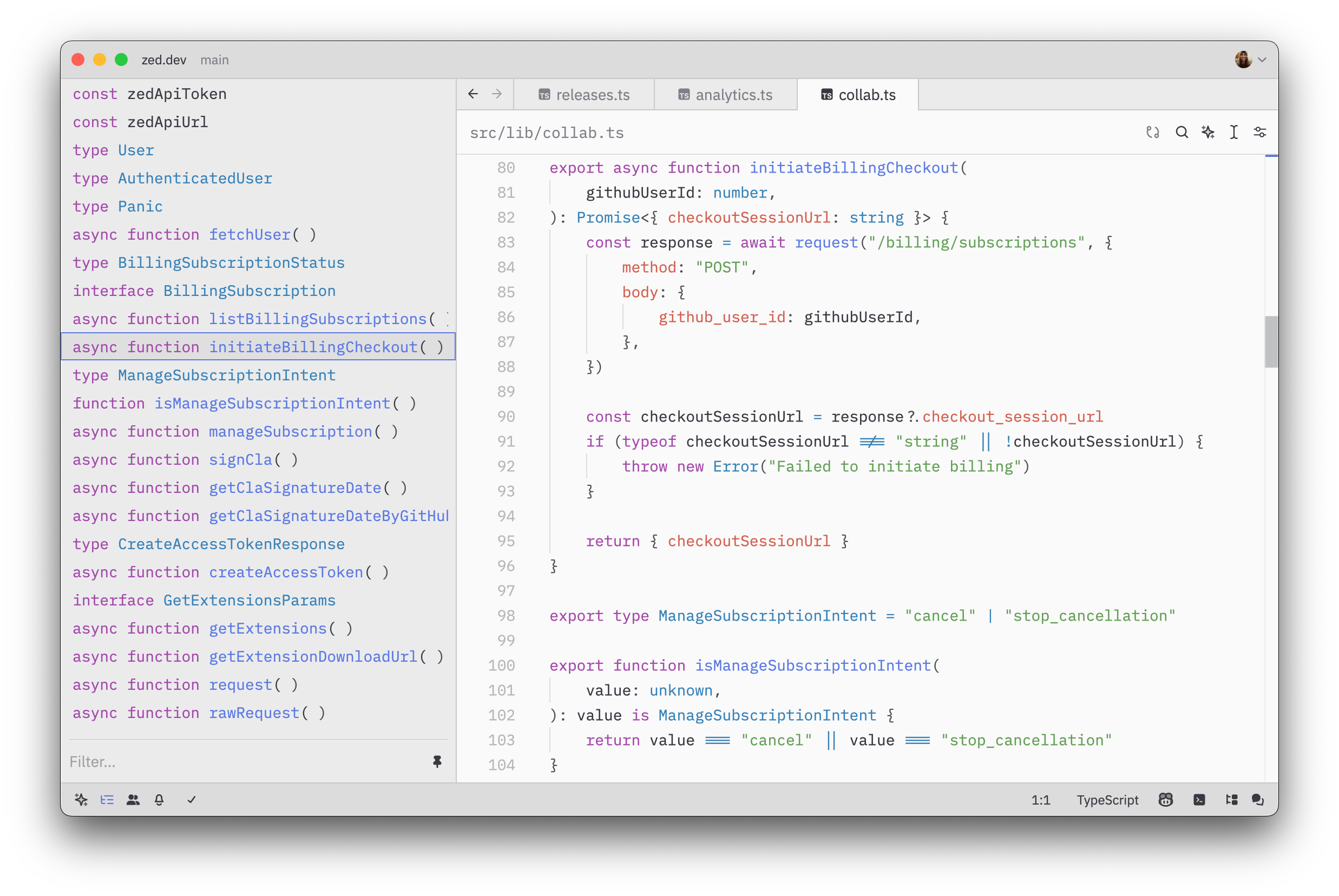diff --git a/docs/src/tasks.md b/docs/src/tasks.mdindex 0fa659eb2cc..482ca7b4d57 100644--- a/docs/src/tasks.md+++ b/docs/src/tasks.md@@ -225,8 +225,6 @@ This could be useful for launching a terminal application that you want to use i## VS Code Task Format-> **Preview:** This feature is available in Zed Preview. It will be included in the next Stable release.-When importing VS Code tasks from `.vscode/tasks.json`, you can omit the `label` field. Zed automatically generates labels based on the task type:- **npm tasks**: `npm: <script>` (e.g., `npm: start`)diff --git a/docs/src/troubleshooting.md b/docs/src/troubleshooting.mdindex f0d039a69c1..bf30b8b837c 100644--- a/docs/src/troubleshooting.md+++ b/docs/src/troubleshooting.md@@ -88,8 +88,6 @@ If you're experiencing language-server related issues, such as stale diagnostics### "Max tokens reached"-> **Preview:** This error handling is available in Zed Preview. It will be included in the next Stable release.-You see this error when the agent's response exceeds the model's maximum token limit. This happens when:- The agent generates an extremely long response