
Code at the speed of thought – Zed is a high-performance, multiplayer code editor from the creators of Atom and Tree-sitter.
tab_switcher: Add documentation for tab switcher (#44189)
Dinod76dd8627236
diff --git a/assets/keymaps/default-linux.json b/assets/keymaps/default-linux.jsonindex 41415bf2047..54a4f331c0b 100644--- a/assets/keymaps/default-linux.json+++ b/assets/keymaps/default-linux.json@@ -616,8 +616,8 @@"ctrl-alt-super-p": "settings_profile_selector::Toggle","ctrl-t": "project_symbols::Toggle","ctrl-p": "file_finder::Toggle",- "ctrl-tab": "tab_switcher::Toggle","ctrl-shift-tab": ["tab_switcher::Toggle", { "select_last": true }],+ "ctrl-tab": "tab_switcher::Toggle","ctrl-e": "file_finder::Toggle","f1": "command_palette::Toggle","ctrl-shift-p": "command_palette::Toggle",diff --git a/assets/keymaps/default-macos.json b/assets/keymaps/default-macos.jsonindex fa8edbe5c23..060151c647e 100644--- a/assets/keymaps/default-macos.json+++ b/assets/keymaps/default-macos.json@@ -684,8 +684,8 @@"ctrl-alt-cmd-p": "settings_profile_selector::Toggle","cmd-t": "project_symbols::Toggle","cmd-p": "file_finder::Toggle",- "ctrl-tab": "tab_switcher::Toggle","ctrl-shift-tab": ["tab_switcher::Toggle", { "select_last": true }],+ "ctrl-tab": "tab_switcher::Toggle","cmd-shift-p": "command_palette::Toggle","cmd-shift-m": "diagnostics::Deploy","cmd-shift-e": "project_panel::ToggleFocus",diff --git a/assets/keymaps/default-windows.json b/assets/keymaps/default-windows.jsonindex 45f37fbd41a..32b52365e08 100644--- a/assets/keymaps/default-windows.json+++ b/assets/keymaps/default-windows.json@@ -608,8 +608,8 @@"ctrl-alt-super-p": "settings_profile_selector::Toggle","ctrl-t": "project_symbols::Toggle","ctrl-p": "file_finder::Toggle",- "ctrl-tab": "tab_switcher::Toggle","ctrl-shift-tab": ["tab_switcher::Toggle", { "select_last": true }],+ "ctrl-tab": "tab_switcher::Toggle","ctrl-e": "file_finder::Toggle","f1": "command_palette::Toggle","ctrl-shift-p": "command_palette::Toggle",diff --git a/docs/src/SUMMARY.md b/docs/src/SUMMARY.mdindex 0d0cd35f436..9d1f6f61d44 100644--- a/docs/src/SUMMARY.md+++ b/docs/src/SUMMARY.md@@ -41,6 +41,7 @@- [Debugger](./debugger.md)- [Diagnostics](./diagnostics.md)- [Tasks](./tasks.md)+- [Tab Switcher](./tab-switcher.md)- [Remote Development](./remote-development.md)- [Environment Variables](./environment.md)- [REPL](./repl.md)diff --git a/docs/src/tab-switcher.md b/docs/src/tab-switcher.mdnew file mode 100644index 00000000000..5cc72be449c--- /dev/null+++ b/docs/src/tab-switcher.md@@ -0,0 +1,46 @@+# Tab Switcher++The Tab Switcher provides a quick way to navigate between open tabs in Zed. It+displays a list of your open tabs sorted by recent usage, making it easy to jump+back to whatever you were just working on.++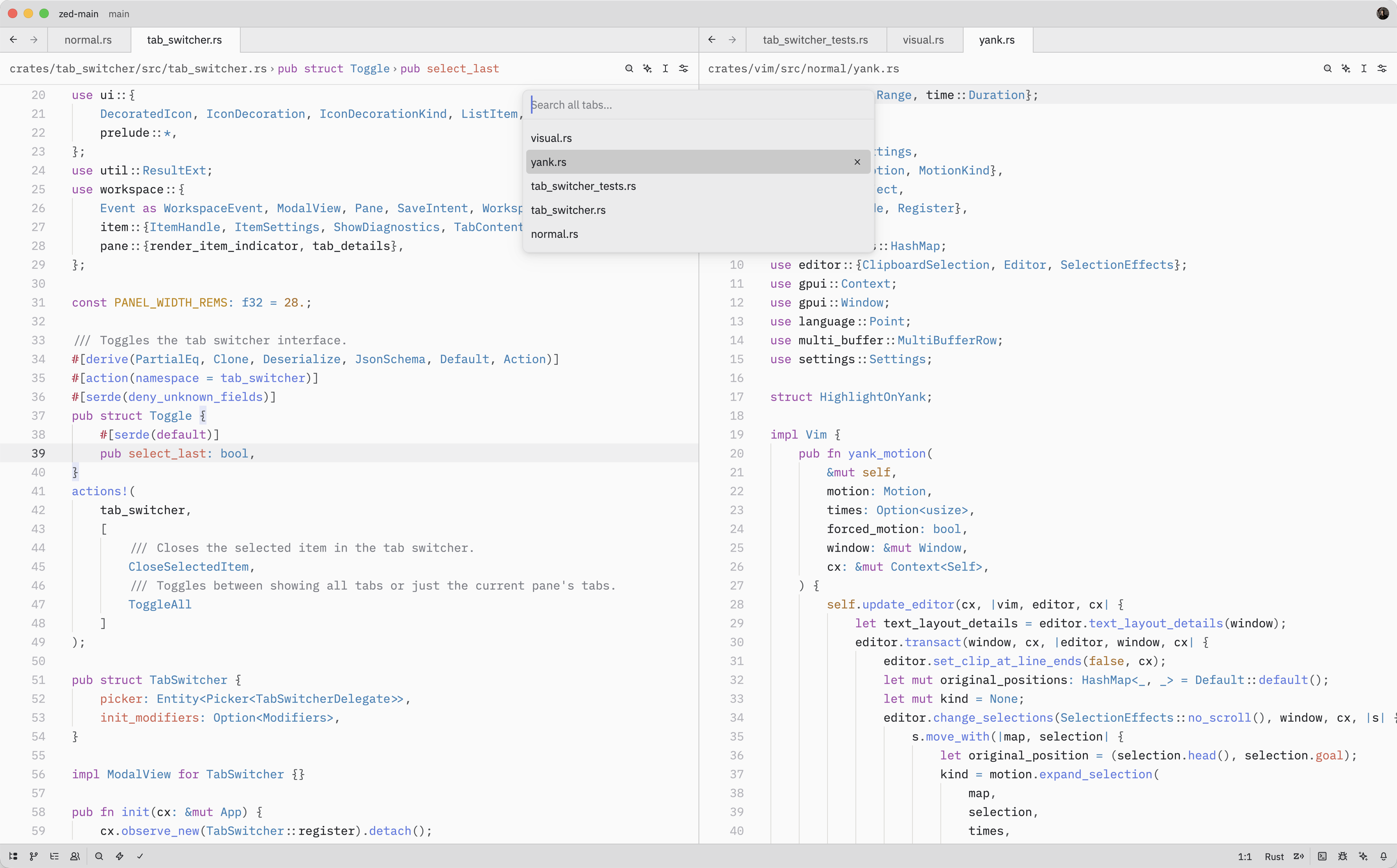++## Quick Switching++When the Tab Switcher is opened using {#kb tab_switcher::Toggle}, instead of+running the {#action tab_switcher::Toggle} from the command palette, it'll stay+active as long as the <kbd class="keybinding">ctrl</kbd> key is held down.++While holding down <kbd class="keybinding">ctrl</kbd>, each subsequent <kbd+class="keybinding">tab</kbd> press cycles to the next item (<kbd+class="keybinding">shift</kbd> to cycle backwards) and, when <kbd+class="keybinding">ctrl</kbd> is released, the selected item is confirmed and+the switcher is closed.++## Opening the Tab Switcher++The Tab Switcher can also be opened with either {#action tab_switcher::Toggle}+or {#action tab_switcher::ToggleAll}. Using {#kb tab_switcher::Toggle} will show+only the tabs for the current pane, while {#kb tab_switcher::ToggleAll} shows+all tabs for all panes.++While the Tab Switcher is open, you can:++- Press {#kb menu::SelectNext} to move to the next tab in the list+- Press {#kb menu::SelectPrevious} to move to the previous tab+- Press <kbd class="keybinding">enter</kbd> to confirm the selected tab and close the switcher+- Press <kbd class="keybinding">escape</kbd> to close the switcher and return to the original tab from which+ the switcher was opened+- Press {#kb tab_switcher::CloseSelectedItem} to close the currently selected tab++As you navigate through the list, Zed will update the pane's active item to+match the selected tab.++## Action Reference++| Action | Description |+| ----------------------------------------- | ------------------------------------------------- |+| {#action tab_switcher::Toggle} | Open the Tab Switcher for the current pane |+| {#action tab_switcher::ToggleAll} | Open the Tab Switcher showing tabs from all panes |+| {#action tab_switcher::CloseSelectedItem} | Close the selected tab in the Tab Switcher |