
Real-time network monitor + outbound firewall — see & block every connection. Privacy-first, local-first, Rust fleet agent, SIEM exports, 8 languages. / Moniteur réseau temps réel + pare-feu sortant, agent de flotte Rust, exports SIEM. 100 % local.
title: "A free, open-source Little Snitch alternative for Windows (yes, it exists)" description: "Little Snitch is macOS-only. If you're on Windows or Linux and want to see which servers your computer talks to, here's an honest comparison of the real alternatives." tags: [opensource, privacy, windows, networking] canonical_url: https://aixisstudio.github.io/Snitch/ cover_image: https://raw.githubusercontent.com/aixisstudio/Snitch/main/docs/assets/social-preview.png
English | Español | Deutsch | Русский | 日本語 | Português | 中文
Your computer talks to hundreds of servers every day. Most of it is fine — updates, sync, telemetry you signed up for. Some of it isn't. The question "who is my machine actually talking to?" is the reason Little Snitch has been a macOS staple for 15 years.
The problem: Little Snitch doesn't exist on Windows or Linux. And most Windows "alternatives" are either paid, account-required, or firewall-first when all you wanted was visibility.
I'm the author of Snitch, an open-source (AGPL) real-time network visualizer that just shipped its Windows port — so, full disclosure upfront. Here's the honest state of the options.
First: visualizer vs blocker
Worth being precise, because people conflate them:
- Visibility = "show me who my machine talks to" (a map, per-app attribution, history)
- Blocking = "let me decide what's allowed" (firewall rules, prompts)
Little Snitch does both. Some alternatives do one or the other. Know which job you need.
The honest comparison
| Tool | OS | Block? | Free? | Account required? | Notes |
|---|---|---|---|---|---|
| Little Snitch | macOS | ✅ | paid (~$59) | no | The reference. Nothing like it off macOS. |
| Snitch | macOS, Windows, Linux | ✅ OS-firewall rules + lockdown (best-effort) | ✅ AGPL | no | Live world map of every connection, anomaly detection, privacy score, opt-in threat intel, forensics export. 100% local. |
| Portmaster | Win, Linux, macOS | ✅ | ✅ core free | no | DNS-level blocking + app rules. Heavier — runs as a system service. |
| OpenSnitch | Linux | ✅ | ✅ GPL | no | The closest Linux equivalent — application firewall with prompts. |
| GlassWire | Windows, Android | ✅ | freemium | pushes account/cloud | Polished UI, but key features + history are paywalled and it nags about the cloud tier. |
| Wireshark | all | ❌ | ✅ | no | The gold standard for deep packet analysis — but it's for dissecting packets, not answering "who's phoning home right now". |
| LuLu | macOS | ✅ | ✅ | no | Great free macOS firewall — but macOS only, and block-first with minimal visualization. |
What Snitch actually does
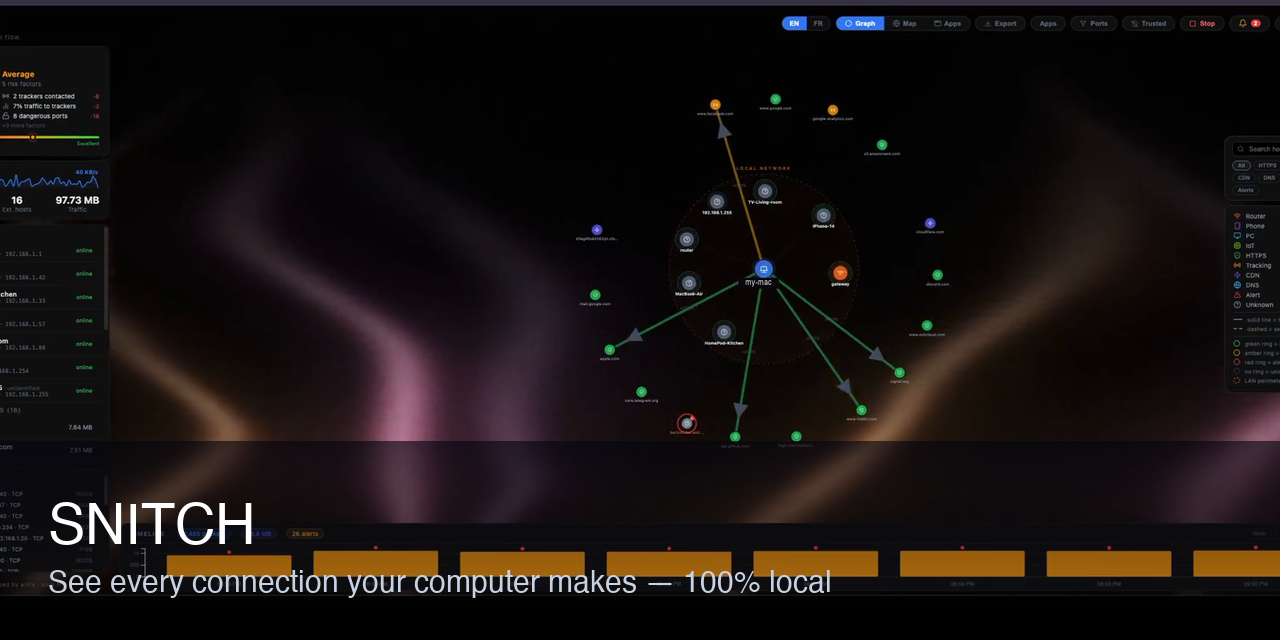
One sentence: a live map of every connection your computer makes — which app, which server, which country.
- Force-graph + world map of connections in real time, geolocated offline (MaxMind/DB-IP — no IP leaves your machine)
- Process attribution: which app opened the connection, not just the IP
- Anomaly detection: port scans, beaconing patterns, potential exfiltration volume
- Privacy score + tracker detection from editable suffix lists
- Per-app traffic view, timeline (15/30/60 min), 24h SQLite history
- Passive LAN scanner (reads the ARP table — shows every device on your network)
The part that matters to privacy people: everything is local. No account, no telemetry, and every outbound call is opt-in — GeoIP download, update checks, threat-intel lookups, webhooks are all off by default. The API is token-authenticated and bound to loopback by default.
What Snitch does NOT do
Honesty section, because HN/Reddit will ask anyway:
- Its blocking is orchestration, not a driver. Since v1.2 Snitch pushes
ip/cidr/domain/process/portrules into the OS-native firewall (netsh advfirewallon Windows,iptableson Linux,pfon macOS) plus a lockdown switch — best-effort: rules need the same privileges as packet capture to actually apply, andpfcan't match processes. It's honest in the UI when a rule couldn't be applied. For a mature interactive application firewall, Portmaster (or Little Snitch on macOS) is still the reference. - It needs admin/root for packet capture (unavoidable — same as Wireshark).
- Deep packet dissection — for that, Wireshark still wins. Snitch is the 10,000-foot view.
Installing on Windows
- Install Npcap (the Windows packet-capture driver — required, same dependency as Wireshark)
- Grab
Snitch Setup <version>.exefrom the latest release — native Electron app with tray — or the Lite backend-only installer - Run it as Administrator (the installer handles the UAC prompt when spawning the backend)
- The UI opens automatically — in the Electron window, or in your browser with Lite
Linux: docker run --network host ghcr.io/aixisstudio/snitch — or the release tarball. macOS: the packaged app or brew.
A note on how the Windows port happened
I maintain the project solo. The Windows port wasn't me — users filed bug reports with root-cause analysis included, then a stranger sent three PRs that fixed capture + the right network interface + the startup crash. Open source working as advertised. v1.0.5 shipped last week.
If you try it and it catches something interesting, there's a "What did you catch?" discussion on the repo. And if it's useful to you, a ⭐ on GitHub genuinely helps the project get found.
Repo: https://github.com/aixisstudio/Snitch — AGPL, UI and docs in 8 languages (EN/FR/ES/DE/RU/JA/PT-BR/中文).