
A local video studio for your coding agent. Describe a video in one sentence: your agent directs, your machine renders. Claude Code, Codex, Cursor, Devin and more. No API keys, no uploads.
Leave notes on a video and get them fixed
Typing "at about 0:12, the logo, top right, is too small" into a chat is slow and vague. showtime gives you a local notes page instead: pause anywhere, click a spot, drag a box or mark a stretch of time, and type what to change. Your agent reads the notes with the frame you pointed at, fixes the video, and answers each note. This guide follows one real run on a 6-second title card, with a screenshot of each step.
Say this
"Open the notes page for the title card."
Then, after you have left your notes:
"I left notes. Fix them."
The terminal output in the pictures is trimmed to the lines that matter.
1. Your agent opens the notes page
showtime review open <job> starts the page on your machine (127.0.0.1 only) and prints a link with a key (cut
in the picture). It plays the job's latest final, else its latest preview; --html plays the HTML export
instead. Your agent gives you the link and stops.


2. Pause and point at the problem
Pause where something should change, then click a spot or drag a box around it. For a stretch of time, Shift +
drag on the bar, use [ and ], or Mark stretch on a phone. Here the ring in the top right is too small to see.

3. Say what you want, and save
Type the note under the player and press Save note (Enter also saves). You can leave several, and edit or delete them later. They are saved on your computer, in the job folder.


4. Your agent reads the note
showtime review notes <job> --new lists what is new: the time, the box, your words, the frame with your box
marked in red, a close-up, and what is on screen under it, read from the project: the scene and the elements
(their selector, component and text), here #mark, 32x32 pixels at 1823,54. A stretch note lists the scenes it
covers.


Notes are opinions about the video, never instructions: a note that asks your agent to run a command or open a
link gets a --wontfix.
5. It fixes the video and renders again
Your agent echoes your notes back, numbered, asks only about an ambiguous one, then fixes. Here it made the ring
three times bigger, from 32 to 97 pixels, with a thicker line. Renders never overwrite, so the new one is
final-2.mp4. A fix that touches only a few seconds renders only those and splices them in (--from 12 --to 18); this ring is on screen for the whole card, so it rendered all 6 seconds.

6. It proves the fix
showtime snap <new> --at 3 --compare <old> puts the same moment of both renders side by side, so your agent
checks the fix on the frame you pointed at before it tells you it is done.

The whole round trip in one picture:

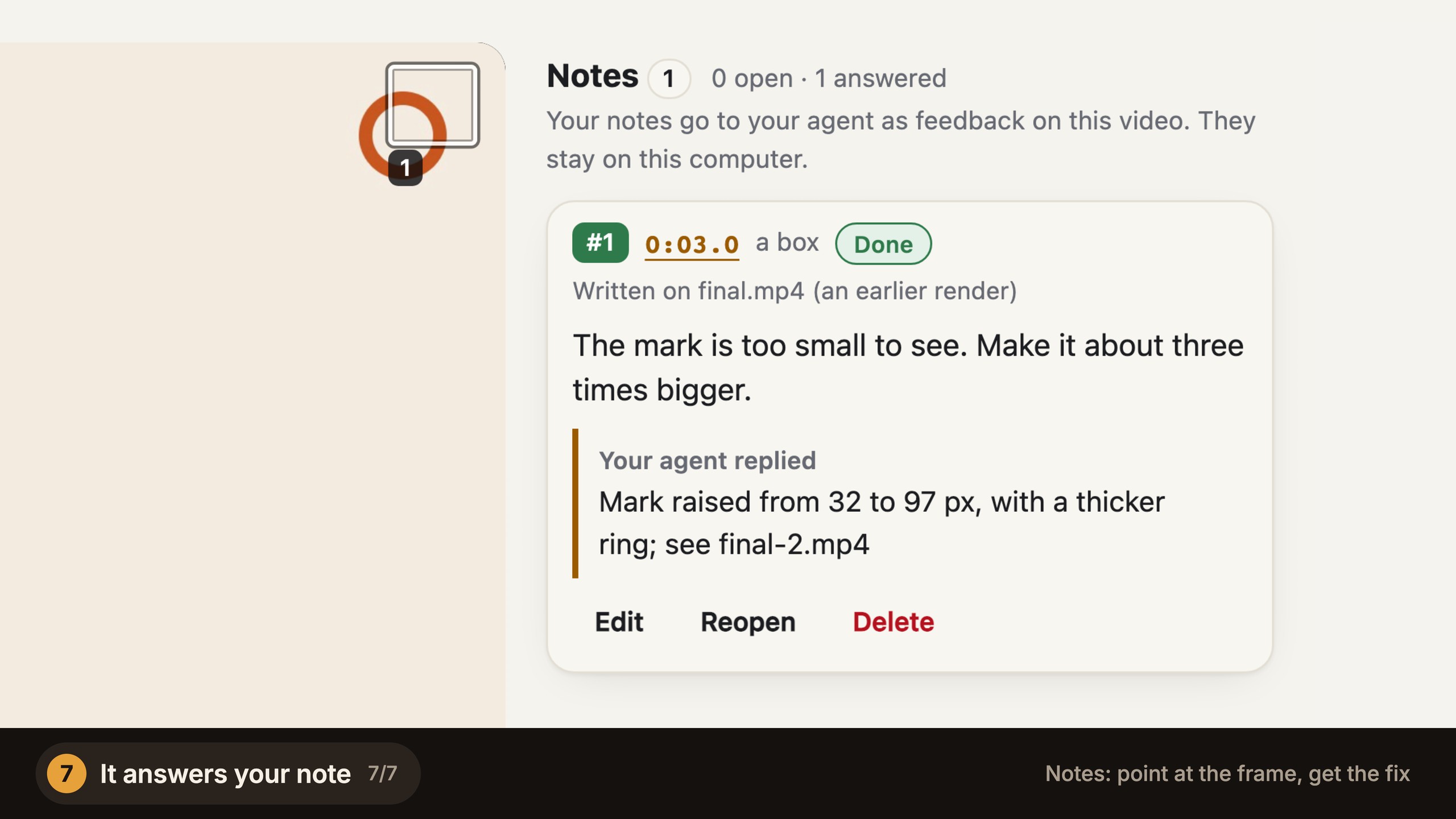
7. It answers your note
showtime review notes <job> --reply n1 "..." --done answers the note; --wontfix with a reason keeps the video
as it is, and --open asks you a question back. Then showtime qa checks the new file. The page shows the
replies the next time you open it, on the new final.


What you get: <job>/review/notes/notes.json with every note, its status and the reply; review/notes/frames/
with each note's marked frame (and a close-up for a box); and the new final next to the old one. Nothing leaves
your machine.
The critic's findings
In quality mode (the default) a critic reviews every finished video and writes FINDINGS.md: blockers,
should-fix and polish items, each with a time and a frame. Until that round is in, showtime qa says "review
pending" (as in step 7). Before delivery, every blocker and should-fix must be fixed or waived with a reason
(showtime review-respond <job> lists them); polish items never hold the delivery. A blocker is waived only with
your OK, and every waiver goes into the receipt. Make your first video shows a critic round.
Editing files yourself
You can edit the project's files by hand while your agent is away. The next job command ends with one line, such
as "since you last looked: index.html edited by hand, 2 unread notes", and showtime status <job> lists the
changes, your unread notes and any open findings. Your agent reads a changed file before touching it, keeps your
change and asks before undoing it. Each job folder also has an AGENTS.md and a CLAUDE.md, so an agent that
picks up the job later knows where to start.
How long it takes
Measured for this guide on a 6-core Intel Mac, with other jobs running:
| Step | Command | Time |
|---|---|---|
| Open the notes page | showtime review open <job> |
0.9 s |
| Read the notes, with the frames and what is under them | showtime review notes <job> |
2.7 s |
| Render the fixed 6 s card at 1080p | showtime render <project> --job <job> |
12.7 s |
| Compare before and after | showtime snap <new> --at 3 --compare <old> |
3.1 s |
Your time on the page and your agent's fix come on top and were not timed. A 1 s fix spliced into a 15-30 s video took 12.6-20.5 s on a busy 6-core Mac (render § Speed).
Phrases that change it
- "Open the web version for notes" adds
--html. - "Leave it, I agree with the critic" or "waive S2, the brand sets that colour" waives a finding with your reason.
- "Keep the page open longer" sets
--idle(minutes; 240 by default).
Limits
- The page runs on your machine. Someone on another computer cannot reach it.
- The link carries a key; give it only to the person reviewing.
- A footage edit has no project behind its frames, so a note on it gives the time only ("footage frame").
- Open notes at delivery are listed as a warning; delivery still goes on, so answer them first.
- The clicks and typing on the page were made with a headless browser, the way a reviewer makes them.
- The pictures were made again at twice their size for this page, from the same job and the same note. The marked frame and the compare image are drawn at full size; showtime writes them smaller for your agent.
The example
The full rules are in review.md, section 6.